


Centralized tool discovery and execution gateway for AI clients, coding tools, enterprise applications, copilots, and agents.
Axiolex connects MCP tools, A2A agent skills, REST APIs, and internal enterprise services through a shared catalog and execution layer. Claude Desktop, Cursor, Codex, Microsoft Copilot, enterprise applications, and custom agents can access relevant capabilities without configuring every downstream provider, endpoint, or credential directly.
- Unified Tool Catalog: index MCP tools, A2A skills, REST APIs, and local/internal tools in one searchable catalog.
- Intent-Driven Discovery: rank the Top-K relevant tools using BM25S and optional ColBERT, with namespace-based business-domain scoping.
- Normalized Execution: use one
execute(tool_id, arguments)contract while Axiolex handles transport, endpoint resolution, authentication, and response normalization. - Enterprise Provider Integration: connect MCP servers and A2A agents directly; REST-based providers integrate through MCP adapters (included example:
atlassian_rest_to_mcpJira adapter). - Flexible Access: Python SDK (
pip install axiolex), REST API, and MCP access — including the stdio MCP gateway proxy vianpx(@axiolex/mcp-gateway) for Claude Desktop and Cursor integration. - Management Dashboard: configure providers, namespaces, credentials, retrieval settings, and test discovery and execution from the web UI.
Get started: Install & Quick Start
As tool catalogs grow, loading every tool definition into every AI client becomes expensive and difficult to manage.
Anthropic documented a five-server setup with 58 tools consuming ~55K tokens before the conversation starts, with Jira alone accounting for ~17K tokens in that example. Anthropic: Advanced Tool Use
Whether for a power user connecting multiple MCP servers or an enterprise team exposing internal tools and services to AI agents and applications, Axiolex provides:
- Relevant tools only: a small ranked Top-K set instead of the full catalog.
- Focused tool selection: fewer competing capabilities for the LLM to evaluate.
- Centralized integration: connect providers once rather than maintaining them across individual clients and applications.
- Governed execution: normalize stdio, HTTP, and A2A behind one gateway with server-side authentication and audit logging; REST-only systems integrate through MCP adapters.
|
Claude — semiconductor supply chain query
Claude using Axiolex to discover and execute tools for a semiconductor request. 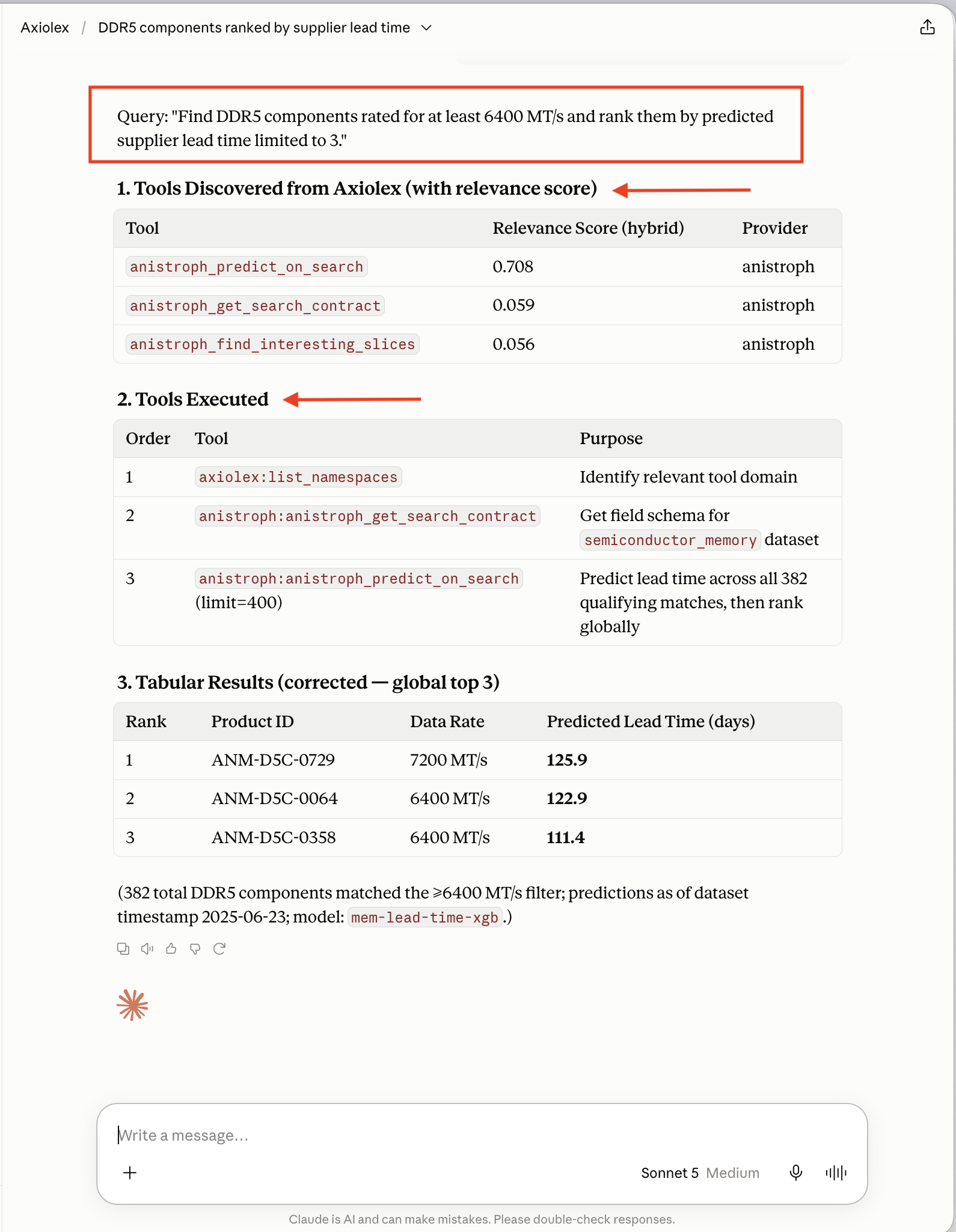
|
Unified tool catalog
MCP, A2A, REST-backed, and internal tools from Anistroph, Aina-Veris, Jira, and Tavily. 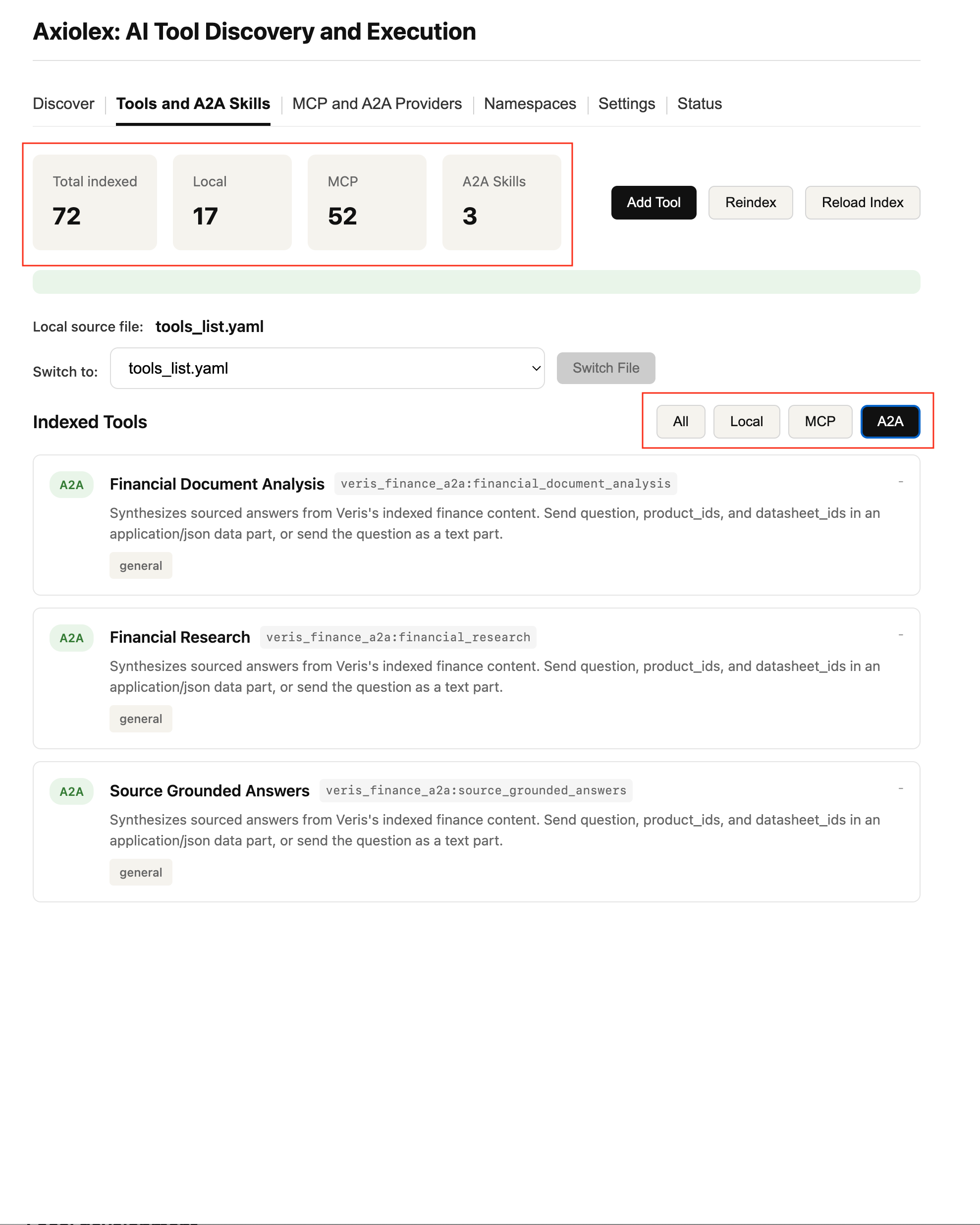
|
|
Codex — creating a Jira ticket
Codex discovers a Jira tool, creates the ticket, returns the linked result. 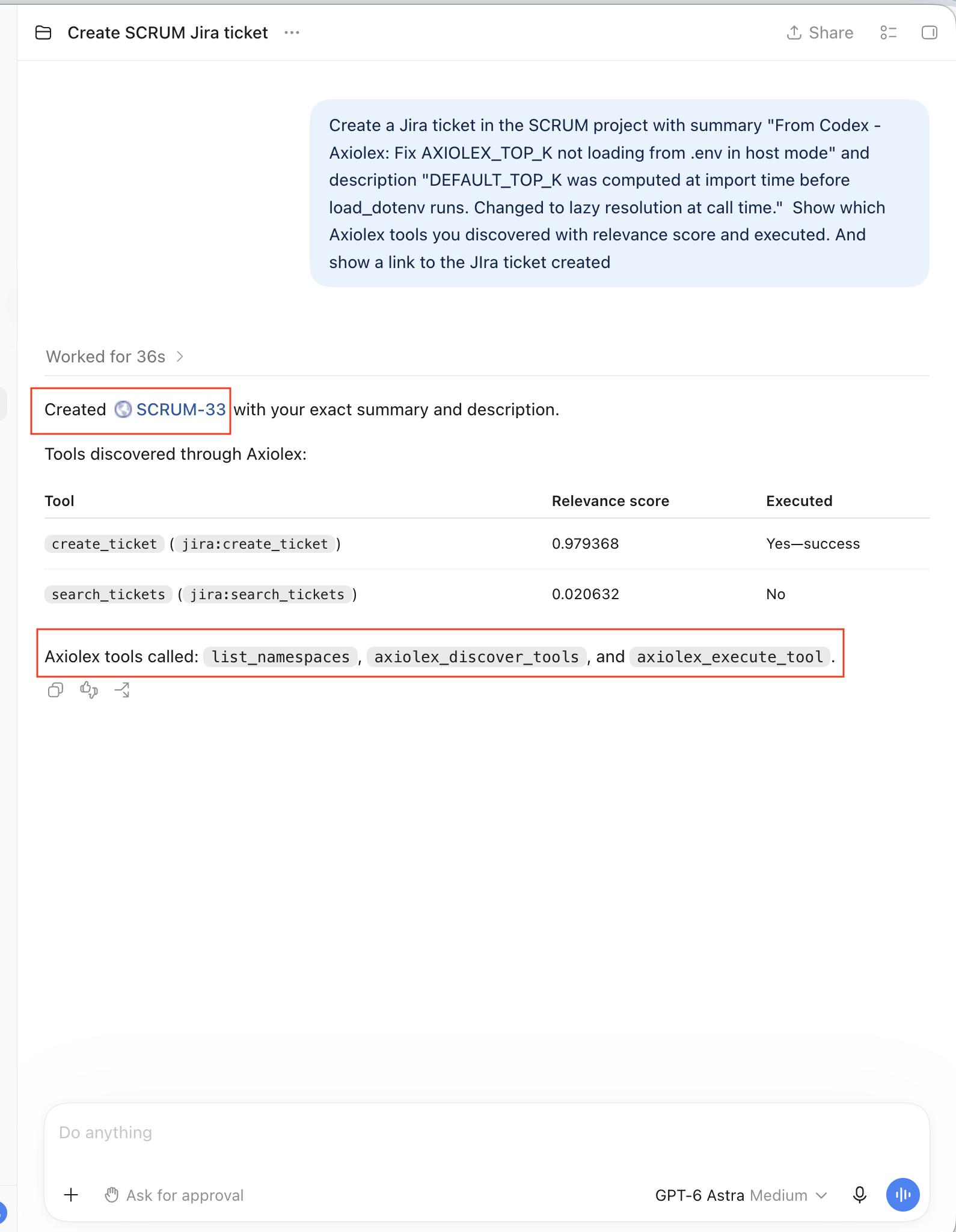
|
Architecture overview
One discovery and execution layer across MCP, A2A, REST, and internal tools. 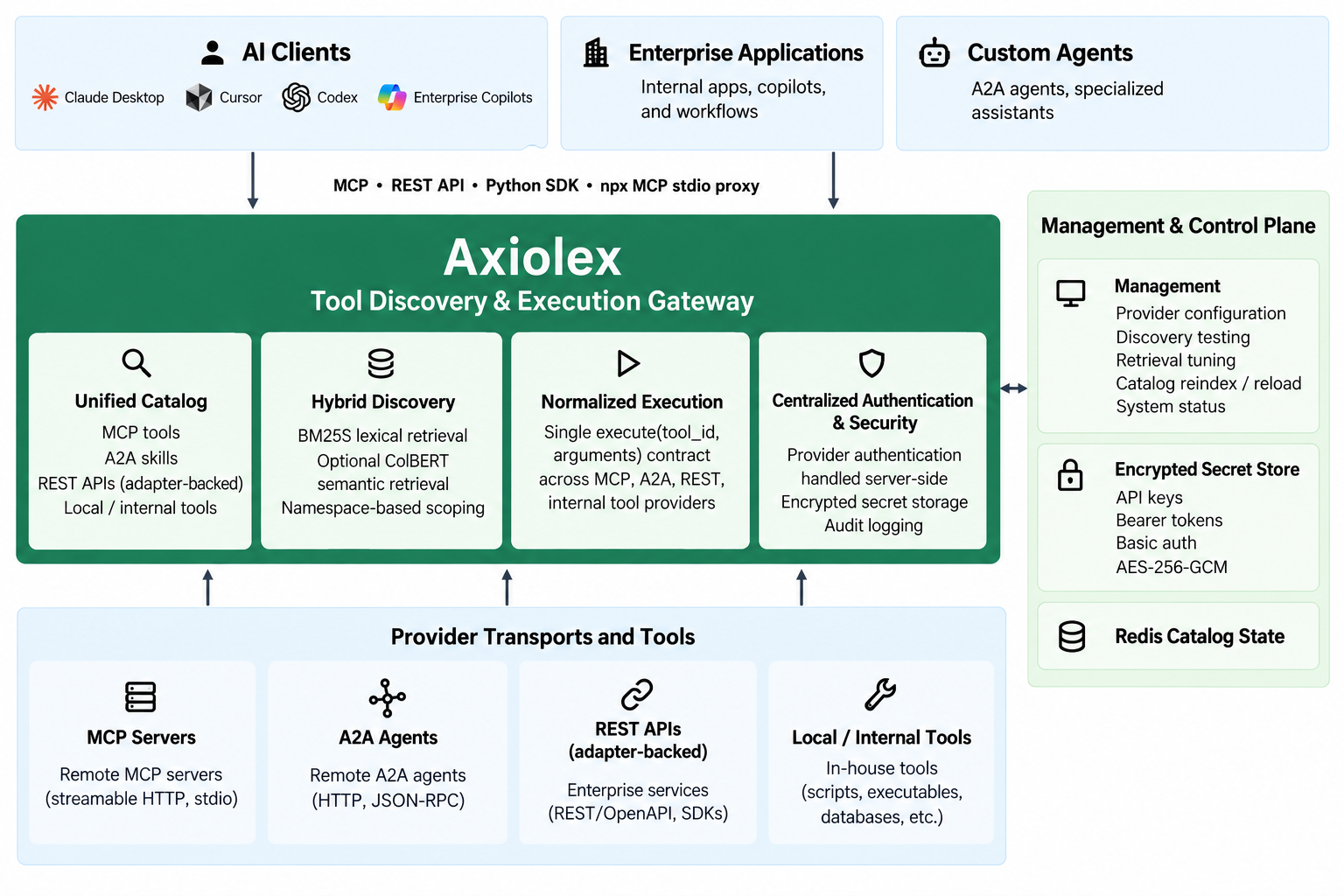
|
|
Discovery UI with namespace scoping
Namespace scoping, Top-K, BM25S/ColBERT weighting, tunable retrieval. 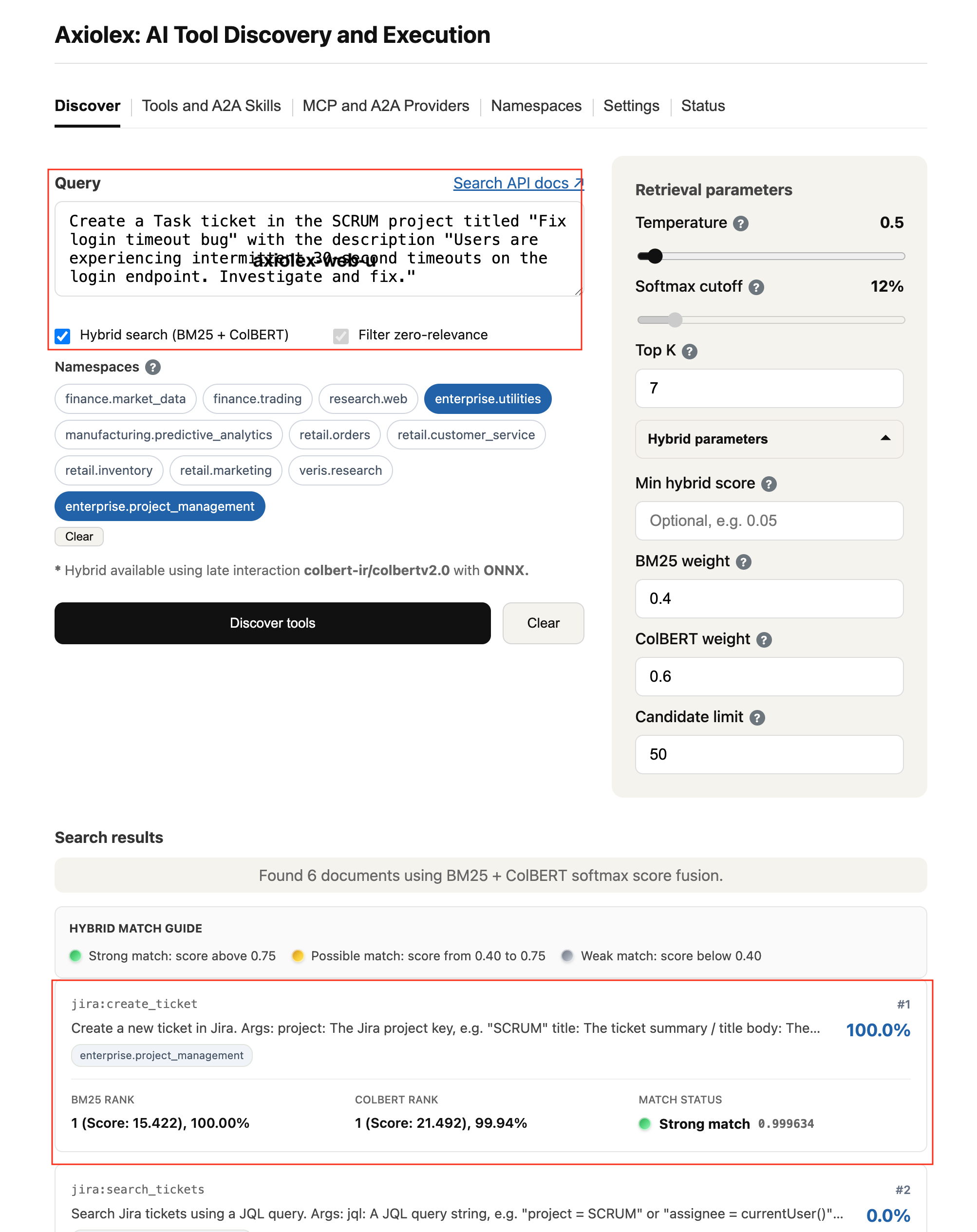
|
Provider registration
Encrypted credentials, namespace assignment, multiple auth types. 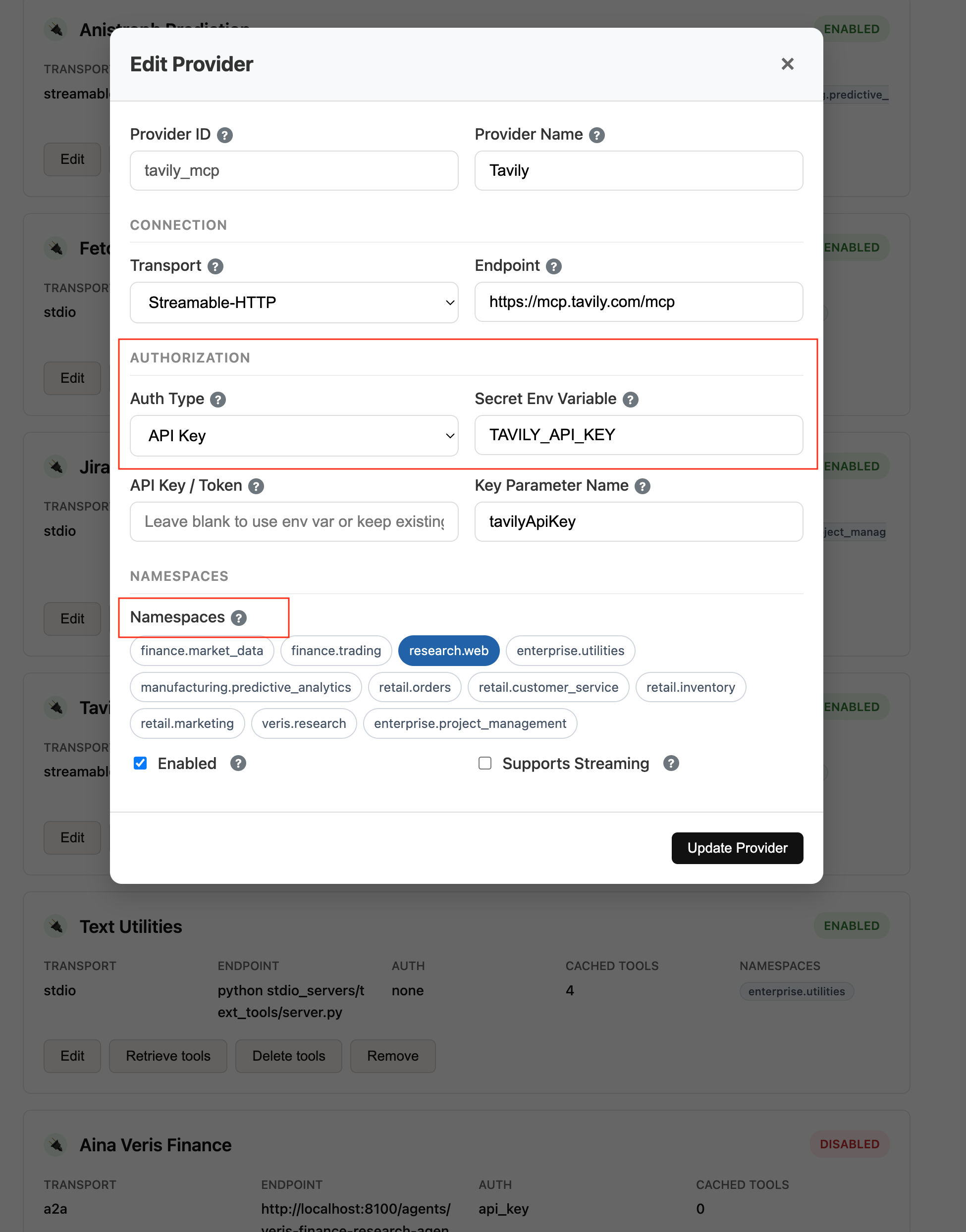
|
Axiolex organizes tools, MCP services, A2A endpoints, and internal services by business domain so discovery can be scoped to the parts of the enterprise relevant to a user query or application request.
| User query | Search scope |
|---|---|
| "Show which business units have the largest variance between forecast and actual revenue." | Finance |
| "Check whether the Acme Inc NDA covers product evaluation." | Legal |
| "What health insurance options are available for dependents?" | HR Employee Services |
| "Find production DDR5 components with at least 24 Gb density that support 55°C, then rank them by predicted four-week supply risk." | Supply Chain |
| "Which deals expected to close this quarter are still waiting for contract approval?" | Sales + Legal |
A calling application or AI client can use single-scope discovery, multi-scope discovery, or full-catalog discovery, depending on the request.
Axiolex represents these search scopes as namespaces, such as
finance,legal,sales,hr.recruiting,hr.employee_services, andsupply_chain. A request can search one namespace, multiple namespaces, or the full catalog.
Applications and AI clients discover and execute tools dynamically using query intent and optional namespace scoping.
User Request --> Query Intent + Optional Scope --> axiolex_discover_tools() --> Top-K Relevant Tools
The same Axiolex catalog, discovery engine, and execution layer are available through:
- MCP tools:
list_namespaces(),axiolex_discover_tools(),axiolex_execute_tool() - REST API:
POST /discover,POST /execute - Python SDK:
results = client.discover(
    query="contract approval status",
    namespaces=["legal"],
    top_k=7,
)Enterprise applications: custom applications can control their own orchestration and use Axiolex for discovery and execution.
AI clients and agents: Claude Desktop, Cursor, Codex, copilots, and custom agents can discover and execute tools without loading the full enterprise tool inventory into the client.
Full-catalog discovery: when a workflow needs to search across all available domains, omit the namespace filter.
results = client.discover(
    query="analyze supplier lead-time risk for MICRON_HBM3E in Q4 2026",
)Multi-domain scoping: search multiple namespaces when one request spans related business areas.
results = client.discover(
    query="deals waiting for contract approval",
    namespaces=["sales", "legal"],
)
Compound requests: when a prompt contains distinct tasks, the calling LLM or application can decompose it into focused discovery queries.
"Show open HR roles and summarize Q3 revenue variance"
       ├──> discover("open engineering roles", namespaces=["hr"])
       └──> discover("Q3 revenue variance", namespaces=["finance"])
Query expansion: conversational requests can be translated into more retrieval-specific intent before discovery.
"How is Apple doing lately?"
       ↓
"Apple AAPL recent stock price performance and market data"
       ↓
axiolex_discover_tools(...)
Axiolex ranks the query it receives; it does not rewrite, expand, decompose, or orchestrate the request. Execution sequencing also remains with the caller, including workflows such as discover → execute → discover.
For details on catalog synchronization, tools/list_changed, and discovery evaluation, see the Technical Architecture.
Axiolex executes discovered tools through a single contract:
execute(tool_id, arguments)
The caller does not manage downstream endpoints, authentication, or transport mechanics. Axiolex resolves them server-side and returns a normalized response shape:
{ "content": [], "is_error": false }Axiolex currently supports MCP Streamable HTTP, MCP stdio, and A2A directly. REST-only enterprise systems can participate through adapters that expose them through a supported execution path.
| Aspect | MCP Streamable HTTP | MCP stdio | A2A |
|---|---|---|---|
| Discovery | tools/list over MCP session |
tools/list over subprocess stdio |
GET /.well-known/agent-card.json |
| Catalog unit | MCP tool with inputSchema |
MCP tool with inputSchema |
A2A skill mapped to tool with prompt input |
| Execution | tools/call over HTTP/SSE |
tools/call over stdio pipes |
JSON-RPC 2.0 SendMessage |
| Required header | Mcp-Session-Id |
— | A2A-Version: 1.0 |
| Session | Stateful | Stateful | Stateless |
| Response | CallToolResult with content[] |
CallToolResult with content[] |
Task with artifacts[].parts[].text |
| Arguments | Structured key-value matching schema | Structured key-value matching schema | Natural-language prompt as text part |
| Execution mode | Synchronous | Synchronous | Synchronous within UPSTREAM_TIMEOUT |
The caller sees the same Axiolex execution contract regardless of the underlying protocol.
Configure remote MCP servers, A2A agents, and local stdio MCP servers in source_files/mcp_providers.yaml:
# 1. Remote MCP server
- id: tavily_mcp
  name: Tavily
  transport: streamable-http
  endpoint: https://mcp.tavily.com/mcp
  auth:
    type: api_key
    key_param: tavilyApiKey
    secret_env: TAVILY_API_KEY
  enabled: true
  namespaces: ["research.web"]

# 2. A2A agent
- id: veris_finance_a2a
  name: Veris Finance Research
  transport: a2a
  endpoint: http://localhost:8100/agents/veris-finance-research-agent/
  auth:
    type: none
  enabled: true
  namespaces: ["veris.research"]

# 3. REST-only enterprise system via stdio MCP adapter
- id: jira
  name: Jira
  transport: stdio
  command: python
  args: ["stdio_servers/jira/atlassian_rest_to_mcp.py"]
  auth:
    type: basic
    key_param: api_key
    secret_env: JIRA_API_TOKEN
    username: ${JIRA_USERNAME}
  enabled: true
  namespaces: ["product_management"]
The Jira example uses the atlassian_rest_to_mcp adapter to expose a REST-only enterprise system through the same Axiolex discovery and execution path. The same adapter pattern can be used for other REST-based systems.
from axiolex import Axiolex

client = Axiolex("http://localhost:9700")

# Discover
tools = client.discover("financial research on Nvidia", top_k=5)

# Execute
result = client.execute(
    "veris_finance_a2a:financial_research",
    {"prompt": "What was Nvidia revenue in 2024?"}
)

for item in result["result"]["content"]:
    print(item["text"])
A2A execution is currently synchronous: Axiolex sends the request, waits within the configured timeout, and returns a normalized response. Long-running asynchronous task workflows are a future extension.
For full architecture details, see docs/technical_architecture.md and docs/api-reference.md.
Applications and AI clients access Axiolex through three front-door surfaces. All three use the same catalog, discovery engine, and execution layer.
Python application  ──►  Python SDK  ──┐
                                       │
HTTP application    ──►  REST API   ──┼──►  Axiolex Server  ──►  Catalog, Discovery & Execution
                                       │
AI client / agent   ──►  MCP Server ──┘
| Capability | Python SDK | REST API | MCP Interface |
|---|---|---|---|
| List namespaces | client.list_namespaces() |
GET /namespaces |
list_namespaces() |
| Discover tools | client.discover(...) |
POST /discover |
axiolex_discover_tools(...) |
| Execute tool | client.execute(...) |
POST /execute |
axiolex_execute_tool(...) |
For Python applications, orchestration pipelines, and batch workflows.
from axiolex import Axiolex

client = Axiolex("http://localhost:9700")

tools = client.discover(
    "get stock earnings",
    namespaces=["finance"],
    top_k=5,
)

result = client.execute(
    tools["tools"][0]["tool_id"],
    {"symbol": "AAPL"},
)
The PyPI package is a thin HTTP client — no Redis, ColBERT, or server-side ML dependencies are required on the client.
Language-agnostic access for enterprise applications, microservices, and non-Python clients.
curl -X POST http://localhost:9700/discover \
  -H "Content-Type: application/json" \
-d '{"query": "contract approval status", "namespaces": ["legal"]}'Claude Desktop, Cursor, Codex, and compatible AI clients can connect directly to Axiolex through MCP.
Streamable HTTP:
{
  "mcpServers": {
    "axiolex": {
      "url": "http://localhost:9700/mcp"
    }
  }
}
For clients requiring stdio, use the @axiolex/mcp-gateway proxy:
{
  "mcpServers": {
    "axiolex": {
      "command": "npx",
      "args": [
        "-y",
        "@axiolex/mcp-gateway",
        "--endpoint",
        "http://localhost:9700/mcp"
      ]
    }
  }
}
The proxy is available through npx and requires no local Axiolex Python installation.
Provider registration, namespace management, index refreshes, and credential configuration are administrative functions managed through the Axiolex Web UI, REST administration endpoints, or CLI rather than client-facing discovery and execution interfaces.
Namespaces organize tools by business domain and define which capabilities are eligible for discovery when a scope is supplied.
| Namespace | Capability area |
|---|---|
finance |
Financial planning, forecasting, reporting, revenue, costs, and related finance capabilities |
legal |
Contracts, agreements, legal review, and related legal capabilities |
sales |
Opportunities, accounts, pipeline, and related sales capabilities |
hr.recruiting |
Recruiting, open roles, candidates, requisitions, and hiring workflows |
hr.employee_services |
Benefits, insurance, leave, compensation, payroll, and employee support |
supply_chain |
Suppliers, procurement, inventory, logistics, and related supply-chain capabilities |
A tool can belong to multiple namespaces. A request can search one namespace, multiple namespaces, or the full catalog. When namespaces are supplied, they form a hard discovery boundary; only tools within those scopes are eligible for ranking.
User Request
     ↓
Query Intent + Optional Namespace Scope
     ↓
Eligible Tool Set
     ↓
BM25S + Optional ColBERT
     ↓
Ranked Top-K Tools
     ↓
Application / AI Client
The calling application, LLM, or orchestrator decides which returned tools are added to model context or executed.
For a request spanning multiple domains, the caller can either search multiple namespaces together or decompose the request into focused discovery calls.
"Show open orders from Acme for HBM3E memory
and check whether Acme is covered under a current NDA."
                    ↓
            LLM / Orchestrator
                    ↓
"Find open Acme orders for HBM3E memory"
    → sales
    → axiolex_discover_tools(...)

"Check current NDA coverage for Acme"
    → legal
    → axiolex_discover_tools(...)
Conversational requests can also be expanded into more retrieval-specific intent before discovery.
Axiolex does not rewrite, decompose, or orchestrate the request itself. It ranks tools against the query and namespace scope it receives. Execution sequencing also remains with the caller, including workflows such as discover → execute → discover.
Axiolex ranks tools within the eligible namespace scope using BM25S lexical retrieval with optional ColBERT semantic retrieval, returning a normalized relevance score from 0.0 to 1.0.
Query Intent
    ↓
Namespace Scope
    ↓
BM25S + Optional ColBERT
    ↓
Ranked Top-K Tools
Retrieval mode, ranking weights, and ColBERT configuration are deployment settings. See the API Reference for tuning details.
axiolex_discover_tools() and POST /discover return execution-ready tool specifications with runtime metadata, input schemas, and relevance scores.
{
  "query": "market quote",
  "tools": [
    {
      "tool_id": "aina_markets:get_stock_quote",
      "name": "get_stock_quote",
      "description": "Get the latest stock quote (current price) for a single symbol.",
      "params": {
        "symbol": { "type": "string", "description": "A single US stock ticker symbol." }
      },
      "inputSchema": {
        "type": "object",
        "properties": {
          "symbol": { "type": "string" }
        }
      },
      "endpoint": "http://localhost:9001/mcp",
      "transport": "streamable-http",
      "provider": "aina_markets",
      "namespaces": ["finance.market_data"],
      "rank": 1,
      "relevance_score": 0.63,
      "bm25_score": 1.46,
      "colbert_score": 20.78,
      "hybrid_score": 0.63
    }
  ],
  "count": 1,
  "search_mode": "hybrid"
}Tool execution through axiolex_execute_tool() or POST /execute requires only the stable tool_id returned during discovery and arguments matching the tool schema.
| Field | Type | Required | Description |
|---|---|---|---|
tool_id |
string | Yes | Stable Axiolex identifier returned during discovery |
arguments |
object | Yes | Arguments validated against the current tool schema |
idempotency_key |
string | No | Optional client key for request de-duplication |
timeout_ms |
integer | No | Execution timeout override, subject to the server limit |
{
  "status": "success",
  "tool_id": "aina_markets:get_stock_quote",
  "execution_id": "55a735b2bfea4d7593890511d5162297",
  "result": {
    "content": [
      {
        "type": "text",
        "text": "AAPL: $224.23 (+1.2%)"
      }
    ]
  },
  "error": null
}Axiolex normalizes execution failures across supported transports.
| Error code | Description | Retryable |
|---|---|---|
TOOL_NOT_FOUND |
tool_id does not resolve in the current catalog |
No |
TOOL_UNAVAILABLE |
Tool transport is disabled or unavailable | No |
INVALID_ARGUMENTS |
Arguments failed schema validation | No |
UPSTREAM_TIMEOUT |
Downstream provider exceeded the execution timeout | Yes |
UPSTREAM_ERROR |
Downstream provider returned a runtime error | Depends |
RATE_LIMITED |
Axiolex or downstream provider rate limit reached | Yes |
INTERNAL_ERROR |
Server-side execution failure | Yes |
Discovery and execution activity can be logged for routing diagnostics, security review, and relevance evaluation.
Captured metadata includes:
- query and namespace scope
- ranked Top-K candidates and relevance scores
- execution latency
- caller identifiers
- tool and provider identifiers
Tools that produce visual or structured artifacts can also return artifact-aware metadata so host applications can route rendered output to the UI while keeping compact semantic results in the LLM context.
Axiolex runs as a shared FastAPI service backed by Redis for catalog state.
git clone https://github.com/vrraj/axiolex.git
cd axiolex

make install
make start
This installs Axiolex with BM25 lexical retrieval and starts Redis and the Axiolex services.
For optional ColBERT semantic retrieval:
make colbert

# Then enable hybrid retrieval in .env:
AXIOLEX_HYBRID_ENABLED=true
The dashboard is available at:
http://localhost:9700/
make docker-upVerify the service:
curl http://localhost:9700/statusColBERT model cache can be bind-mounted through AXIOLEX_COLBERT_CACHE_HOST_DIR so model downloads persist across container rebuilds.
Axiolex exposes MCP at:
http://localhost:9700/mcp
Claude Desktop, Cursor, Codex, and other MCP-compatible clients can connect directly through Streamable HTTP or through the @axiolex/mcp-gateway stdio proxy.
See Integration Surfaces & Client Access for configuration examples.
from axiolex import Axiolex

client = Axiolex("http://localhost:9700")

tools = client.discover(
    query="contract approval status",
    namespaces=["legal"],
    top_k=5,
)curl -X POST http://localhost:9700/discover \
-H "Content-Type: application/json" \
-d '{"query": "contract approval status", "namespaces": ["legal"]}'| Extra | Command | Purpose |
|---|---|---|
server |
pip install "axiolex[server]" |
FastAPI, Uvicorn, BM25S, Redis, MCP SDK, cryptography |
colbert |
pip install "axiolex[colbert]" |
FastEmbed, ONNX Runtime, NumPy, ColBERT hybrid retrieval |
dev |
pip install "axiolex[dev]" |
pytest, black, ruff |
ColBERT is optional.
make installprovides a working BM25-based server. Runmake colbertand enableAXIOLEX_HYBRID_ENABLED=trueto add semantic retrieval.
The Axiolex Web UI (default: http://localhost:9700) provides a control plane for managing providers, maintaining the tool catalog, evaluating discovery quality, tuning retrieval, and monitoring system health.
Manage MCP providers (stdio and Streamable HTTP), A2A agents, and local tool definitions from a single interface.
- Register, edit, enable, disable, and refresh providers.
- Configure transport, endpoints, authentication, and namespace assignments.
- Manage Basic auth, Bearer tokens, and API keys through AES-256-GCM encrypted secret storage.
- Create, edit, and assign namespaces to define business-domain discovery boundaries.
Maintain the catalog as provider definitions change.
- Reindex the catalog to rebuild BM25S and ColBERT retrieval indexes.
- Reload catalog state from cache.
- Inspect provider tools, schemas, namespace assignments, and catalog version.
Test how Axiolex resolves real user and application requests before exposing changes to AI clients and agents.
- Run natural-language discovery queries across single, multiple, or full-catalog scopes.
- Adjust namespace scope,
top_k, and hybrid-search behavior. - Inspect ranked tools, relevance scores, schemas, and provider metadata.
Evaluate retrieval quality and tune ranking behavior across the catalog.
- Compare BM25S lexical retrieval with ColBERT semantic retrieval.
- Adjust temperature, softmax cutoff, and
top_k. - Inspect rank and relevance-score behavior across namespaces and query types.
Monitor operational state from the same interface.
- Service health
- Document count
- Retriever status
- Hybrid search status
The Web UI operates against the same Axiolex REST API and catalog used by the Python SDK and MCP interface.
Axiolex separates security into two boundaries: clients accessing Axiolex and Axiolex accessing downstream providers.
┌─────────────────┐    Authenticated Boundary    ┌─────────────────┐    Server-Side Secrets    ┌──────────────────┐
│ Client / Agent  │ ───────────────────────────► │ Axiolex Gateway │ ───────────────────────► │ Provider / Tool  │
│ Claude / Cursor │   OAuth / OIDC / mTLS / Keys │                 │    Service Credentials   │ Jira / Tavily ... │
└─────────────────┘                              └─────────────────┘                          └──────────────────┘
Client authentication is handled at the enterprise deployment boundary (reverse proxy, API gateway, or service mesh) using mechanisms such as OAuth/OIDC, mTLS, or API keys. Axiolex does not enforce client authentication in the current release; the FastAPI middleware layer is extensible to add authentication directly when needed.
Consuming applications and AI clients never receive downstream provider credentials.
Axiolex resolves and injects provider credentials server-side.
- Encrypted secret store: secrets are stored in
source_files/mcp_secrets.encusing AES-256-GCM encryption. The master key is supplied throughAXIOLEX_SECRET_MASTER_KEY. - Credential resolution: Axiolex checks configured environment variables first and falls back to the encrypted secret store.
- Runtime injection: provider credentials are injected only when needed for execution, including into stdio provider processes through environment variables where applicable.
- Redaction: credentials are stripped from logs, REST payloads, and Redis metadata.
The following authentication methods are currently supported and applied based on provider transport:
| Auth Type | MCP HTTP | MCP stdio | A2A |
|---|---|---|---|
| API Key | ✅ Appends to URL query | ✅ Passed as env var | ✅ Appends to URL query |
| Bearer Token | ✅ Authorization: Bearer header |
✅ Passed as env var | ✅ Authorization: Bearer header |
| Basic Auth | ❌ | ✅ Username + token as env vars | ❌ |
| None | ✅ | ✅ | ✅ |
The auth adapter layer is extensible — additional methods such as OAuth client credentials or AWS Signature v4 can be added without changing the discovery or execution contracts.
| Dimension | Current Phase | Future Phase |
|---|---|---|
| Provider credentials | Centralized service account per provider | Per-user credential mapping or delegated OAuth |
| Client configuration | Axiolex server connection only | Axiolex server connection only |
| User authentication | Enterprise boundary | Enterprise boundary |
| Downstream audit identity | Shared service account | Individual user identity |
The current model supports centrally governed enterprise service accounts. Per-user delegated identity and token exchange are future extensions.
For provider authentication configuration and secret-store details, see the Technical Architecture.
Interactive OpenAPI / Swagger documentation is available from a running Axiolex instance at:
http://localhost:9700/docs
| Operation | REST endpoint | Python SDK | Purpose |
|---|---|---|---|
| Discovery | POST /discover |
client.discover() |
Search and rank relevant tools using BM25S / ColBERT |
| Execution | POST /execute |
client.execute() |
Execute a discovered tool using its tool_id |
| Namespaces | GET /namespaces |
client.list_namespaces() |
List available business-domain discovery scopes |
| System status | GET /status |
client.health() |
Check service health, uptime, and Redis status |
| Method | Path | Purpose |
|---|---|---|
GET/POST/PUT/DELETE |
/mcp-providers |
Manage MCP providers, A2A agents, and provider definitions |
POST/GET/DELETE |
/mcp-providers/{id}/secret |
Store, inspect availability of, or remove encrypted provider credentials |
POST/PUT/DELETE |
/namespaces/{id} |
Create and manage namespace scopes |
For complete request/response schemas, configuration options, and CLI commands, see the API Reference.
For local installation and runtime setup, see Install & Quick Start.
Axiolex exposes three MCP tools to AI clients:
| Tool | Purpose |
|---|---|
list_namespaces |
List enabled tool domains and namespace descriptions |
axiolex_discover_tools |
Discover tools relevant to a natural-language request |
axiolex_execute_tool |
Execute a discovered tool using its tool_id and arguments |
Tool descriptions are defined in axiolex/mcp/server.py as:
- Contract (
_*_CONTRACT) — defines what the tool does and should remain stable. - Behavior (
_*_BEHAVIOR) — controls guidance presented to the AI client and can be customized.
The final MCP description combines both:
description = CONTRACT + " " + BEHAVIOR
After changing behavior text, restart Axiolex:
make stop && make startThe stdio proxy is published as @axiolex/mcp-gateway. Its version is managed independently from the Axiolex Python package.
cd mcp-gateway
npm install
node index.js --endpoint http://localhost:9700/mcp
To publish a new gateway version:
npm publish --access public| Target | Purpose |
|---|---|
make install |
Install Axiolex with BM25 lexical retrieval |
make colbert |
Add optional ColBERT retrieval dependencies |
make start |
Start Redis, refresh the catalog, and run Axiolex |
make stop |
Stop local services |
make docker-up |
Run Axiolex and Redis in Docker |
make docker-down |
Stop Docker services |
make index-refresh |
Rebuild the catalog and retrieval indexes |
make test |
Run the test suite |
make format |
Format code and run lint fixes |
make type-check |
Run static type checks |
make build |
Build Python package artifacts |
make clean |
Remove build and Python cache artifacts |
make docker-logs
make docker-restart
make docker-build
make docker-down-volumes
For full Docker configuration, Redis deployment options, environment variables, and internal architecture, see the Technical Architecture.
- Setup & Usage Guide
- API Reference
- Techncan you check if tical Architecture
- Providers Guide
- Search & Retrieval Guide
- MCP Client Setup — Claude · Cursor · Codex
- Medium: Centralized Tool Discovery and Execution for AI Systems — with Axiolex
- Medium: Context Engineering for Tool-Heavy Agents
- Axiolex on MCP Marketplace
Optional hybrid retrieval uses the pinned colbert-ir/colbertv2.0 checkpoint through FastEmbed.
The model is not included in the Axiolex repository or package. Its model card declares the MIT License; see the upstream model card for current metadata and licensing details.
Axiolex is available under the GNU GPLv3.
You may clone, explore, modify, and build with Axiolex under the terms of GPLv3.
Commercial licensing is also available for organizations interested in incorporating Axiolex into proprietary products or custom solutions.
Contact: ai-musings99@gmail.com