





The official SeatLayer React Native and Expo SDK adds an interactive seating chart and seat picker to iOS and Android ticketing apps. It combines live availability, best-available selection, temporary holds, and typed TypeScript APIs with composable React Native buyer controls around SeatLayer's version-pinned shared venue renderer; your trusted server completes booking.
@seatlayer/react-native on npm ·
React Native seat-map documentation ·
SeatLayer SDK and API overview ·
Buyer seat-map demo (web) ·
SeatLayer iOS seat map SDK ·
SeatLayer Android seat map SDK ·
SeatLayer Flutter seat map SDK ·
SeatLayer AI Toolkit
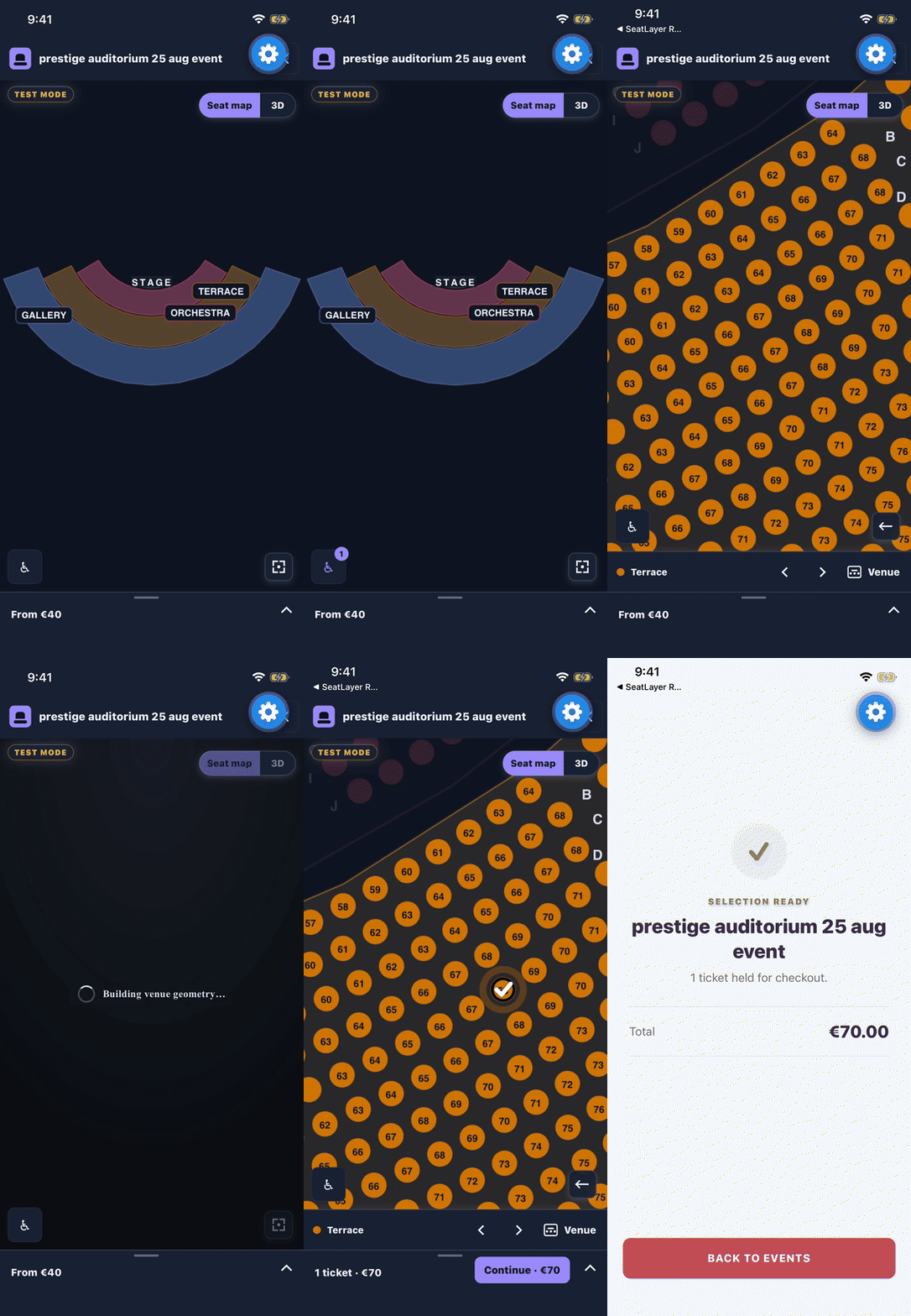
Walk through the picker screen by screen — what the buyer sees from the venue overview to the checkout handoff, and which parts a host can turn off, restyle, or replace.
Production SDK: Pin the release you validated, and check your event, checkout handoff, lifecycle, and supported physical devices before rollout. Each release pins one immutable hosted runtime; this one loads
seatlayer-js@0.84.1fromhttps://cdn.seatlayer.io.
npm install @seatlayer/react-native
npx expo install react-native-webviewnpm install @seatlayer/react-native react-native-webview
npx pod-installReact Native autolinks react-native-webview on Android and iOS. The package
ships no custom native module of its own, so there is nothing else to link.
Peer requirements are react >= 18.2.0, react-native >= 0.72.0, and
react-native-webview >= 13.0.0. TypeScript declarations are published with the
package — dist/index.d.ts for ESM and dist/index.d.cts for CommonJS — so no
@types/* package is needed.
Use SeatLayerPicker for the complete native buyer flow. Give it a definite
height or a full-screen parent, and keep the configuration object stable so
React rerenders do not reload the chart.
import React, { useMemo } from 'react';
import { SeatLayerPicker } from '@seatlayer/react-native';

export function TicketPicker({
  event,
  startCheckout,
}: {
  readonly event: string;
  readonly startCheckout: (holdId: string) => Promise<void>;
}) {
  const configuration = useMemo(
    () => ({
      event,
      publicKey: 'pk_test_your_key',
      currency: 'USD',
      maxSelection: 8,
    }),
    [event],
  );

  return (
    <SeatLayerPicker
      configuration={configuration}
      themeMode="auto"
      onCheckout={(handoff) => startCheckout(handoff.holdId)}
    />
  );
}
onCheckout receives the typed hold handoff. Send it only to your trusted
backend for payment and idempotent booking.
Give the map a definite height or a full-screen parent. Keep the configuration object stable so React rerenders do not reload the chart.
import React, { useEffect, useMemo } from 'react';
import { View } from 'react-native';
import {
  SeatLayerError,
  SeatLayerView,
  useSeatLayerController,
} from '@seatlayer/react-native';

export function SeatMapScreen({ event }: { readonly event: string }) {
  const controller = useSeatLayerController();
  const configuration = useMemo(
    () => ({
      event,
      publicKey: 'pk_test_your_key',
      currency: 'USD',
      maxSelection: 8,
    }),
    [event],
  );

  useEffect(
    () =>
      controller.on('selectionChanged', (seats) => {
        console.log('Selected seats', seats);
      }),
    [controller],
  );

  return (
    <View style={{ flex: 1 }}>
      <SeatLayerView
        style={{ flex: 1 }}
        controller={controller}
        configuration={configuration}
        onReady={(info) => {
          console.log(
            `SeatLayer ready: protocol=${info.protocolRevision} mode=${info.mode}`,
          );
        }}
        onLoadError={(error) => {
          console.error(error.code, error.message);
        }}
      />
    </View>
  );
}
Drive checkout-related actions through the controller:
try {
  const hold = await controller.bestAvailable(4);
  if (hold) {
    // Send only the hold id to your trusted backend.
    await beginCheckoutOnServer(hold.holdId);
  }
} catch (error) {
  if (error instanceof SeatLayerError) {
    showInventoryMessage(error.code, error.message);
  }
}
For private channel inventory, mint short-lived buyer sessions on your backend
for the exact allowed origin https://cdn.seatlayer.io:
const configuration = useMemo(
  () => ({
    event,
    buyerAccessTokenProvider: (context) =>
      buyerBackend.mintSeatLayerAccess(context.reason),
  }),
  [event],
);The native picker uses one immutable latest snapshot as its seam. Choose the integration level that matches the amount of application UI you want to own; all three paths keep the same typed checkout handoff and capability-gated actions.
SeatLayerPicker fills its bounded parent with the adaptive SeatLayer venue
map and native picker chrome.
import { SeatLayerPicker } from '@seatlayer/react-native';

<SeatLayerPicker
  configuration={configuration}
  themeMode="auto"
  onCheckout={continueWithHandoff}
/>
Use SeatLayerPickerModal for a controlled dialog or full-screen presentation.
It uses the same scope, snapshot, and back ladder as the in-page picker.
import { SeatLayerPickerModal } from '@seatlayer/react-native';

<SeatLayerPickerModal
  visible={isPickerOpen}
  configuration={configuration}
  onCheckout={continueWithHandoff}
  onRequestClose={() => setPickerOpen(false)}
  barrierDismissible
/>Use typed options, theme roles, string overrides, visual style slots, and complete-part builders to change native chrome without changing picker state or actions.
<SeatLayerPicker
  configuration={configuration}
  themeMode="dark"
  options={{
    layout: 'adaptive',
    chrome: { priceLegend: false },
    haptics: true,
    languages: ['en-GB', 'fr-FR'],
    pricing: {
      formatter: (amount, currency) =>
        new Intl.NumberFormat('fr-FR', {
          style: 'currency',
          currency,
        }).format(amount),
    },
  }}
  locale="fr-FR"
  strings={{ holdAndCheckout: 'Continue' }}
  styles={{
    headerContainer: { backgroundColor: '#172033' },
    continueButton: { backgroundColor: '#5B4B8A' },
  }}
  builders={{ header: ({ defaultChild }) => defaultChild }}
  onCheckout={continueWithHandoff}
/>
The customization layers have distinct ownership:
optionscontrols session behaviour and which ready-made parts are visible.themeModeandthemeOptionsmap app colours, typography, radii, logos, and map colours into one resolved theme.localeselects generated native wording;stringsoverrides any individual label or plural formatter.options.languagessupplies the runtime language choices.stylesprovides 62 typed, aesthetic-only slots. Colour, type, borders, radii, shadows, and opacity may change; SDK-owned placement, safe areas, viewport insets, and 44-point minimum targets remain intact.buildersreplaces any of 28 complete parts and receives the live scope plusdefaultChild. Use a builder when structure or placement must change.
An app that wants the picker set in its own typeface passes
themeOptions.theme.fontFamily and loads the face itself — with expo-font,
react-native.config.js asset linking, or whatever the app already uses — and
every line the picker draws then takes that family. Without it the picker draws
the platform's own face, which is the right default: React Native has no
inherited text style, so a picker that guessed at the surrounding typography
would be guessing. Pass the family name the platform registers the face under,
and load every weight the app expects to see; a weight that is not loaded is
resolved to the nearest one that is.
Behaviour options worth knowing:
eventNamenames the event in the header before the runtime reports one, so the title does not swap a second after the picker opens. It is never sent to the runtime; the runtime's own name wins the moment it arrives.showBookedOverlay(defaulttrue) draws the picker's own "You're all set" screen when the handed-off hold settles to booked. A host with its own confirmation screen sets itfalseand listens toonBookedinstead, so the buyer is told once.showHoldPill(defaulttrue) draws the header's hold countdown for as long as a live hold exists, whoever owns it. A host drawing its own clock sets itfalse. It composes withchrome.holdPill: the pill appears only where both are on.chrome.dockandchrome.showExtendHoldPromptresolve off on a phone and on in the wide layout unless set explicitly.showExtendHoldPromptis reserved: no prompt is drawn on any layout yet, and the option is resolved and carried so a host that sets it does not have to change when the wide prompt lands.
Callbacks are optional observations, never a place the SDK waits:
onReady · onChartLoad · onSelectionChanged · onSelectionValidityChanged ·
onHoldChanged · onHoldExpired · onBooked · onAccessExpired ·
onAccessUnavailable · onSelectedObjectUnavailable · onClosed · onError ·
onThemeResolved · onSectionFocused · onSeatSelected · onSeatRemoved ·
onSeatViewOpened · onSeatConfidence · onContinue
onBooked fires once, when the handed-off hold settles to booked — never on the
handoff itself, because a buyer on the way to pay has not paid.
onSeatConfidence opens the seat's confidence passport; supplying it turns the
3D card's confidence teaser into a chip, and without it the teaser stays a
static information row, because a chip beside a dead target would say nothing.
options.pricing.formatter formats every native amount: confirmation, ticket
rows, GA/table tiers, peek, expanded cart, and best-available entry pricing.
It changes presentation only. Runtime selection, hold totals, and the trusted
server checkout remain authoritative; the SDK never recalculates inventory
prices from display text.
SeatLayerPickerScope owns one command controller and one latest immutable
snapshot. The standalone parts below read the same scoped theme, capabilities,
presentation state, and actions.
import { View } from 'react-native';
import {
  SeatLayerCartSheet,
  SeatLayerDockBar,
  SeatLayerFloorStrip,
  SeatLayerMapControls,
  SeatLayerPickerAccessibilityFilters,
  SeatLayerPickerChart,
  SeatLayerPickerHeader,
  SeatLayerPickerHoldCountdown,
  SeatLayerPickerScope,
  SeatLayerPickerViewModeControl,
  SeatLayerPriceLegend,
} from '@seatlayer/react-native';

<SeatLayerPickerScope configuration={configuration} themeMode="auto">
  <SeatLayerPickerHeader />
  <SeatLayerPickerHoldCountdown />
  <SeatLayerPriceLegend />
  <SeatLayerFloorStrip />
  <View style={{ flex: 1, position: 'relative' }}>
    <SeatLayerPickerChart style={{ flex: 1 }} />
    <SeatLayerPickerViewModeControl />
    <SeatLayerMapControls
      includeViewModeControl={false}
      showAccessibilityControl={false}
    />
    <SeatLayerPickerAccessibilityFilters />
  </View>
  <SeatLayerDockBar />
  <SeatLayerCartSheet
    expanded={isCartExpanded}
    onExpandedChanged={setCartExpanded}
    onCheckout={continueWithHandoff}
  />
</SeatLayerPickerScope>
Call useSeatLayerPicker() inside the scope when your own component needs the
latest snapshot, resolved theme, capability availability, presentation state,
or scoped actions.
The same scope also supports standalone confirmation and seat-view actions,
best seats, section navigation, floor selection, GA/table prompts, dense cart
lists, hold-lapse recovery, loading/error/empty states, attribution, venue 3D,
and panorama chrome. Custom ticket trays can reuse the exported
resolveDenseTicketLines, groupTicketLines, runSeatsLabel, and
ticketIsGroupable utilities instead of reimplementing the pick-order and
folding rules.
SeatLayerPickerController carries the picker's own commands alongside the
venue-map ones. Reach it as controller from useSeatLayerPicker() inside a
SeatLayerPickerScope. The chrome-facing members:
| Member | What it does |
|---|---|
setSelectionFocus(seatId | null) |
Names the seat a host-drawn card is asking about, so the runtime paints it as the candidate. null clears the paint. |
setBlockedRegions(regions | null) |
Reports where native chrome lies over the map, in the map's own pixels, so the runtime swallows a touch that starts inside one. |
frameSeat(seatId, options) |
Pans — never zooms — so a seat rests in the band the reported insets leave clear. Answers dy: 0 for a seat already in place, an unknown seat, insets that leave no band, or a stale gesture count. |
focusAccessibilityFilter() |
Flies to the matches of the filter already on, leaving the filter alone. |
focusNextAccessibleSection(types?) |
Steps to the next section holding a free matching space, in chart order, wrapping. null — nothing matches — is an answer; undefined means the runtime does not offer the tour. |
subscribeSeatRetap(listener) |
A seat already in the selection tapped again. Subscribing never replays an earlier event. |
subscribeBooked(listener) |
Fires once per sale, with the handoff that became it. |
getCheckoutHandoff() / getBookedHandoff() |
The handoff this picker made, and the one whose hold settled to booked. |
releaseHandoffAndChangeSeats() |
Gives a handed-off hold back so the seats go on sale again and the buyer picks afresh. Answers false where there is no handoff or the runtime does not offer the reject. |
releasePickerOwnedHold() |
Releases a picker-owned hold after earlier queued mutations have settled. |
refreshAvailability() / holdSelection({ ttlMs }) |
Re-reads live availability; holds the current selection. |
Each command is gated on what the loaded runtime advertises, and the matching
getter says so before you call: supportsSelectionFocus,
supportsBlockedRegions, supportsFrameSeat, supportsAccessibilityFocus,
supportsAccessibleSectionTour, supportsHandoffReject,
supportsAvailabilityRefresh, supportsHoldSelection. A command the runtime
does not offer resolves with nothing rather than rejecting: a capability the
runtime does not advertise is a feature this host does not offer, never a
failure.
SeatLayerPickerBlockedRegionSurface, SeatLayerPickerBlockedRegion and
useSeatLayerPickerBlockedRegionCover measure and report those rectangles for
you when you compose your own chrome, including the 600 ms a rectangle keeps
guarding after its control has gone.
While the seat card is up, the map goes behind a veil with a feathered hole
around the tapped seat, so the buyer can still see the seat they are being
asked about. React Native has no blur of its own, and a native blur module
cannot be a hard dependency — a bundler resolves require statically, so an
app without the module could not build.
An app that already has one installs it once, at start-up:
import { BlurView } from '@react-native-community/blur';
import { setSeatLayerPickerSpotlightBlur } from '@seatlayer/react-native';

setSeatLayerPickerSpotlightBlur(BlurView);
Without it the glass is the plain veil, which is a correct state and not a
degraded one. Pass undefined to remove it again. The picker drops the blur
and deepens the veil by itself when the buyer has asked for reduced
transparency.
A seat can say what it is — an accessible physical seat, an empty wheelchair
space, a restricted view, a premium seat — and each of those wears a drawing
shared with every other SeatLayer SDK, so the same seat wears the same mark
everywhere. With no drawing dependency the picker hands each glyph to Image
as an SVG data URI.
On iOS that fallback draws nothing. Image decodes a data URI through the
platform's own image decoders, and none of them reads SVG, so the seat-note
bands on the seat card and the rows of the accessibility sheet keep their words
and lose the mark beside them. Nothing else changes — no gap, no broken box,
no error — but if you want the marks on iOS, install the renderer below.
react-native-svg is an optional peer. An app that already has it installs
the built-in vector renderer once, at start-up, and every glyph is drawn
natively instead — scaling without resampling and taking each row's ink
directly:
import Svg, { Circle, Path } from 'react-native-svg';
import { installSeatLayerPickerSvgIcons } from '@seatlayer/react-native';

installSeatLayerPickerSvgIcons({ Svg, Path, Circle });
You pass your own imports rather than the SDK requiring the module, for the
same reason as the blur above: a bundler resolves require statically, so a
guarded import here would put react-native-svg in every consumer's build
graph whether they wanted it or not. Circle is optional — without it the
circles in a glyph are drawn as paths. Pass undefined to go back to the data
URI, and setSeatLayerPickerSeatIconRenderer to draw them some other way
entirely.
pnpm install
cd example && pnpm install && pnpm start
example/App.tsx is a minimal Expo app using the production ready-made picker
and secure checkout handoff. Set
EXPO_PUBLIC_SEATLAYER_EVENT and, for public startup,
EXPO_PUBLIC_SEATLAYER_PUBLIC_KEY before starting it; when the event is absent,
the example shows setup guidance and does not mount a picker. The browser-based
buyer seat-map demo is a preview of the
wider SeatLayer buyer experience, not a React Native app.
The React Native app selects and holds inventory. Your trusted backend inspects and books the hold after payment or order validation.
- Never ship a SeatLayer secret key in JavaScript or the app bundle.
- Send only the
holdIdand your normal checkout context to your backend. - Calculate the charge from server-inspected hold items, not device input.
- Reuse your stable order id as the booking reference for safe booking retries.
- Do not allow arbitrary navigation from the SDK renderer.
Continue with seat holds and secure server-side checkout before connecting payment and booking.
SeatLayerView is a React component that renders the SeatLayer venue map.
It loads the immutable, version-pinned SeatLayer runtime and its lazy assets
from the canonical CDN origin, which gives iOS and Android one canonical HTTPS
origin for origin-bound buyer sessions. This release pins
seatlayer-js@0.84.1, so views load
https://cdn.seatlayer.io/seatlayer-js@0.84.1/mobile.html; the pinned version
is also exported as seatLayerHostedWebVersion. Register
https://cdn.seatlayer.io on the publishable key used for public startup.
For private inventory, omit
publicKey and use buyerAccessTokenProvider; buyer access tokens stay in
memory and are never placed in a page URL, a React key, or an event payload.
Application code never touches the renderer. It works through a typed TypeScript controller whose contract matches the Web, iOS, and Flutter SDKs:
- range-negotiated protocol compatibility before the chart renders;
- one response per command, matched by correlation id;
- a 15-second command deadline, with late replies dropped rather than delivered;
- monotonic event ordering per event name, so a stale envelope is discarded; and
- forward-compatible unknown events and unknown payload fields.
See the bridge contract for the wire-level details.
A host may warm the runtime page before the picker is opened, with
SeatLayerRuntimePrewarm. On React Native this warms the transport — DNS,
TLS, the CDN edge and the HTTP cache entry for the runtime document and, where
named, its bundles — rather than a live page, because a page belongs to the
component that rendered it. The warm entry lives on a short TTL and is dropped
under memory pressure, and a picker that finds nothing warm simply starts cold.
hold · resumeHold · extendHold · release · releaseLabels ·
bestAvailable · holdGA · setSeatTier · getSelection ·
selectObjects · deselectObjects · clearSelection · selectCategories ·
deselectCategories · setSelectableObjects · setMaxSelection ·
getSelectionValidity · refreshAccess · getCurrentHold · getGAAreas ·
getFloors · setFloor · setColorblindSafe · setViewMode ·
getViewMode · zoomIn · zoomOut · zoomToFit · destroy
Every command returns a promise. Failures reject with SeatLayerError.
Inventory outcomes such as sold_out, not_enough_together, expired holds, and
hold conflicts remain distinct codes suitable for buyer-facing recovery.
Subscribe with controller.on(name, listener). The returned function removes
the listener.
useEffect(() => {
  const offHold = controller.on('holdChanged', persistOpenHold);
  const offExpired = controller.on('holdExpired', returnBuyerToSelection);
  const offError = controller.on('error', reportSeatLayerError);
  return () => {
    offHold();
    offExpired();
    offError();
  };
}, [controller]);
Events: ready · selectionChanged · holdChanged · holdRestored ·
holdExpired · selectionValidityChanged · selectionValid ·
selectionInvalid · selectionLimit · accessExpired · accessUnavailable ·
selectedObjectsUnavailable · error · hint · gaClick · seatHover ·
deckTap · checkout · unknownEvent
Unknown future events remain observable through unknownEvent; adding a bundle
event does not crash an older app.
- Use a fixed-height or full-screen parent; do not put the map inside a vertical
ScrollView. The canvas owns pan and pinch for map navigation. - Keep
configurationstable withuseMemo. - Change
reloadKeyto deliberately rebuild the renderer and bridge. useSeatLayerControllerdisposes the controller automatically on unmount.- Persist an open
holdIdand callresumeHoldafter app restoration.
The ready-made picker declares its own reading order, type-size ceilings, live regions and focus handling. Two of those need something from the host app.
The picker walks a screen reader through the seat map in buyer order — event,
prices, map, then the tray — rather than in the order the views happen to be
painted. It declares that with React Native's own
experimental_accessibilityOrder, naming the nativeID of each surface at the
composition root.
On iOS that prop is only honoured when the app turns the native feature flag on. Without it, nothing breaks and nothing is announced twice — VoiceOver simply falls back to the paint order, in which the cart tray is reached before the map. On Android the order is honoured without a flag.
Turn it on once, early in the app's native start-up, before the first React
Native view is created — in AppDelegate:
// AppDelegate.mm, above [super application:didFinishLaunchingWithOptions:]
#import <React/RCTConstants.h>

RCTSetAccessibilityElementOrderEnabled(YES);
or, in a Swift AppDelegate:
RCTSetAccessibilityElementOrderEnabled(true)Expo apps reach the same file through a config plugin or a prebuild; a managed project that cannot run native code does not get the declared order, and the picker stays usable on the fallback.
Check your React Native version's release notes for the flag's exact name — it has been an experimental API, and the SDK deliberately spreads the prop rather than typing it, so a runtime that does not know it simply ignores it.
Bold Text and the platform's text-size setting are answered by the picker
itself, with no host wiring: every weight the picker states moves up one step
(200, clamped at 900) while Bold Text is on, and each surface caps how far
its type may grow so a sheet cannot push its own buttons off screen. The
card's answer scales down before it truncates, and the boxes grow with the
type they hold.
No host code is needed for the rest, and all of it follows the platform's own settings:
- the map is one named region with a hint naming the controls around it;
- the seat card is a dialog, with custom actions, that hides the page beneath it, and focus returns to the map when the card — or a toast's action — is done with it;
- a change that is news is a live region and nothing else is: where the buyer has arrived and how much room is left there, and the hold's countdown;
- reduced motion has its own routing for both settle springs, and reduced transparency turns the seat card's spotlight into a deeper flat veil;
- haptic cues run behind one switch,
options.haptics, and a platform that refuses one is not an error the buyer sees; - the accessibility sheet applies each switch as it is flipped, with no Apply
step, and closes an unanswered seat card as it opens so one decision surface
holds the screen at a time. Where the runtime advertises
accessibility-focus-v1, a provision's free count is a button that turns it on, applies the filter and frames the first section holding a matching space, and a stepper beside the accessibility control walks the rest.
Install @seatlayer/react-native
alongside react-native-webview, create a controller with
useSeatLayerController(), and render <SeatLayerView> with your event key in a
full-screen or fixed-height parent. The quick start above is a complete
interactive seating chart with live availability; the
React Native seat-map documentation
covers lifecycle, commands, and events in depth.
SeatLayerView is a React Native component with a typed TypeScript controller
and a SeatLayer venue-map renderer. The package contains no custom native
module — no podspec, no Java, Kotlin, Swift, or Objective-C source — so
application code works through TypeScript commands, payloads, errors, and
events.
Yes. The only native dependency is react-native-webview, which Expo documents
and includes in Expo Go, so npx expo install react-native-webview is enough for
Expo Go on a supported Expo SDK. Development builds and bare React Native
projects work the same way, and the repository's own example/ app is an Expo
app that renders the SDK.
When a buyer selects seats, the SDK creates a temporary hold that reserves the
inventory against concurrent buyers for a limited window. The hold expires
automatically if checkout does not complete — the holdExpired event tells the
app to return the buyer to the map — and extendHold and resumeHold cover
longer checkouts and app restarts. This prevents double-selling without locking
seats forever.
Yes. SeatLayer never processes payment inside the seat map. The app hands the
holdId to your backend, and your backend charges through any payment provider
you already use — Stripe, Adyen, Razorpay, or your own — before booking the hold
through the
server-side checkout flow.
The package declares peer dependencies of react >= 18.2.0,
react-native >= 0.72.0, and react-native-webview >= 13.0.0, and it is
developed and tested against React Native 0.86 and React 19. Both iOS and
Android are supported; the SDK ships ESM, CommonJS, and TypeScript declaration
outputs from one build.
- Follow the React Native seat-map documentation for setup, lifecycle, commands, events, and runtime requirements.
- Connect seat holds to secure server-side checkout without exposing booking credentials in the app.
- Run the complete checkout example to connect the buyer hold id to payment and idempotent booking.
- Compare SeatLayer's mobile seat map SDKs when choosing between React Native, Flutter, and the native iOS and Android packages.
- Review the buyer SDK installation options when the same event also has to render on the web.
- Explore the 3D seating chart for web buyers as a separate browser capability when comparing the wider buyer experience.
- Point AI coding agents at the SeatLayer docs index
(
llms.txt) for an agent-readable map of the documentation.
| Surface | Package or source |
|---|---|
| React Native | @seatlayer/react-native (this package) |
| JavaScript | @seatlayer/js |
| React | @seatlayer/react |
| iOS | seatlayer-ios |
| Flutter | seatlayer |
| Android | seatlayer-android |
| Server SDKs | Node.js, Python, PHP, Ruby, .NET, Java, and Go |
pnpm install
pnpm validate
pnpm validate type-checks, runs the protocol tests, builds ESM, CommonJS, and
type declarations, and validates the npm tarball with publint and
@arethetypeswrong/cli. Production loads the exact hosted runtime; the package
does not generate or ship an inline Web document.
MIT © SeatLayer