A command-line tool for MeerKLASS data management. It provides functionality for downloading the data and running sanity check on the data blocks, as well as checking the disk usage of downloaded data.
meerdata (/meːrˈdɑːtə/):
A make up word from Afrikaans word "meer" meaning "more" and an English word data. More data!
- Access to SARAO archive. See Obataining RDB Link.
- Python >= 3.12
pip(museek and other dependencies are installed automatically when installing this package withpip)
No installation required! Simply activate meerklass shared Python virtual environment.
source /idia/projects/meerklass/virtualenv/meerklass/bin/activate
Contact @piyanatk if there is any issue with the shared environment
Note: This repository is private. You must have been granted access to the
meerklass/meerdataGitHub repository to install directly from GitHub. If you do not have access, contact the project maintainers (e.g.,@piyanatk) to request repository access.
Recommended (SSH): Add your SSH key to your GitHub account following GitHub's instruction and then install via SSH
pip install git+ssh://git@github.com/meerklass/meerdata.gitor clone via SSH and install locally
git clone git@github.com:meerklass/meerdata.git
cd meerdata
pip install .
HTTPS with Personal Access Token (if you do not have SSH access):
pip install git+https://<USERNAME>:<TOKEN>@github.com/meerklass/meerdata.gitSecurity tip: avoid exposing tokens in shell history — prefer using a git credential helper or clone the repo locally and run pip install . instead.
If you run into compiler issues when pip tries to install python-casacore, you may have to pass explict environment variables for C/C++ compilers and turn off pip cache
export CC=gcc
export CXX=g++
export CCACHE_DISABLE=1
pip install git+ssh://git@github.com/meerklass/meerdata.git
If you want to contribute to meerdata codes, install in editable mode with test dependencies
pip install -e .[test]
After installation, the meerdata command will be available:
meerdata --helpThe tool provides four main commands: pull, extract, check, and verify.
meerdata needs to know where it's running: default data/venv/sanity-check-folder paths, and whether to submit jobs to SLURM or run them directly (local mode). This is called the "site", and is resolved once per invocation using the first of:
--site-config PATH— a custom site config YAML file, for HPC systems not shipped with the package.--site NAME— an explicit, shipped site name (currentlyilifuorlocal).- The
MEERDATA_SITEenvironment variable, set to a shipped site name. - Auto-detection — the same "just works on Ilifu" experience as before, using multiple markers (SLURM cluster name, hostname, known mount points) to recognize Ilifu without any flags.
- Falling back to
localif nothing above matched — no SLURM, no default paths, so--data-folder/--venv/--sanity-check-foldermust be supplied explicitly.
# Default: auto-detects Ilifu, unchanged zero-flag behavior
meerdata pull -r "RDB_LINK"

# Force a specific known site
meerdata --site local pull -r "RDB_LINK" --data-folder ./data --venv ./venv

# Same, via environment variable (handy for a shell profile / job script)
MEERDATA_SITE=local meerdata pull -r "RDB_LINK" --data-folder ./data --venv ./venv

# Point at a custom site config for an HPC not shipped with the package
meerdata --site-config /path/to/my_cluster.yaml pull -r "RDB_LINK"
In local mode, pull/check/extract run each processing step (download, extraction, sanity check, cleanup) directly as a foreground subprocess instead of generating and submitting .sbatch scripts — no SLURM installation is required.
A SLURM site's config (see meerdata/configs/ilifu.yaml for a full example) sets paths: and a slurm: block. slurm.options and each entry in slurm.resources are lists of raw --flag=value sbatch directives — any SBATCH-compatible option is allowed, not just a fixed set of fields:
slurm:
  modules: ["rclone"]           # `module load` lines for the download step
  scontrol_path: "scontrol"     # used to requeue a failed download
  options:                      # applied to every generated job
    - "--account=my-account"
    - "--partition=batch"
  resources:                    # per-step options, override `options` above
    download:
      - "--cpus-per-task=16"
      - "--mem=16GB"
      - "--time=10:00:00"
# ... auto, ms, cleanup, sanity-checkmeerdata pull -r "RDB_LINK"Options:
-r, --rdb-link: SARAO Archive RDB file link (required)-c, --correlation: Type of data to pull (default: auto)auto: autocorrelations only, i.e. single dish IM datacross: cross-correlations (measurement set), i.e. OTF dataall: both autocorrelations and cross-correlations
--data-folder: Directory for storing data (no default). If not provided, the resolved site's default (if configured) will be used when available (a warning will be emitted). See Site Configuration.--venv: Path to a Python virtual environment or conda/mamba environment to use (no default). If not provided, the resolved site's default (if configured) will be used when available (a warning will be emitted). A venv/virtualenv is activated viasource {venv}/bin/activate; a conda/mamba environment (detected by the presence ofconda-meta/) is activated viaconda activate {venv}instead — this requires thecondaexecutable to be on$PATHin the job's shell (e.g. via a site'sslurm.modules, or an already-loaded shell environment).--no-cleanup: Skip the full raw data cleanup step at the end (useful for debugging or preserving raw files).-s, --slurm-override: Override a SLURM sbatch directive for this run, e.g.--slurm-override "--mem=64GB". Can be repeated. Applies uniformly to every job step in this run (not per-step) — for per-step tuning, use a custom--site-configinstead. Ignored (with a warning) in local mode. See SLURM Job Management.
Examples:
# Download autocorrelations only (default)
meerdata pull -r "https://archive-gw-1.kat.ac.za/1234567890/1234567890_sdp_l0.full.rdb?token=abc123"

# Download cross-correlations only
meerdata pull -r "RDB_LINK" -c cross

# Download both auto and cross correlations
meerdata pull -r "RDB_LINK" -c all

# Specify custom data folder
meerdata pull -r "RDB_LINK" --data-folder /path/to/custom/folder

# Skip the final cleanup step (keep raw files)
meerdata pull -r "RDB_LINK" --no-cleanup

# Use a specific Python virtual environment for job scripts
meerdata pull -r "RDB_LINK" --venv /path/to/venv

# Omitting `--venv` will attempt to use the resolved site's default (if configured) when available (a warning will be emitted).

# Override a SLURM resource request for this run only
meerdata pull -r "RDB_LINK" -s "--mem=64GB" -s "--time=02:00:00"
Note that we keep the data folders organised on ilifu. There should be no need to change --data-folder option if you are downloading the lastest campaign (XLP).
Extract auto or cross-correlation data from local RDB files that have already been downloaded.
meerdata extract --rdb-file "PATH_TO_LOCAL_RDB"Options:
--rdb-file: Path to local RDB file on disk (required)-c, --correlation: Type of data to extract (default: auto)auto: autocorrelations only, i.e. single dish IM datacross: cross-correlations (measurement set), i.e. OTF dataall: both autocorrelations and cross-correlations
--data-folder: Directory for storing extracted data (no default). If not provided, the resolved site's default (if configured) will be used when available (a warning will be emitted).--venv: Path to a Python virtual environment or conda/mamba environment to use (no default). If not provided, the resolved site's default (if configured) will be used when available (a warning will be emitted). A venv/virtualenv is activated viasource {venv}/bin/activate; a conda/mamba environment (detected by the presence ofconda-meta/) is activated viaconda activate {venv}instead.--no-cleanup: Skip the temp-download cleanup step at the end. Cleanup is automatically skipped anyway when--rdb-filealready points at its final destination (i.e. the RDB was never in a separate temp download directory to begin with) — this flag is for the remaining cases where you want to keep that temp directory around too.-s, --slurm-override: Override a SLURM sbatch directive for this run. Can be repeated. Applies uniformly to every job step in this run (not per-step) — for per-step tuning, use a custom--site-configinstead. Ignored (with a warning) in local mode. See SLURM Job Management.
Examples:
# Extract autocorrelations from local RDB file (default)
meerdata extract --rdb-file /path/to/1234567890_sdp_l0.full.rdb

# Extract cross-correlations only
meerdata extract --rdb-file /path/to/1234567890_sdp_l0.full.rdb -c cross

# Extract both auto and cross correlations
meerdata extract --rdb-file /path/to/1234567890_sdp_l0.full.rdb -c all

# Specify custom data folder
meerdata extract --rdb-file /path/to/1234567890_sdp_l0.full.rdb --data-folder /path/to/custom/folder
This command is useful when you have already downloaded the full MVF data locally and want to extract specific correlation types without re-downloading from the archive.
meerdata check -r "RDB_LINK"Options:
-r, --rdb-link: SARAO Archive RDB file link (required)--sanity-check-folder: Folder to save sanity check results (no default). If not provided, the resolved site's default (if configured) will be used when available (a warning will be emitted).--venv: Path to a Python virtual environment or conda/mamba environment (no default). If not provided, the resolved site's default (if configured) will be used when available (a warning will be emitted). A venv/virtualenv is activated viasource {venv}/bin/activate; a conda/mamba environment (detected by the presence ofconda-meta/) is activated viaconda activate {venv}instead.-s, --slurm-override: Override a SLURM sbatch directive for this run. Can be repeated. Applies uniformly to every job step in this run (not per-step) — for per-step tuning, use a custom--site-configinstead. Ignored (with a warning) in local mode. See SLURM Job Management.
Example:
meerdata check -r "https://archive-gw-1.kat.ac.za/1234567890/1234567890_sdp_l0.full.rdb?token=abc123"The sanity check should take about 5 minutes to run. Otherwise, there is likely a networking issue, which can happen from time to time. Simply resubmit the job on the same block.
Once ran, the "formatted output" should be copy to the MeerKLASS data tracking spread sheet.
meerdata verify -b BLOCK_NUMBER [ -b BLOCK_NUMBER ... ]Options:
-b, --block-number: Block number(s) to verify (required, can be specified multiple times)--data-folder: Directory containing block directories (no default). If not provided, the resolved site's default (if configured) will be used when available (a warning will be emitted).
Example:
meerdata verify -b 1753129121 -b 1753219043 -b 1753297658For each block number, this command will:
- Check if the directory
<data-folder>/<block-number>exists - If it exists, report the disk usage in GB
- If the directory exists but is empty (0 GB), print a
[WARNING] - If the directory does not exist, print
[MISSING] - Print a summary table at the end
To access recent MeerKLASS data, you will need a permission from our PI.
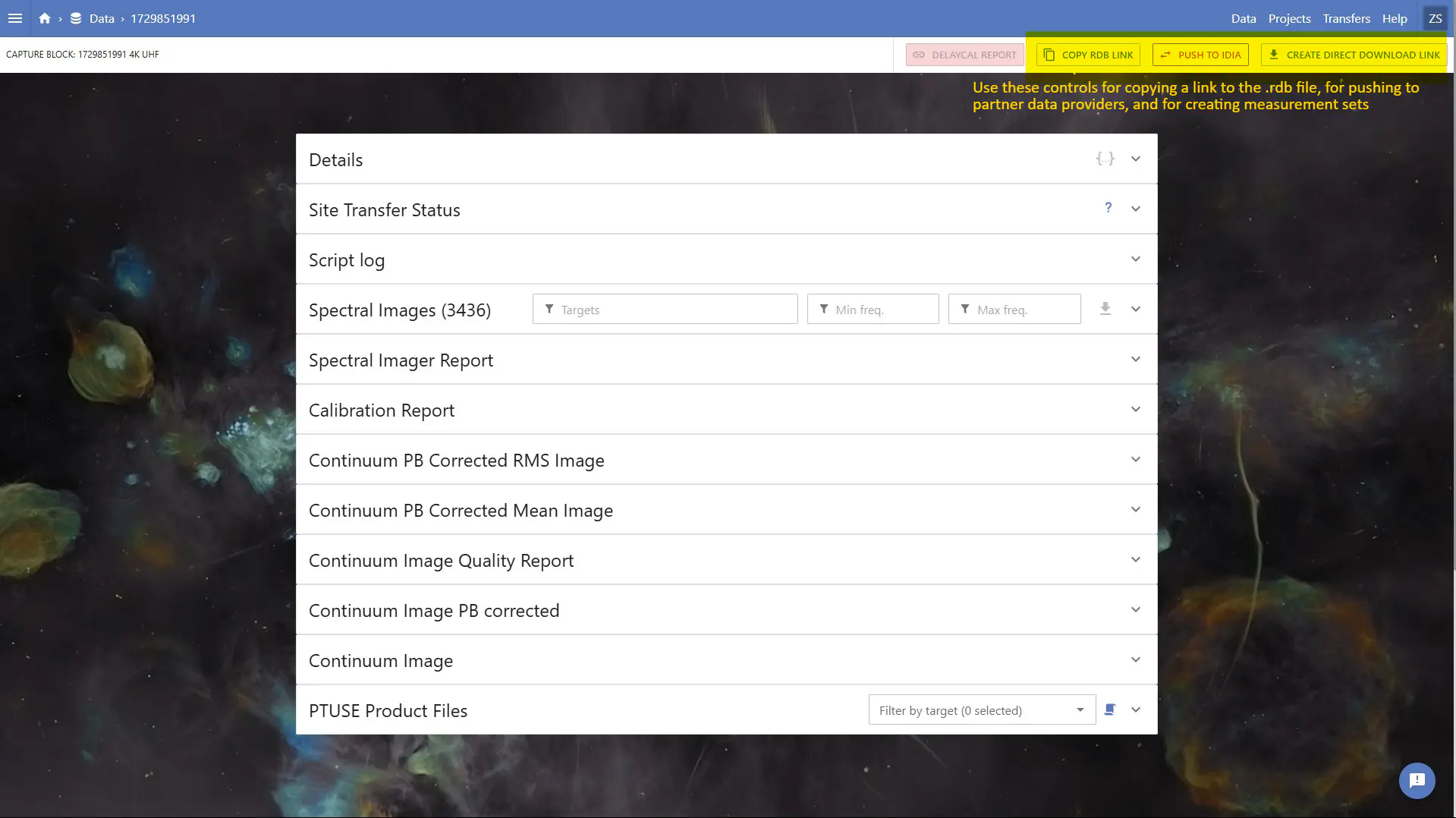
A link to the raw .rdb file containing the metadata of the data block is required to run sanity check or download it. The RDB link can be obtained by clicking on "COPY RDB LINK" (now ".RDB FILE LINK" after their recent update) on the top right corner.
- Extracts CBID (block number) and token from the RDB link
- Creates necessary directories
- Runs (on SLURM sites, generates and submits sbatch jobs for; on
local, runs directly) each requested step:- Downloading MVF data from SARAO archive using
mvf_download.pyscript fromkatdal - Extracting autocorrelations (if requested) using
mvf_copy.pyscript fromkatdal - Extracting measurement set for cross-correlations (if requested) using
mvftoms.pyfrom katdal - Cleaning up the MVF files after extraction. This cleanup step can be skipped by passing
--no-cleanuptopull(useful for debugging or preserving raw data)
- Downloading MVF data from SARAO archive using
- Infers CBID from the local RDB file name
- Creates necessary output directories
- Runs (on SLURM sites, generates and submits sbatch jobs for; on
local, runs directly):- Extracting autocorrelations from local MVF data (if requested)
- Extracting measurement set for cross-correlations (if requested)
- Cleaning up temporary files after extraction
- Extracts CBID and token from the RDB link
- Runs the museek sanity check plugin (as a submitted SLURM job on SLURM sites, or directly on
local) - Results are saved to the specified sanity check folder
On sites with scheduler: slurm (e.g. Ilifu), the tool automatically generates and submits SBATCH scripts:
- SBATCH scripts, log files, and job titles are attached with the block number for easy tracking
- The generated scripts handle job dependencies:
- Extraction jobs wait for download to complete
- Cleanup runs after all extraction jobs finish
- The download step can be requeued automatically on failure
-s/--slurm-overridecan override any generated#SBATCHdirective for a single run (see Site Configuration and each command's options above). The override applies uniformly to every job step in that invocation (e.g.pull -s "--mem=64GB"sets--mem=64GBon the download, extraction, and cleanup scripts alike) — it is not a way to target a single step. If you need different resources per step on an ongoing basis, set them in a site config'sslurm.resourcesinstead (built-in sites, or your own via--site-config).
All SLURM output logs are saved in the logs/ directory with descriptive filenames.
On scheduler: local sites, none of the above applies — steps run directly as foreground subprocesses, and -s/--slurm-override is ignored (with a warning).
There are no dedicated --mail-user/--mail-type flags. Instead, since site configs and -s/--slurm-override accept any SBATCH-compatible option (see Site Configuration), set mail notifications either per-site (in options:, so every job at that site gets them) or per-run:
# Per-run, for this command only
meerdata pull -r "RDB_LINK" -s "--mail-user=user@example.com" -s "--mail-type=ALL"
# Per-site default, in a site config's slurm: block
slurm:
options:
- "--account=..."
- "--mail-user=team@example.com"
- "--mail-type=FAIL"See SLURM sbatch documentation for all --mail-type values.
For detailed help on any command:
meerdata --help
meerdata pull --help
meerdata extract --help
meerdata check --help
meerdata verify --help