Every Claude Code session in one window, kept visible and usable.
Kadrell is a native macOS app for people who run a lot of Claude Code sessions at once across several projects. A tree on the left groups sessions by project with a status dot each; the terminals sit on the right in a grid, stack or zoom. No server, no account, no tracking. Kadrell starts claude itself as a child process.


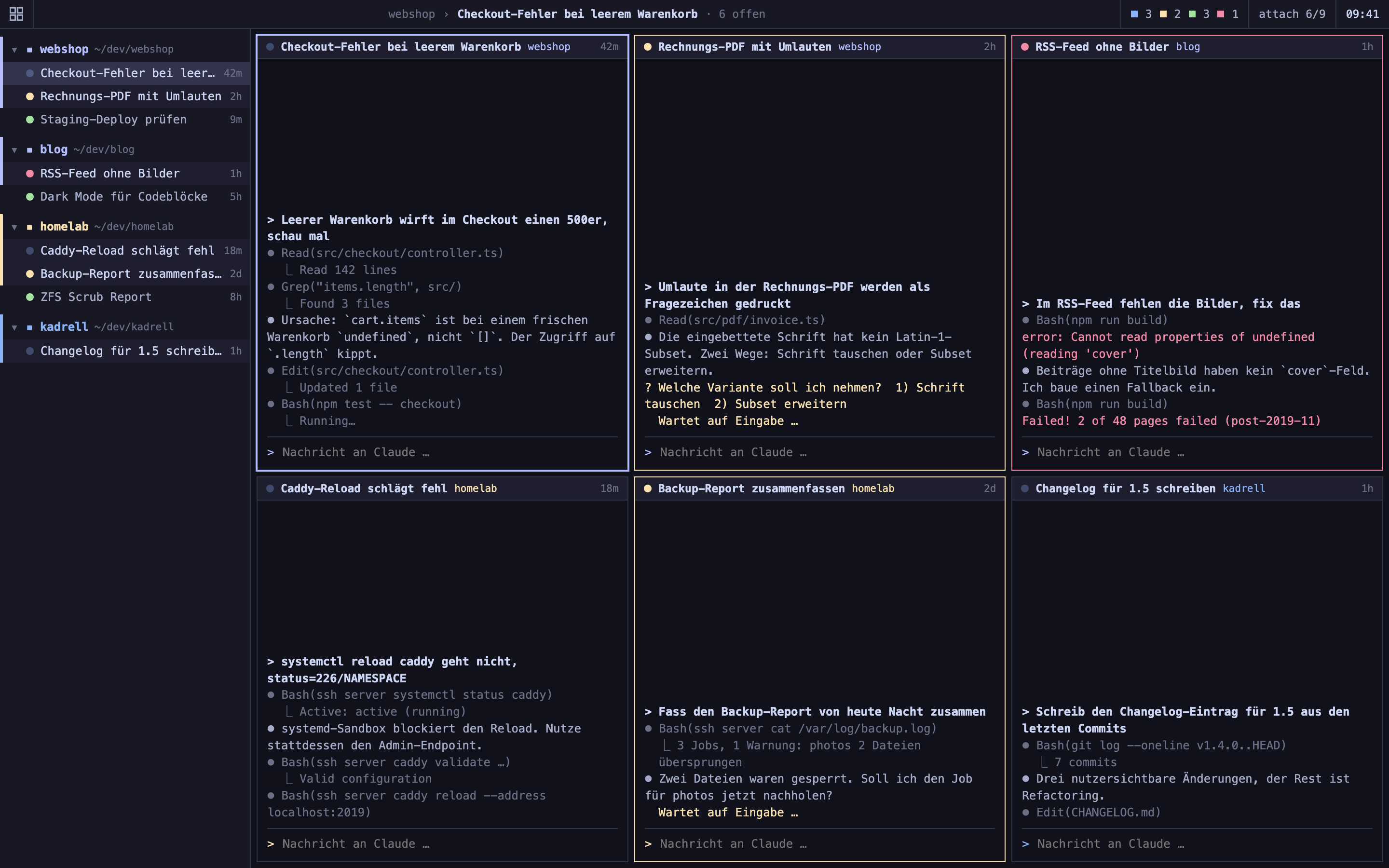
Terminal tabs and a plain tmux session both work until you have eight, ten, twelve Claude Code sessions open. Then a flat tab bar stops telling you which session is working, which is waiting for you and which has finished, and you end up clicking through them one by one.
Kadrell keeps them all in a single window:
- A tree, not a flat tab bar. Sessions are grouped by project folder, each with a status dot, runtime and a "new" mark for sessions that finished or started waiting while you were looking elsewhere.
- Tiling layouts like i3 and bspwm, not a rigid grid. Grid, stack, main + column, spiral, i3-style free split and niri-style scrolling columns. Split lines are draggable; the split belongs to the layout, not the individual session.
- tmux shortcuts, not a new set of habits. Focus, swap, zoom, sync, rename: the defaults follow tmux and every shortcut is rebindable. If tmux is in your muscle memory, there is nothing new to learn.
- Everything local. No server to run, no account to create, nothing sent anywhere. Kadrell launches and holds the Claude processes itself.
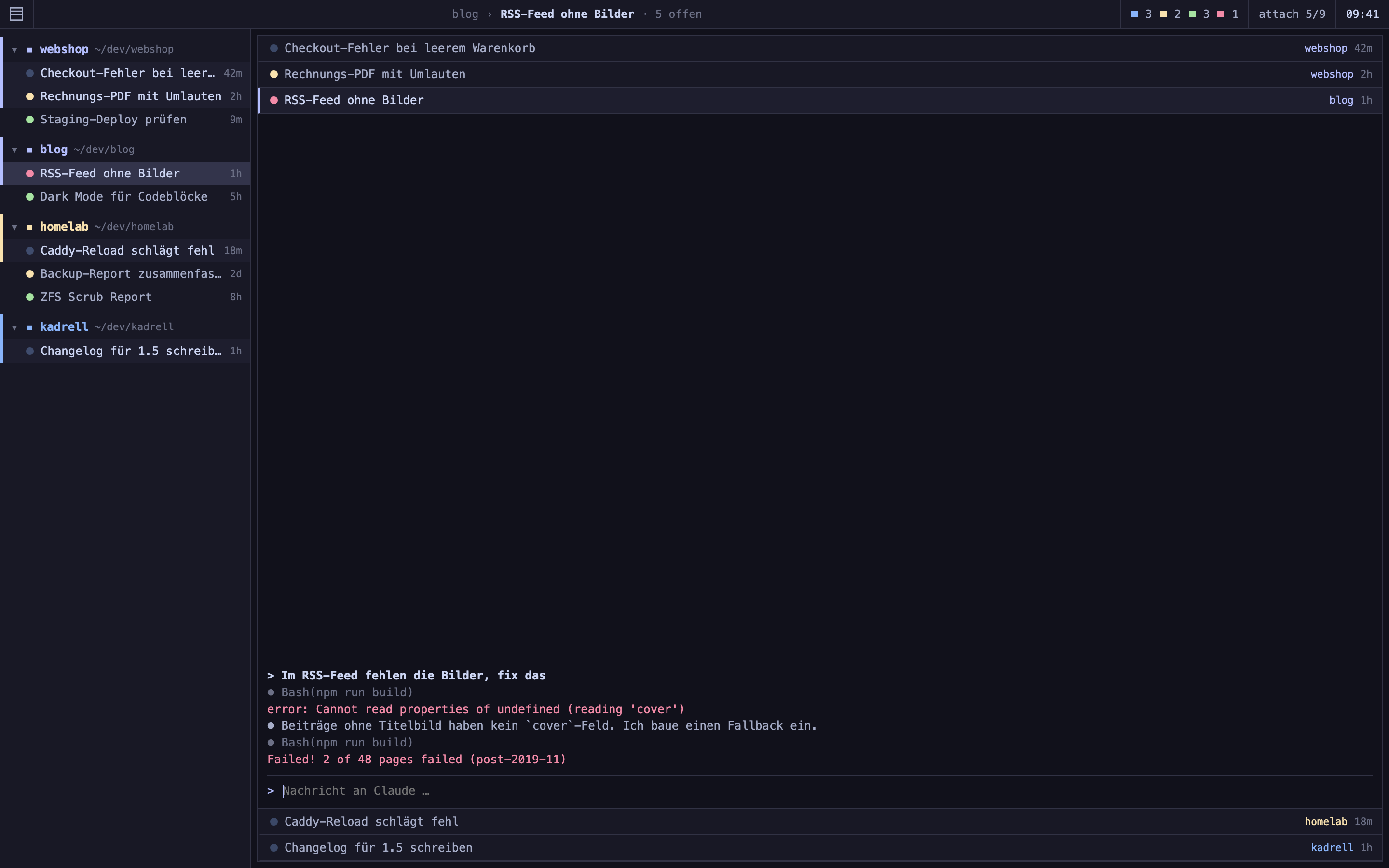
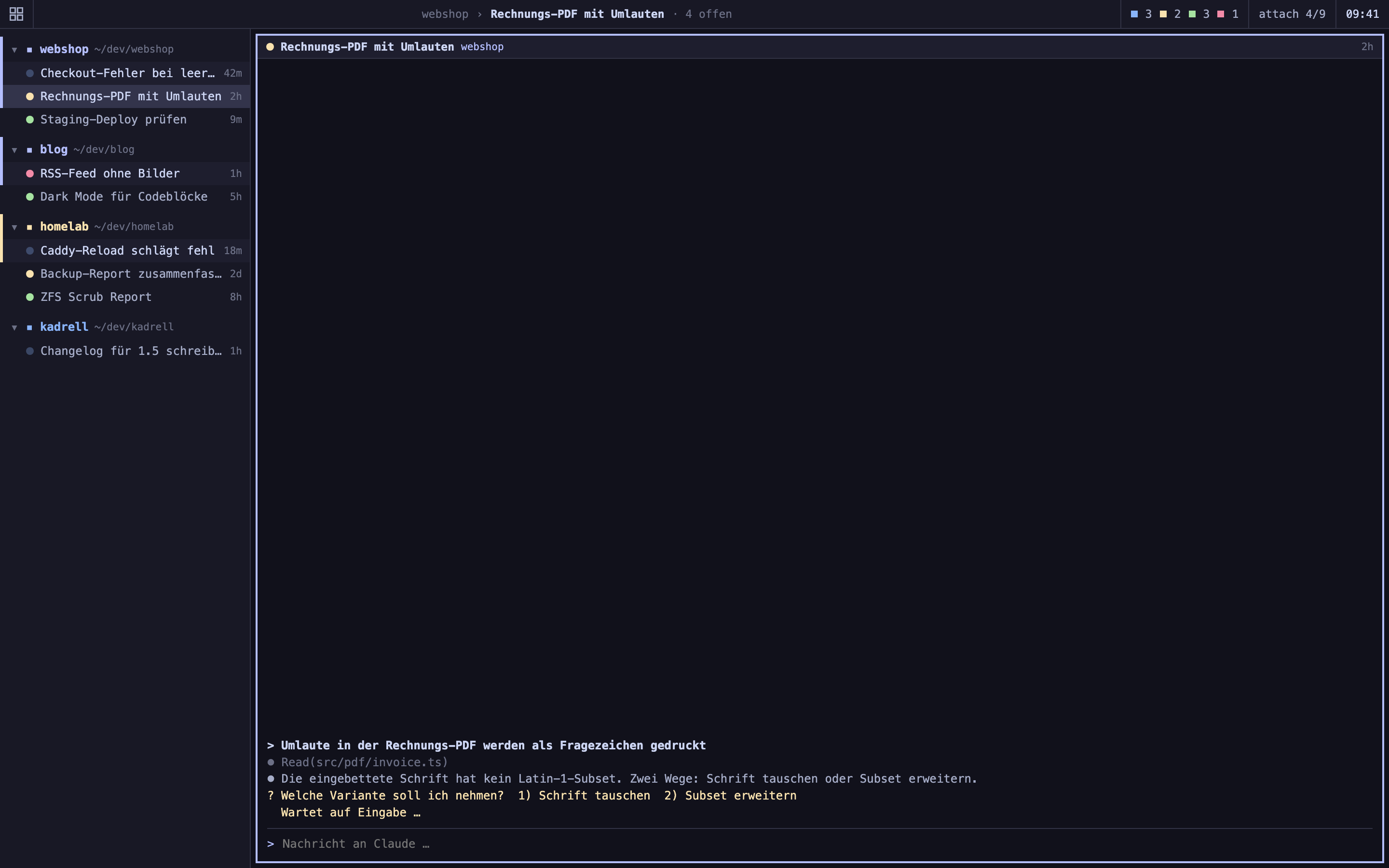
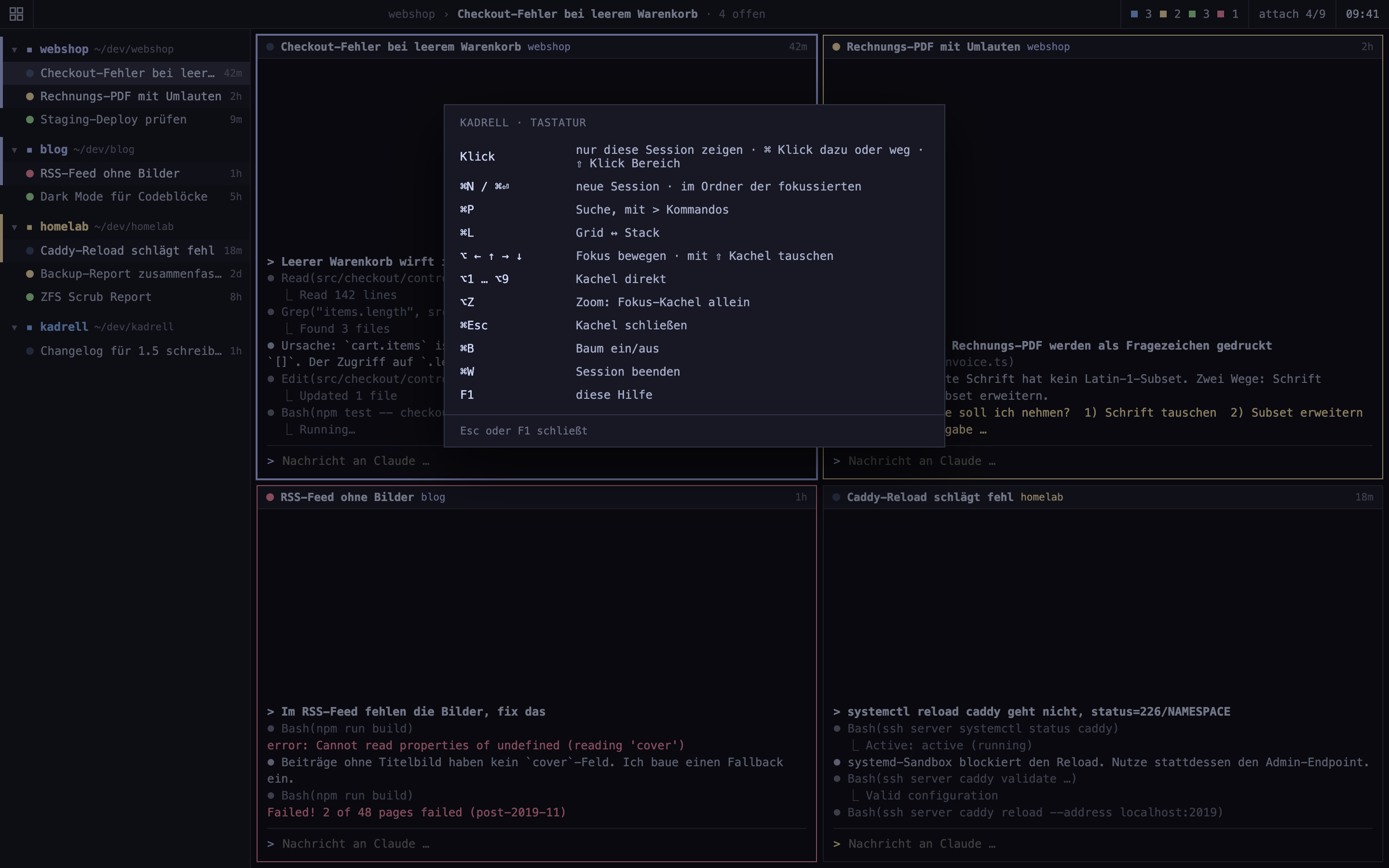
| Stack | Zoom | Help |
|---|---|---|
 |
 |
 |
- Project tree with status. Group per project folder, sessions underneath with a status dot (working, waiting, done, error, disconnected), runtime and a "new" mark for unseen finished or waiting sessions.
- Grid, stack and zoom, plus more layouts. Grid, stack, main + column, spiral (each tile halves the rest, like bspwm), free (i3-style splits set per tile) and scrolling (niri-style fixed-width columns). Draggable split lines, or move them with keyboard arrows.
- Status count in status colors. The bar shows how many sessions are working, waiting, done, in error and disconnected, each in its status dot color, with the total behind it.
- Usage and quota display with a plan gauge. The 5-hour and 7-day Claude usage sit in the bar. The 7-day value is shown against a plan pace for the current hour of the week: green while you are below it, yellow just before, red once you are over.
- Pulsing blue dot for background commands. If a background command is still running in a session while Claude is already waiting again, its dot pulses blue instead of sitting still, in the tree, the tile bar and the stack view.
- Disconnect all finished at once. A button in the bar disconnects every finished session in one go; the tiles stay, a click resumes the conversation. Finished sessions can also auto-disconnect after an adjustable delay.
- Switch language without a restart. German and English, changeable in settings and applied immediately, so a restart never takes your Claude processes with it.
- Statistics (F3). Messages sent, sessions and terminals opened, tile switches and the record for simultaneously open sessions.
- Grouping is optional. Turn off grouping by project (⌥G) and all sessions stand in a single list with the project name before the title. Grouped and flat keep separate drag orders.
- Resume after restart. When Kadrell quits, the processes end; on the next start each shown session resumes with its history.
- Terminal font, scaling and scrollback. Pick any installed monospace font, adjust size, line spacing and padding, and set the scrollback buffer from 1,000 to 50,000 lines.
- Favorites. Mark a group as a favorite so it stays in the tree even after its last session closes, ready to start a new one.
- Remote sessions. ⌘⇧N connects over ssh to a host from your ssh config and attaches to its tmux, in the same interface as local sessions.
- Profiles.
--profile <name>starts a second instance with its own sessions, groups and settings;--profile tmpis a throwaway profile for testing. - Command-line control. A
kadrellcommand drives the running app over a Unix socket, tmux-style:kadrell ls,new,send,capture,select,layoutand more. - Keyboard-first and accessible. The tree is fully keyboard-operable and a real outline for VoiceOver; status dots add a shape under "differentiate without color" and animations respect "reduce motion".
Grab the signed, notarized build from kadrell.malura.de/download/Kadrell.dmg and drag Kadrell into Applications. It needs macOS 15 or newer and runs on Apple Silicon and Intel. Older builds stay available at kadrell.malura.de/download/.
Kadrell is a Swift 6 / AppKit app. The Xcode project is generated with XcodeGen from app/project.yml (the .xcodeproj is gitignored). The only third-party dependency is SwiftTerm, which Swift Package Manager resolves automatically.
Requirements: macOS 15, Xcode 16, XcodeGen (brew install xcodegen).
cd app
xcodegen generate
xcodebuild -project Kadrell.xcodeproj -scheme Kadrell -configuration Debug \
  -derivedDataPath build -skipPackagePluginValidation -skipMacroValidation build
open build/Build/Products/Debug/Kadrell.app
Run the tests with xcodebuild ... test. Complexity is kept in check with lizard (CCN 15 or lower): cd app && uv tool run lizard Kadrell -w should print nothing. See CONTRIBUTING.md for the full setup.
Defaults follow tmux and are rebindable in settings (⌘,).
| Shortcut | Action |
|---|---|
⌘N |
New session (search over groups, recent folders and git repos) |
⌘⇧N |
Remote session over ssh |
⌘⏎ |
New session in the focused session's folder |
⌘T |
Terminal without Claude in the same folder |
⌘P |
Command and search palette |
⌘F / ⌘G / ⌘⇧G |
Find in terminal, next, previous |
⌘⇧F |
Find across all running terminals |
⌘B |
Toggle the tree |
⌘L |
Cycle layout |
⌘Esc |
Close the focused tile |
⌘W |
Close the focused session |
⌘⇧T / ⌘⇧W |
Open / close an extra window |
⌥←↑→↓ |
Move focus |
⌥⇧←↑→↓ |
Swap tiles |
⌥1…⌥9 |
Focus a tile directly |
⌥Z |
Zoom the focused tile |
⌥I |
Sync input to all open tiles |
⌥J / ⌥K |
Preview through the tree |
⌥G / ⌥O |
Toggle grouping / sort |
F1 / F2 / F3 |
Help / rename / statistics |
⌘, |
Settings |
Kadrell has no server, no account and no tracking. It runs entirely on your machine and holds the Claude processes locally. See the privacy statement.
Contributions are welcome. Read CONTRIBUTING.md for the build setup, the code quality rules (clean build, lizard, bilingual user text) and the commit and changelog conventions. Please also read the Code of Conduct.
Kadrell is released under the MIT License, so you are free to use, modify and redistribute it. If you fork it or build on it, please keep the authorship of Michael Malura visible and link back to kadrell.malura.de. It is a small courtesy, not a legal condition, and it is much appreciated.
If Kadrell saves you time, you can support the work over Ko-fi:

Kadrell is an independent project with no affiliation to Anthropic. Claude is a trademark of Anthropic, PBC.