Required UniTask itself, so first-thing-first install a .unitypackage from this link. Can be used for default .NET classes if you install UniTask as NuGet package. Also feel free to change whatever you want or collab.
- StaticServices (Global Services)
- DynamicServices (Local Services)
- Injections (Services that needs other services)
Whats the difference? Static Services get initialized on Link creation (e.g database). Dynamic Services is a flexible collection and can be added and removed whenever you want at any point of Link or Collectionist lifespan. Usually you dont need DynamicServices if its not a huge project. (unless u are a resource handling maniac who needs to free resources 24/7)
Create a CollectionistLink (ScriptableObject) for serialization purposes if you want to get services in
MonoBehaviourobjects, via:
Right Click > Create > Services > Links > CollectionistLink
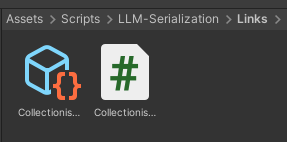
Drag and drop it to any
[SerializedField] private CollectionistLink _link;field and initialize it (usually on startup of your app)
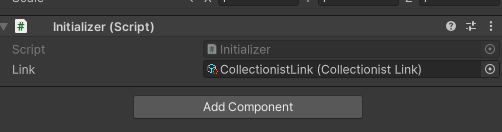
Register service you wanna use in this collectionist (
_link.Serviceto get actual service from the link whenever you want)
public class Initializer : MonoBehaviour
{
    [SerializeField] private CollectionistLink _link;

    private void Awake()
    {
        ServiceCollection globalServices = new ServiceCollection()
            .Add(new SaveService())
            .Add(new SettingsService())
            .Add(new AudioService())
            .Add(new LocalizationService())
            .Add(new PopupService(popupRoot))
        ;

        _link.Create(globalServices).Initialize();
    }
}
Tip
_link.Initialize() is an awaitable operation in case your services do something on startup (like GET request from database, or load Audio). Put await before creation to wait for it: await _link.Create(globalServices).Initialize();
Now you can use it whenever you want by getting that
ServiceCollectionlike_link.Serviceto get actual service from the collection:
    [SerializeField] private CollectionistLink _globalCollection;

    ...
    Collectionist collection = _globalCollection.Service;

    collection.Get<AudioService, PopupService>(out var audioService, out var popupService);

    audioService.PlayMusic("HOYOMiX - Shade of Flowers");
    popupService.ShowPopup<CryingFurina>();
    ...
Basically, they are the same but without creation process.
Add services whenever you want:
    [SerializeField] private CollectionistLink _globalCollection;

    ...
    _globalCollection.Service
        .Add(new HoyoClientWrapper())
        .Add(new HoyoFpsUnlocker())

        .Build();
    ...
Tip
Collectionist.Build() is an awaitable operation in case your services do something on startup (like GET request from database, or load Audio). If so, put await before creation.
Using them in same pattern, just use
_globalCollection.Service.Get<TService>():
_globalCollection.Service.Get<HoyoFpsUnlocker>().UnlockFps();
Or if you need service multiple services:
_globalCollection.Service.Get<HoyoFpsUnlocker, HoyoClientWrapper>(out var fpsUnlock, out var wrapper);
Warning
Dont forget to _link.Service.Remove(service) or _link.Service.Remove<TService>() if you dont need it anymore or if service was destroyed!
Caution
If you gonna use Injections (if you need some services to be inside other services, for example our ConfigService needs SaveService), then you NEED to .Add(service) SERVICES IN ORDER! You can only get services registered BEFORE the current (in our case ConfigService) service:
public class ConfigService : IService
{
    public bool IsInitialized { get; private set; }

    public async UniTask Initialize(ServiceCollection services)
    {
        services.Get<SaveService>(out var saveService);

        if(saveService.HasAnySaves()) await LoadUserSavedConfigs();
        else await LoadDefaultConfigs();

        IsInitialized = true;
    }
        ...