



Website • Docs • API Reference
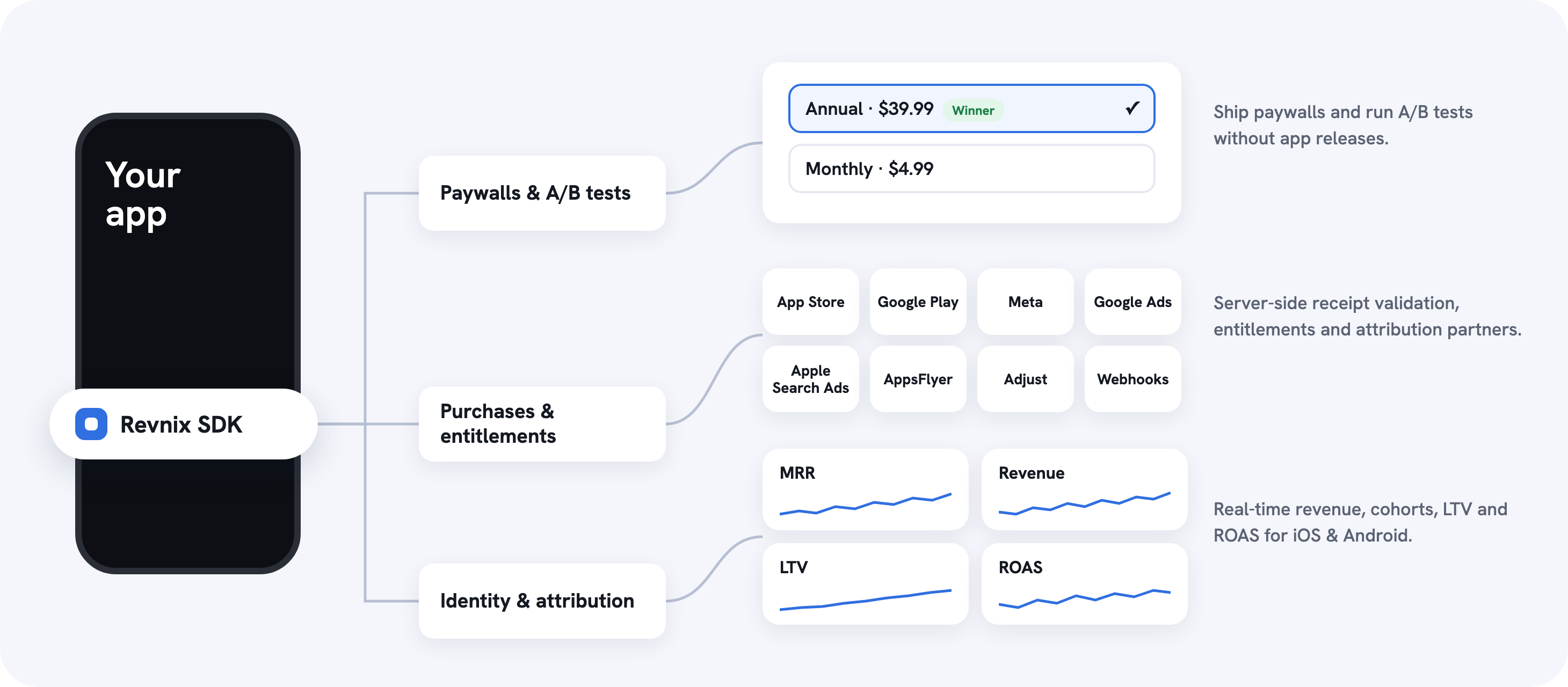
Revnix SDK makes in-app subscriptions, paywalls and attribution for iOS fast and easy. One package buys through StoreKit 2, validates the receipt on the server and unlocks the entitlement, offline-correct, with zero dependencies. iOS 16+, macOS 13+, tvOS 16+, watchOS 9+.
- Why Revnix?
- Getting Started
- Quick start
- Purchases and entitlements without server code
- Paywalls that update without app releases
- A/B tests with a built-in holdout
- Attribution and deep links
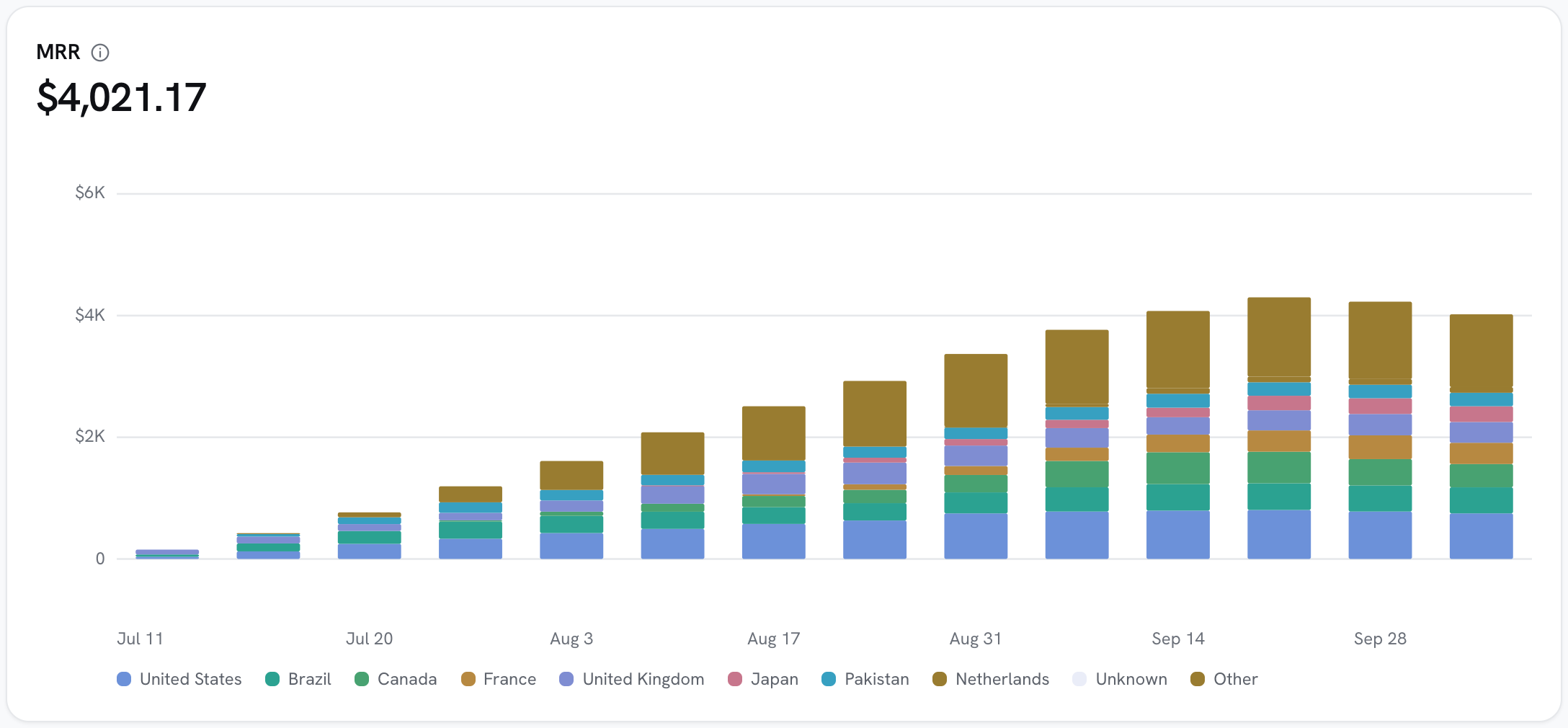
- Real-time analytics for your iOS app
- Compatibility
- Documentation
- Support
- Contributing
- Like Revnix SDK?
- License
- Purchases in one call.
RevnixStoreKit.purchaseopens the App Store sheet, validates the receipt on the server and grants the entitlement. No server code. - Entitlements that work offline. Entitlement checks are cached on device, so a user who paid stays unlocked without a network.
- Remote paywalls. Design paywalls in the dashboard, pick from nine templates and ship copy, prices and layout changes without an app release.
- A/B tests and holdouts. Split a placement between variants, measure revenue per user and ship the winner from the dashboard.
- Attribution and deep links. Install attribution, deferred deep links, Apple Search Ads, SKAdNetwork and MMP forwarding, all from the same SDK.
- Privacy and tracking. App Tracking Transparency support and a privacy manifest ship with the SDK.
Requires iOS 16+ / macOS 13+ / tvOS 16+ / watchOS 9+ and Swift 5.9.
Swift Package Manager. In Xcode: File → Add Package Dependencies…, paste
https://github.com/Oth-tech/RevnixSDK-iOS.git, and pick the Revnix
library. Or in Package.swift:
.package(url: "https://github.com/Oth-tech/RevnixSDK-iOS.git", from: "1.5.0")Releases are the vX.Y.Z tags on this repository. CocoaPods is not published.
Use the publishable key (rvx_pk_…) only. Secret keys must never ship in a binary. Your API key is in the dashboard under Settings. See Setup.
import Revnix

// 1. Configure once at app start
let client = RevnixClient(RevnixConfig(
    apiKey: "rvx_pk_live_…",
    baseURL: URL(string: "https://your-deployment.convex.site")!
))

// 2. Replay store transactions + drain the offline queue
let observer = RevnixStoreKit.startObserving(client: client)
await client.retryPendingPurchases()
await client.registerInstall(platform: "ios")

// 3. Buy: opens the store sheet, validates the receipt, grants the entitlement
if let result = try await RevnixStoreKit.purchase(product, client: client) {
    _ = try await client.waitForEntitlements(seq: result.seq)
}

// 4. Check access anywhere
if await client.isEntitled("pro") { unlockPro() }Revnix handles the hard parts of subscriptions in a small, developer-friendly SDK.
RevnixStoreKit.purchaseruns the whole flow: store sheet, server-side receipt validation with the StoreKit 2 JWS as proof, entitlement, transaction finish.RevnixStoreKit.restorebrings purchases back on a new device.- Renewals and purchases on other devices arrive on their own and are registered automatically.
- A network blip keeps paying customers unlocked offline; a revoked key still locks them out.
- Already using your own StoreKit code? Call
client.registerPurchaseinstead. See Register purchases.
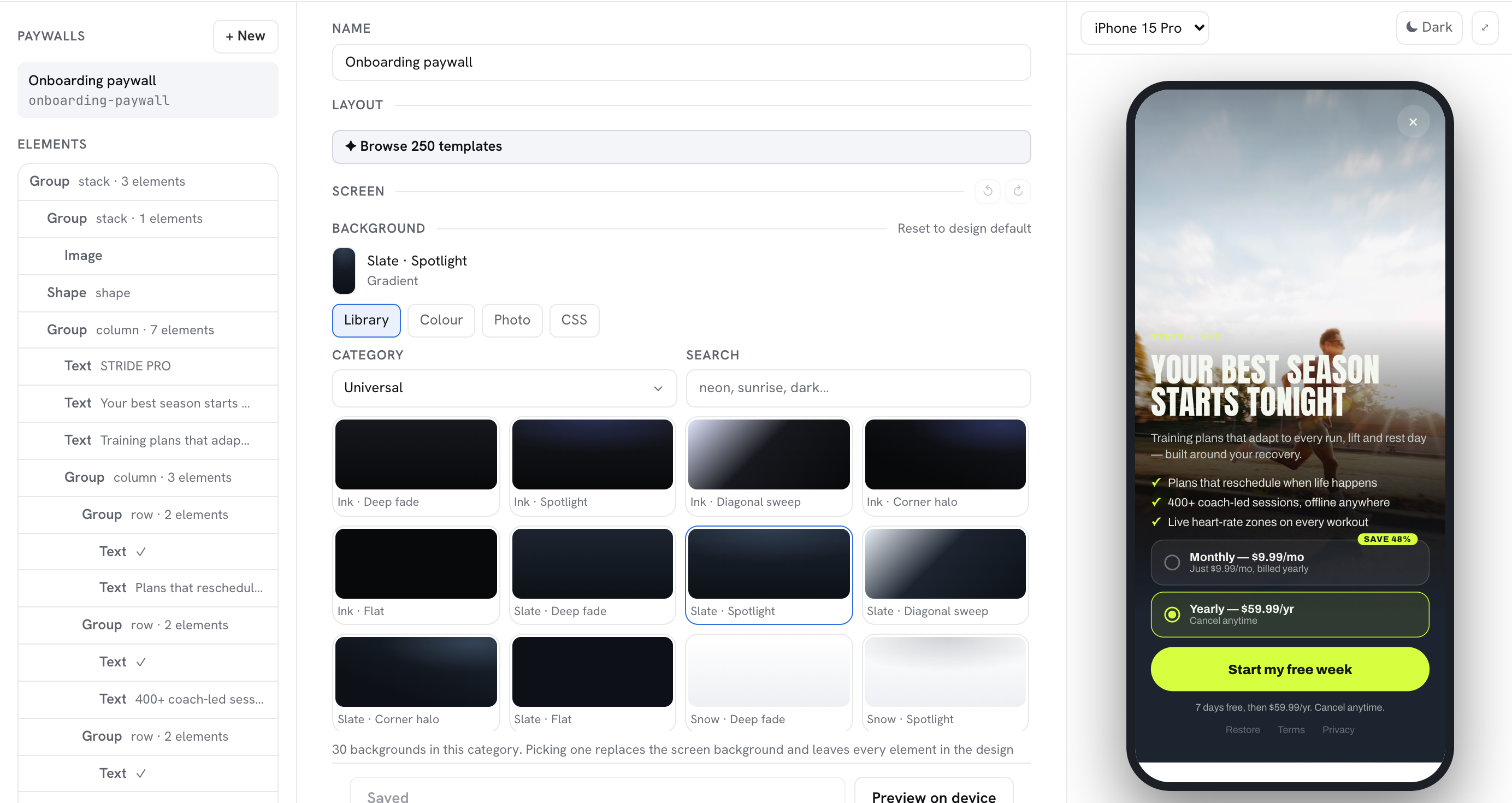
With the Revnix paywall builder you design the paywall in the dashboard and render it natively in your app.
- Native rendering:
resolvePlacementreturns the config,RevnixPaywallViewdraws it with SwiftUI and hands you the selected package to buy. - Nine templates plus builder designs: pick a layout, theme and accent, then edit copy, packages and badges.
- Prices from StoreKit: you supply titles and localized prices from StoreKit, so display never disagrees with the charge.
- Localized:
RevnixClient.setLocaleforces every designed paywall into a given language.
let resolution = try await client.resolvePlacement("paywall_main")
if let paywall = resolution.paywall {
    RevnixPaywallView(
        config: paywall.config,
        packages: products.map {
            RevnixPaywallPackage(packageId: packageId(for: $0), title: $0.displayName, priceLabel: $0.displayPrice)
        },
        onPurchase: { packageId in purchase(packageId) },
        client: client,
        placementKey: "paywall_main",
        paywallId: paywall.paywallId
    )
}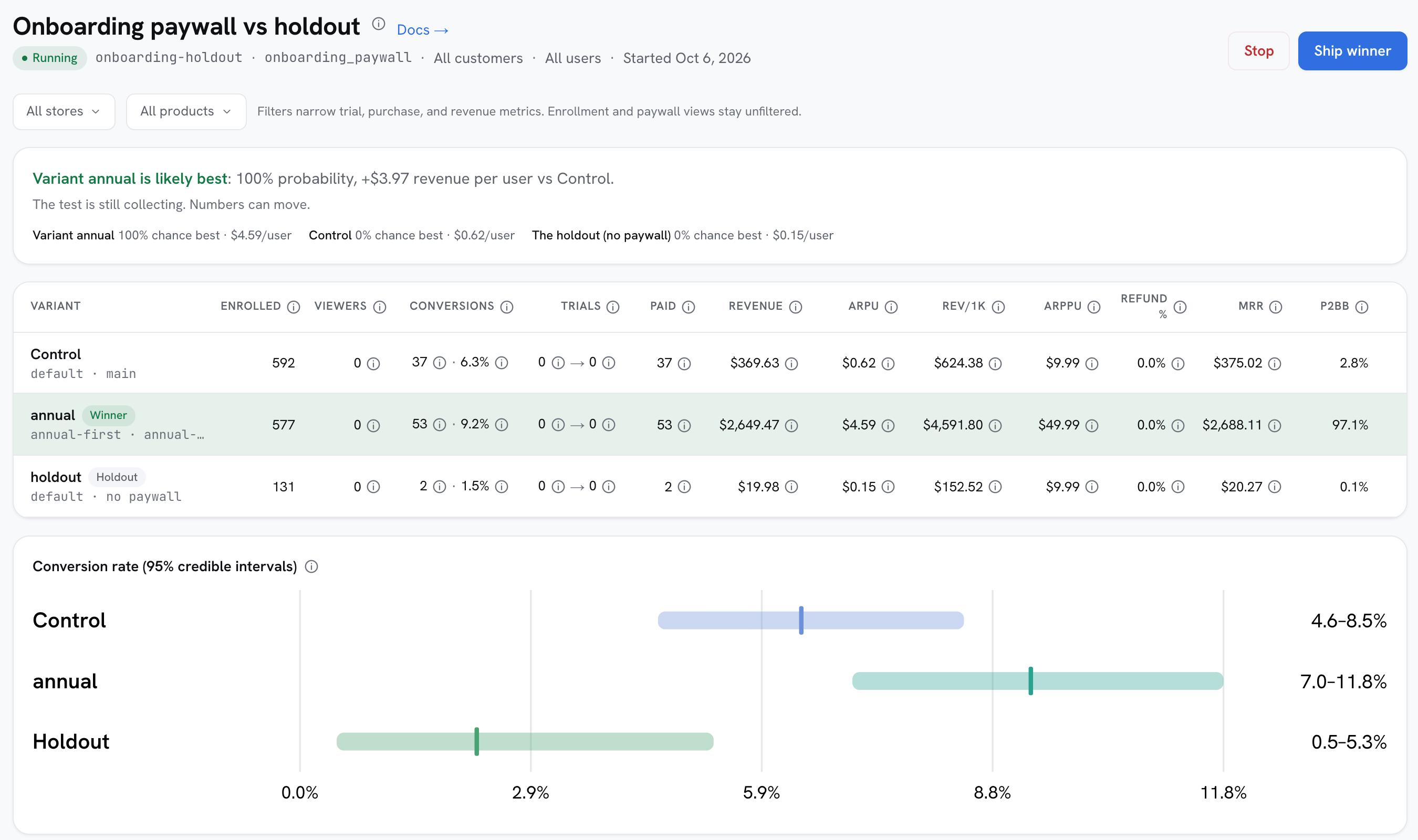
resolvePlacementsends the customer id, so a running A/B test serves that customer's variant, sticky across identity merges.experimentmetadata on the response tells you which variant was shown, for your own analytics.- A holdout variant shows no paywall at all, to measure what the paywall is really worth.
setAttributessupplies the customer attributes a test's audience conditions read.
- Install attribution:
registerInstallmints the Apple Search Ads token and registers SKAdNetwork, once per install. See Track events. - SKAdNetwork conversion values: report progress with
client.updateSkanConversionValue. - Deep links:
client.handleDeepLinkreports an opened URL;onDeferredDeepLinkdelivers a link matched to the install after an App Store detour. See Deferred deep links. - Attribution verdicts:
client.getAttributionor theonAttributioncallback report which campaign, link or referrer an install came from;client.setAttributionforwards Adjust/AppsFlyer attribution callbacks. - Tracking permission:
client.requestTrackingAuthorizationshows Apple's App Tracking Transparency prompt. See App Tracking Transparency.
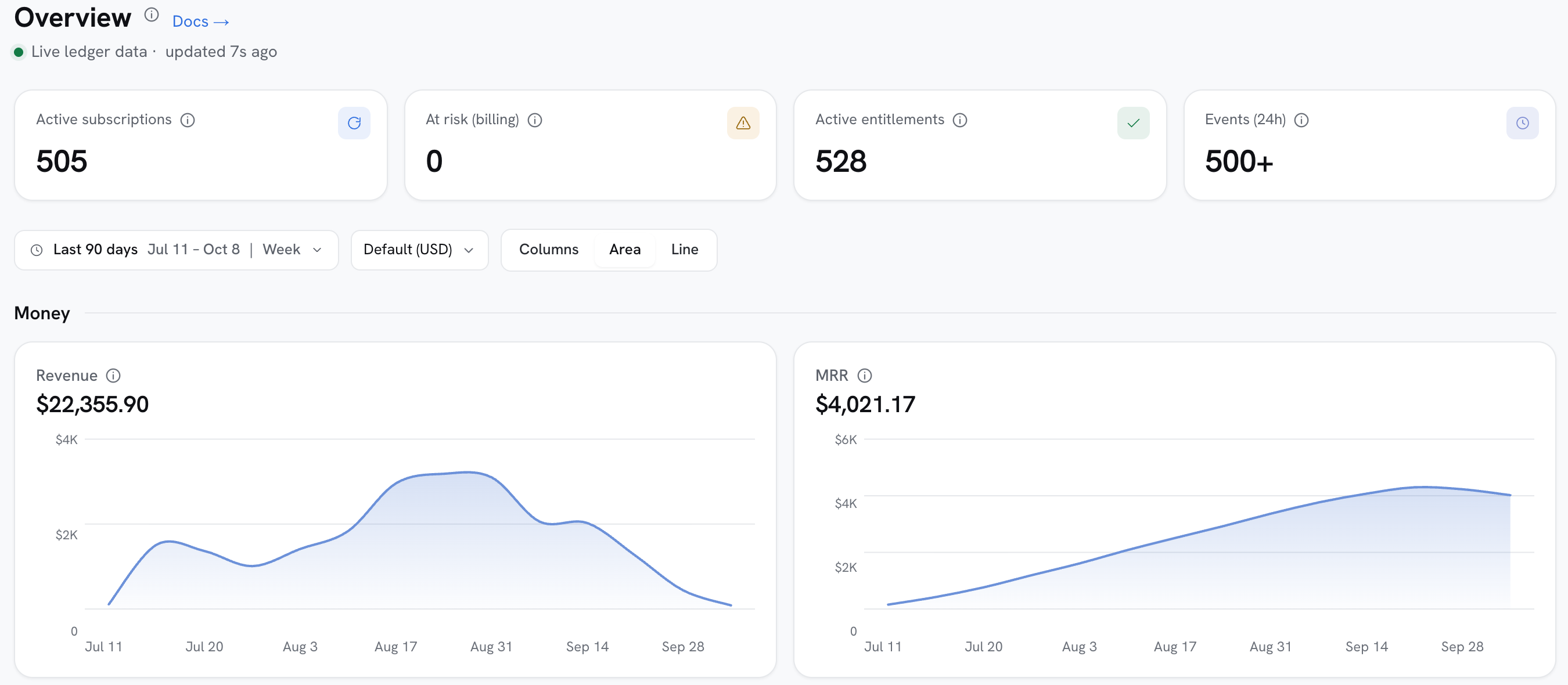
- Install reports, paywall view/close/interaction beacons feed funnels and conversion reports.
client.trackreports any custom in-app event, e.g.level_up.client.logAdRevenuereports impression-level ad revenue from a mediation SDK's paid callback, feeding the ROAS table.client.setPushTokenenables uninstall measurement. See Uninstall measurement.
| Platform | Minimum |
|---|---|
| iOS | 16.0 |
| macOS | 13.0 |
| tvOS | 16.0 |
| watchOS | 9.0 |
| Swift | 5.9 |
| Xcode | 15 or later |
| Store integration | StoreKit 2 only |
| Dependencies | none |
- Overview
- Setup
- Identify users
- Register purchases
- Check entitlements
- Show paywalls
- Track events
- Privacy manifest
- Email support@revnix.io with questions, bugs or feature requests.
- Open an issue on GitHub.
- Found a bug or want a feature? Open an issue, we read all of them.
- Pull requests are welcome: run
swift testbefore opening one.
So do we! Star the repo ⭐️ and make our developers happy.
Revnix SDK is available under the MIT license. See LICENSE for details.