
Author: Nephren (github.com/NephVx2) Version: 6.1 Compatible: Windows 10/11 — UEFI / Legacy BIOS — GPT / MBR — English & French Windows
- Overview
- Screenshots
- What it checks
- Requirements
- First run (step by step)
- Usage
- Understanding the score
- Reports generated
- Why it's useful
Check-Boot is a read-only PowerShell diagnostic script that audits the entire Windows startup chain in one run: firmware, BCD, Secure Boot, TPM, EFI/bootloader files, drivers loaded at boot, BitLocker, WinRE, the Recovery partition, disk SMART health, system-image integrity, and the boot event log.
Boot problems are usually invisible until the day Windows won't start — by then it's too late to gather diagnostics. This script is meant to be run before that happens: on a healthy machine, it establishes a baseline (hashes of winload.efi/bootmgfw.efi, DBX revocation-list size, score history) and flags anything that looks abnormal, drifted, or misconfigured — so an actual boot failure later on is faster to diagnose, or never happens at all.
It never modifies the boot configuration. The only optional write action is creating a Windows System Restore point (-CreateRestorePoint) before running the slower checks.
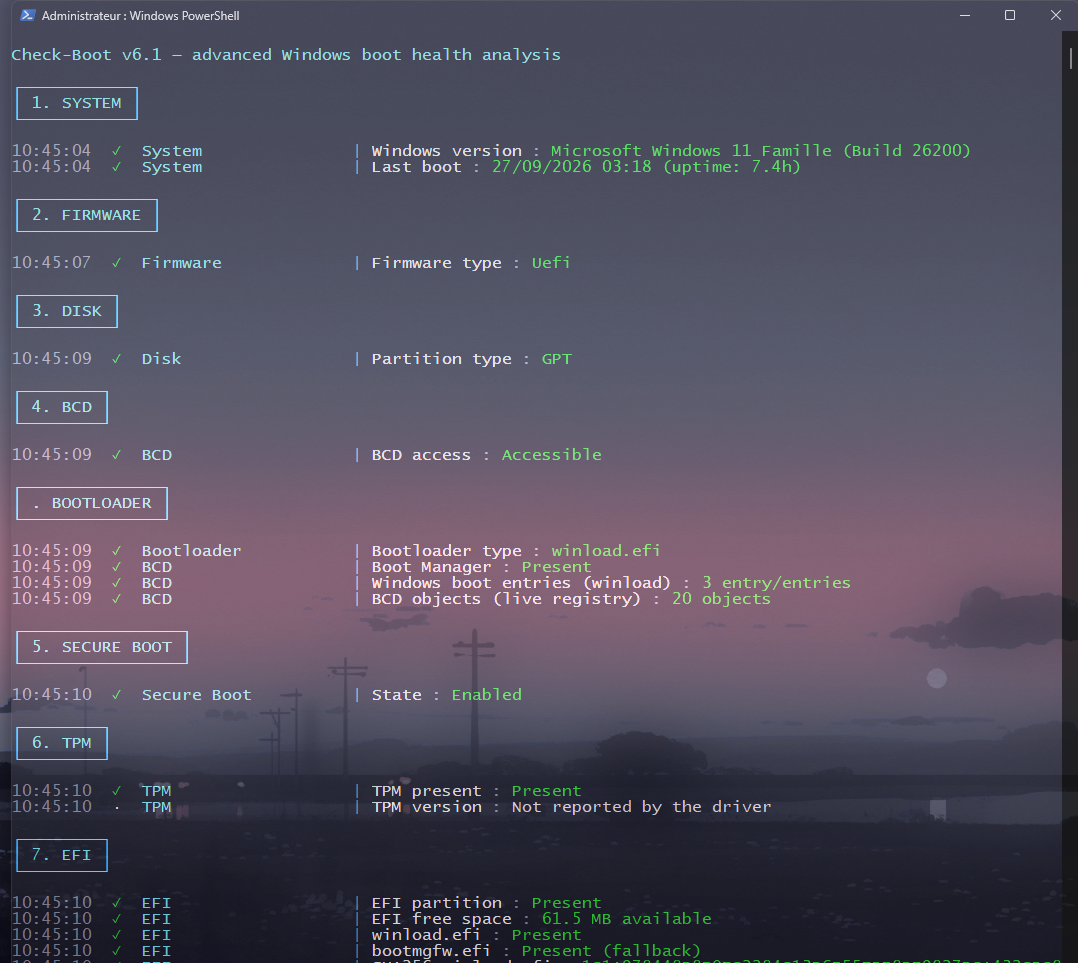
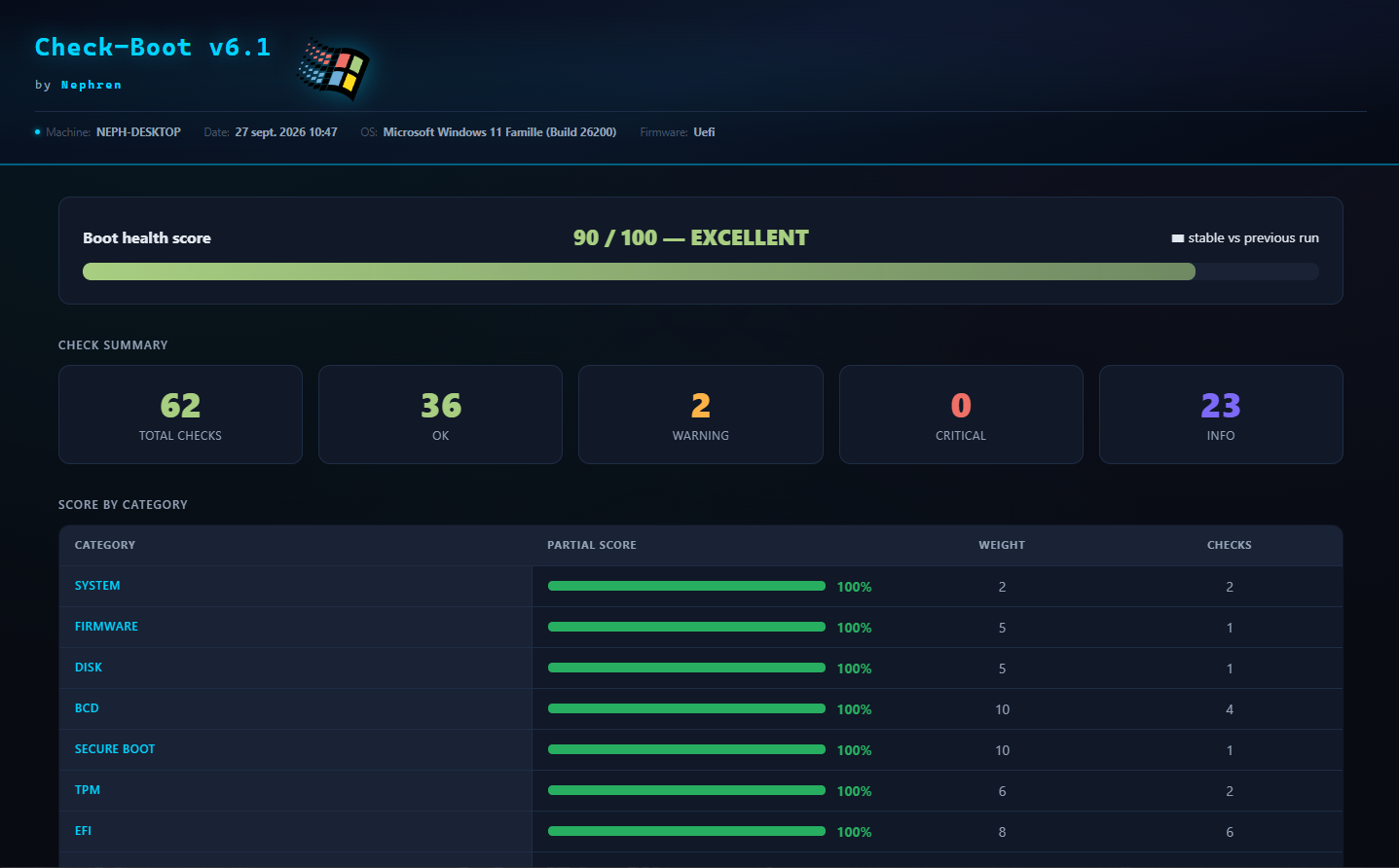
More screenshots (Secure Boot section, the final "Audit Complete" summary, the detailed HTML results table, a flagged Boot Log warning) are in the screenshots folder.
| Category | What it looks at |
|---|---|
| System | Windows version/build, last boot time, uptime |
| Firmware | UEFI vs Legacy BIOS |
| Disk | System partition style (GPT/MBR) |
| BCD | Boot Configuration Data accessibility, Boot Manager presence, number of Windows boot entries, BCD object count (registry) |
| Secure Boot | Enabled/disabled state |
| TPM | Presence and spec version |
| EFI | EFI partition presence and free space, winload.efi/bootmgfw.efi presence, SHA256 hashes and drift vs the previous run |
| Legacy BIOS | winload.exe presence (non-UEFI systems) |
| Secure Boot Keys | DB / KEK / DBX certificate stores, DBX regression detection |
| Security | BlackLotus bootkit mitigation, VBS (Virtualization Based Security), HVCI (Memory Integrity) |
| Boot Drivers | Unsigned boot-start/system-start drivers |
| Fast Boot | Windows fast startup (Hiberboot) state |
| BitLocker | Protection status on the system drive |
| WinRE | Windows Recovery Environment state |
| Recovery | Recovery partition presence and whether it's improperly exposed with a drive letter |
| SMART | Physical disk health status |
| System Integrity | SFC /verifyonly and DISM /CheckHealth results |
| Boot Order | Firmware boot order accessibility |
| Dual Boot | Detects a Linux bootloader (GRUB/shim) or Linux partition |
| Hackintosh | Detects OpenCore/Clover bootloader entries |
| Win11 Compatibility | Whether the current boot setup (UEFI + GPT) meets Microsoft's Windows 11 requirements |
| Boot Log | Recent Kernel-Boot errors and unclean shutdowns (Event ID 41) from the last 7/30 days |
Every check is scored: OK, WARNING, or ERROR. Each category also gets its own weighted 0–100 score, on top of the overall health score.
- Windows 10 or 11
- PowerShell run as Administrator (the script auto-elevates via a UAC prompt if launched from a non-elevated session)
-
Copy
Check-Boot.ps1to the target machine. -
Open PowerShell (elevation isn't required to launch it — the script self-elevates via a UAC prompt on its own). Go to the folder that contains the script (adjust the path; keep the quotes if it contains spaces):
cd "$HOME\Downloads" -
Unblock the script if you downloaded it from the Internet. Windows flags downloaded files, and PowerShell's execution policy (
RemoteSigned, for example) refuses to run a flagged script. From the script's folder:Unblock-File .\Check-Boot.ps1
If PowerShell says instead that running scripts is disabled on this system (the Windows default policy is
Restricted), allow scripts for the current account first (the change applies to this account only, not to the whole machine):Set-ExecutionPolicy -Scope CurrentUser -ExecutionPolicy RemoteSigned
Still blocked? See the step-by-step guide.
-
First run the self-test — no files written, no system modifications:
.\Check-Boot.ps1 -SelfTest
Runs 16 internal assertions (
Add-Resultscoring,-Categoryfiltering,Safe-CommandExists,Get-FileSha256, and MBR/GPT recovery-partition detection). Exit code 0 = everything passes, 1 = at least one failure. -
Run the full analysis:
.\Check-Boot.ps1Takes well under a minute on most machines —
SFC /verifyonlyandDISM /CheckHealthare the slowest steps (skip them with-SkipSlowChecksfor a quick pass). Watch the console for a live, color-coded line per check as each section completes. -
When it finishes, the console prints a
SUMMARYbox (totals, weighted score, evolution vs the previous run) followed by anAUDIT COMPLETEbox with a text score bar and the paths to the generated reports. -
Open the generated HTML report (the script offers to do this automatically unless
-Silentis used) — check the critical-findings links at the top first if any check failed, then use the search box and status filters for everything else. -
On the second and subsequent runs, the SUMMARY/AUDIT COMPLETE boxes also show the score trend vs the previous run, and the report flags any drift in the
winload.efi/bootmgfw.efihashes or a shrinking DBX — both are abnormal outside of a Windows update.
.\Check-Boot.ps1| Parameter | Description |
|---|---|
-Silent |
No console output — for scheduled tasks. Reports are still generated. |
-SelfTest |
Runs 16 internal assertions against the script's core functions and exits (no system checks performed). |
-SkipSlowChecks |
Skips SFC /verifyonly and DISM /CheckHealth, the two slowest checks. |
-CreateRestorePoint |
Creates a System Restore point before the DISM checks. |
-Category <name(s)> |
Runs only the given category/categories (see the table above for valid names) plus the always-shown Summary. |
# Full run
.\Check-Boot.ps1

# Quick run, skipping SFC/DISM, no console output
.\Check-Boot.ps1 -Silent -SkipSlowChecks

# Only check Secure Boot and TPM
.\Check-Boot.ps1 -Category "Secure Boot","TPM"

# Verify the script's own logic
.\Check-Boot.ps1 -SelfTestOverall health score (100 → 0, -15 per error, -5 per warning):
| Score | State |
|---|---|
| ≥ 90 | EXCELLENT |
| ≥ 75 | GOOD |
| ≥ 50 | FAIR |
| < 50 | CRITICAL |
Per-category score: each of the 22 categories starts at 100 and is deducted independently (-30 per error, -10 per warning in that category), then combined with a weight (BCD, Secure Boot, and System Integrity carry the most weight; Boot Order, Dual Boot, and Hackintosh the least) — so one weak category doesn't get lost in the overall average.
Each run writes timestamped reports to %USERPROFILE%\Desktop\Maintenance_Reports\Check-Boot\:
Rapport_Boot_<timestamp>.csvRapport_Boot_<timestamp>.jsonRapport_Boot_<timestamp>.html— a dark-theme dashboard with a score gauge, trend vs the previous run, a sparkline of score history, per-category tiles, a critical-findings section, and a filterable results tableBaseline_Boot.json— persisted between runs to detect drift (binary hash changes, DBX shrinking, score trend)
- Catches a silently degraded boot chain (corrupted
bootmgfw.efi, disabled Secure Boot, a DBX that has shrunk, an unsigned boot driver) long before it turns into a machine that won't start. - Gives dual-boot and Hackintosh users visibility into how their setup interacts with the native Windows boot chain, without assuming a single-OS configuration is broken.
- Works identically on a French-language Windows install and an English one: every locale-dependent detection (
sfc,dism) matches both languages, and the higher-risk detections (BCD entries, EFI GUIDs) are driven by literal file paths and GUIDs that are never translated by Windows. -SelfTestand-Categorymake it easy to fold into a larger maintenance suite or a scheduled task without re-running the entire (slower) check set every time.
Part of Nephren's Windows 11 maintenance/security script suite.