
The overall objective of the project is to implement a microservices-based backend solution for the comprehensive management of a package transport logistics system. The system enables the management of a vehicle fleet, package handling, and efficient delivery route planning, optimizing costs and times through distance calculation.



- Technology Stack
- Quick Start Guide
- C4 Model
- Database Schema
- Authentication Flow
- Shipment Creation Flow
- Key Design Decisions
- Contact
| Tech Stack | |
|---|---|
| Backend |    |
| Frontend |    |
| Database |   |
| Security & Auth |    |
| DevOps & Infra |     |
| Testing |   |
| Docs |  |
Follow these steps to set up the complete development environment.
- Docker and Docker Compose installed.
- Git to clone the repository.
- (Optional) Java 17 and Maven to run services without Docker.
- (Optional) Node 20 and npm to run the frontend without Docker.
git clone https://github.com/LucasCallamullo/fleet-optimizer.git
cd fleet-optimizerThe project includes an example file. Create your own .env file from it and adjust the values if needed.
cp .env.example .envNote: The.env.examplefile uses placeholders. To run the authentication flow, you need to create a free Auth0 tenant and configure it. The full step-by-step guide is available atdocs/AUTH0_SETUP.md.
From the repository root, run:
docker compose up -d --buildThis downloads the base images (PostgreSQL, nginx, node, Maven) and builds every backend service and the frontend. No manual JAR build is required; each service has a multi-stage Dockerfile that compiles the code inside the image.
-
Frontend App:
http://localhost(served by Nginx, proxies/apirequests to the Gateway) -
Gateway (via Nginx):
http://localhost/api(all API calls go through Nginx)
Nginx acts as the single entry point on port 80. All /api
traffic is internally proxied to the Gateway container. The Gateway is
not exposed to the host; only Nginx can reach it.
Optional Steps
By default, the Gateway is only reachable through Nginx. If you want to
hit the API directly (e.g. with Postman or Swagger UI), temporarily
uncomment the ports block in docker-compose.yml:
gateway-service:
    # ...
    ports:
      - "8080:8080"  # Uncomment for local debugging only
Then restart the stack and access:
- Gateway direct:
http://localhost:8080 - Swagger UI:
http://localhost:8080/swagger-ui.html
Note: When the Gateway is exposed directly, the browser
(or Postman) bypasses Nginx. CORS configuration in the Gateway applies,
and headers like X-Forwarded-For will reflect the Gateway's
own address instead of the real client IP. This is fine for debugging,
but never use this in production.
You still need the databases running. You can start only the databases with Docker while running the apps natively:
docker compose up -d postgres-fleets postgres-routes postgres-packagesBuild the JARs manually (only if you want to run a service outside Docker):
cd backend
  mvn clean package -DskipTests -f gateway/pom.xml
  mvn clean package -DskipTests -f ms-auth/pom.xml
  mvn clean package -DskipTests -f ms-fleets/pom.xml
  mvn clean package -DskipTests -f ms-packages/pom.xml
  mvn clean package -DskipTests -f ms-geocoding/pom.xml
  mvn clean package -DskipTests -f ms-routes/pom.xml
If you want hot reload while developing the frontend:
Frontend (dev server):http://localhost:5173
cd frontend
  npm install
npm run devdocker compose downTo also remove the database volumes (this deletes all data):
docker compose down -vflowchart TD
%% Users
subgraph Users ["Users & Roles"]
Client["Client"]
Admin["Admin"]
Shipper["Shipper"]
end
%% Frontend & Gateway
subgraph Entry ["Entry Point"]
Frontend["Client Interface FrontEnd<br/><i>(React / TypeScript)</i>"]
Gateway["API Gateway<br/><i>(Java / Spring Cloud)</i><br/>Validate JWT + propagate headers"]
end
%% Core System
subgraph System ["Logistics & Fleet Management System"]
MS_Auth["MS Auth<br/><i>(Java / Spring Boot)</i><br/>Register / Login / Refresh / Logout (via Auth0)"]
MS_Routes["MS Routes<br/><i>(Java / Spring Boot)</i><br/>Manages shipments, routes & legs"]
MS_Geo["MS GeoCoding<br/><i>(Java / Spring Boot)</i><br/>Calculates distances"]
MS_Packages["MS Packages<br/><i>(Java / Spring Boot)</i><br/>Package inventory & origin"]
MS_Fleets["MS Fleets<br/><i>(Java / Spring Boot)</i><br/>Vehicle fleet management"]
end
%% External Services
subgraph External ["External Services"]
Auth0["Auth0<br/><i>(OAuth 2.0 / OIDC)</i>"]
ORS["ORS API<br/><i>(External Map Service)</i>"]
end
%% Databases
subgraph Databases ["Persistence Layer"]
DB_Routes[("Routes DB<br/><i>PostgreSQL</i>")]
DB_Packages[("Packages DB<br/><i>PostgreSQL</i>")]
DB_Fleets[("Fleets DB<br/><i>PostgreSQL</i>")]
end
%% Flow Relationships
Client & Admin & Shipper -->|Uses HTTPS| Frontend
Frontend -->|API Requests| Gateway
Gateway -->|Auth Requests| MS_Auth
Gateway -->|Shipment Requests| MS_Routes
Gateway -->|Package Requests| MS_Packages
Gateway -->|Fleet Requests| MS_Fleets
MS_Auth <-->|OAuth 2.0 / Token Validations| Auth0
MS_Routes -->|Distance Queries| MS_Geo
MS_Routes <-->|Package Validation| MS_Packages
MS_Routes <-->|Vehicle Availability| MS_Fleets
MS_Geo -->|Distance Matrix| ORS
MS_Routes <-->|Reads / Writes| DB_Routes
MS_Packages <-->|Reads / Writes| DB_Packages
MS_Fleets <-->|Reads / Writes| DB_Fleets
Each microservice owns its own PostgreSQL database. The diagram below shows the tables and relationships for ms-fleets, ms-routes and ms-packages.
  erDiagram
    CATEGORIES ||--o{ VEHICLES : "categorizes"
    STORES ||--o{ PACKAGES : "owns"
    ROUTES ||--o{ LEGS : "contains"
    VEHICLES ||--o{ LEGS : "assigned to"
    PACKAGES ||--o{ LEGS : "transported in"

    CATEGORIES {
        bigint id PK
        string name
        boolean active
    }

    VEHICLES {
        bigint id PK
        bigint category_id FK
        string license_plate
        decimal max_weight_kg
        decimal max_volume_cbm
        string status
    }

    STORES {
        bigint id PK
        string owner_id "Auth0 sub"
        string name
        string city
        string country
    }

    PACKAGES {
        bigint id PK
        bigint store_id FK
        string owner_id "Auth0 sub"
        string tracking_number
        string status
        decimal total_weight_kg
    }

    ROUTES {
        bigint id PK
        string owner_id "Auth0 sub"
        string status
        decimal estimated_distance_km
        int estimated_duration_minutes
    }

    LEGS {
        bigint id PK
        bigint route_id FK
        bigint vehicle_id FK
        bigint package_id FK
        int sequence
        decimal distance_km
        int duration_minutes
    }
Notes:
- There is no local
userstable. User identity is managed by Auth0, and referenced by thesubclaim (e.g.auth0|6aaf...) stored in theowner_idcolumns.owner_idis denormalized instores,packagesandroutesto avoid N+1 cross-service calls when filtering resources by user.legs.origin_*andlegs.destination_*store a snapshot of the address at shipment time, so historical routes remain accurate even if a store's address changes later.
- Authentication Start: The user logs in from the frontend with their credentials.
-
Login in Gateway:
The frontend sends the credentials to the
/api/v1/auth/loginendpoint of the API Gateway. -
Validation in Auth0:
The Gateway routes the request to the
ms-authmicroservice, which validates the credentials against Auth0 and obtains a JWT token. - Token to Frontend: The Gateway returns the JWT token to the frontend.
-
Request with Token:
The frontend sends the token in the
Authorization: Bearer <token>header in every subsequent request. -
Validation and Routing:
The Gateway validates the JWT token (signature and expiration), extracts user information (ID, roles, email)
from the JWT custom claims (https://fo.dev/roles, https://fo.dev/email) and injects them as headers
(
X-User-Id,X-User-Email,X-User-Roles). -
Authorization in Microservices:
The destination microservice receives the user context (via headers) and uses
@PreAuthorizeto control access to endpoints based on roles.
  sequenceDiagram
    participant U as User
    participant F as Frontend
    participant G as Gateway
    participant A as ms-auth
    participant K as Auth0

    U->>F: Enter credentials
    F->>G: POST /api/v1/auth/login
    G->>A: Forward request
    A->>K: Validate credentials
    K-->>A: JWT
    A-->>G: JWT
    G-->>F: JWT
    F->>G: Request with Authorization: Bearer <token>
    G->>G: Validate JWT, extract roles from custom claims
    G->>G: Inject X-User-Id, X-User-Roles, X-User-Email
    G->>A: Forward with headers
This sequence diagram illustrates the main business flow of the system: creating a shipment.
It highlights how ms-routes orchestrates validation calls to other microservices
ms-fleets, ms-packages,
calculates distances via ms-geocoding, and atomically persists the route and its legs.
sequenceDiagram
    autonumber
    actor User as User (Admin | Client)
    participant F as Frontend (React)
    participant G as API Gateway
    participant R as ms-routes
    participant P as ms-packages
    participant Fl as ms-fleets
    participant Geo as ms-geocoding
    participant DB_R as Routes DB
    participant DB_P as Packages DB
    participant ORS as OpenRouteService

    Note over User,F: User is already authenticated (JWT stored in frontend)

    User->>F: Open "Create Shipment" page
    F->>G: GET /api/v1/packages (with Bearer token)
    G->>G: Validate JWT, inject X-User-Id, X-User-Roles
    G->>P: Forward request + user headers
    P->>DB_P: Fetch available packages for user
    DB_P-->>P: Packages list
    P-->>G: Packages response
    G-->>F: Packages response
    F-->>User: Render packages list

    F->>G: GET /api/v1/vehicles?minWeight=&minVolume=
    G->>Fl: Forward request
    Fl-->>G: Filtered vehicles
    G-->>F: Filtered vehicles
    F-->>User: Render vehicle options

    User->>F: Select destination (Geocoding autocomplete)

    User->>F: Select vehicle (filtered by weight/volume)

    User->>F: Submit shipment form
    F->>G: POST /api/v1/shipments (packageId, vehicleId, destination)
    G->>G: Validate JWT, inject X-User-Id, X-User-Roles
    G->>R: Forward shipment creation request

    Note over R: Orchestration starts

    R->>P: GET /api/v1/packages/{id} (validate package exists & status)
    P-->>R: Package details

    R->>Fl: GET /api/v1/vehicles/{id} (validate vehicle availability)
    Fl-->>R: Vehicle details

    R->>Fl: POST /api/v1/vehicles/{id}/reserve (optional: mark as in-use)
    Fl-->>R: Vehicle reserved

    R->>Geo: POST /api/v1/distance (batch: all legs)
    Geo->>ORS: Request route matrix
    ORS-->>Geo: Distances + ETAs
    Geo-->>R: Distances + ETAs

    R->>DB_R: Persist Route + Legs (atomic transaction)
    DB_R-->>R: Route saved

    R->>P: PATCH /api/v1/packages/{id}/status (IN_TRANSIT)
    P->>DB_P: Update package status
    DB_P-->>P: Updated
    P-->>R: Status updated

    R-->>G: Shipment created (route + legs + totals)
    G-->>F: Shipment response
    F-->>User: Redirect to shipment detail page
The application provides an intuitive interface for managing all aspects of the logistics system. Below are some of the main screens.
| Dashboard | Fleet Management |
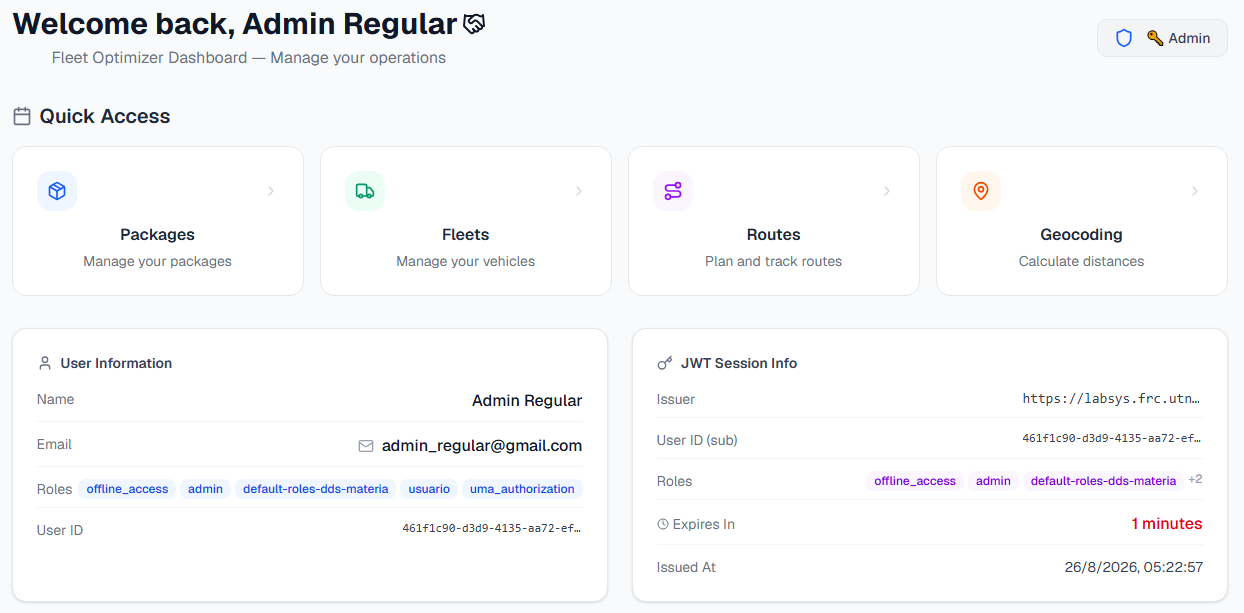
Dashboard with JWT info and quick access |
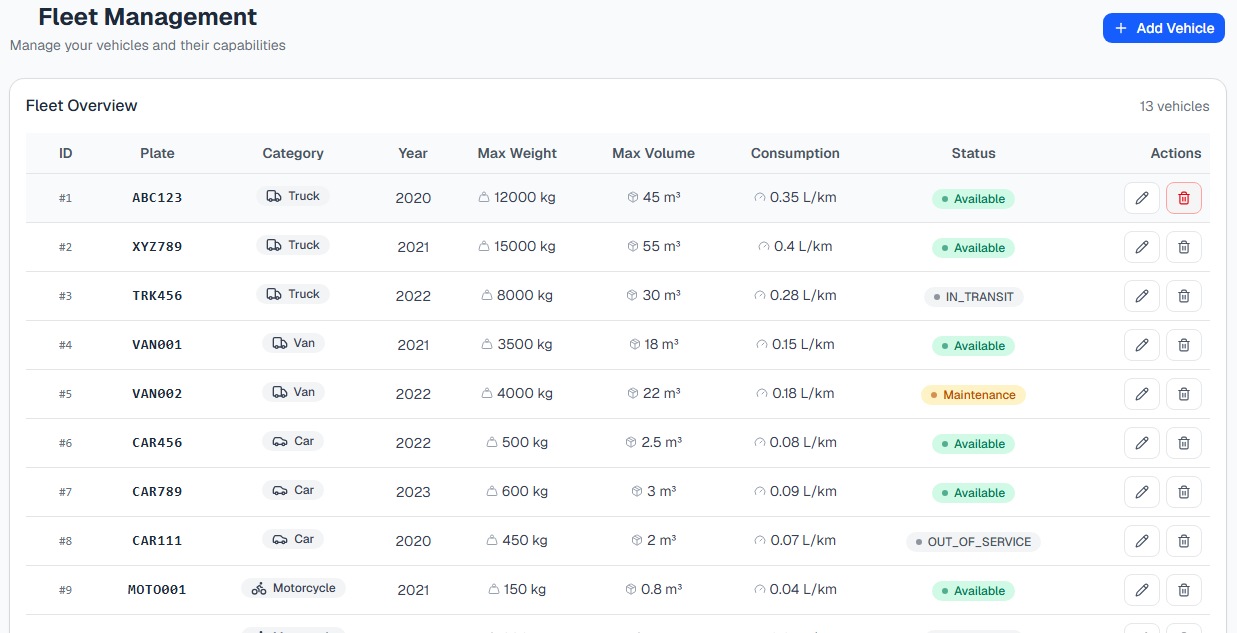
Vehicles table with capacities and status |
| Package Detail | Vehicle Selection |
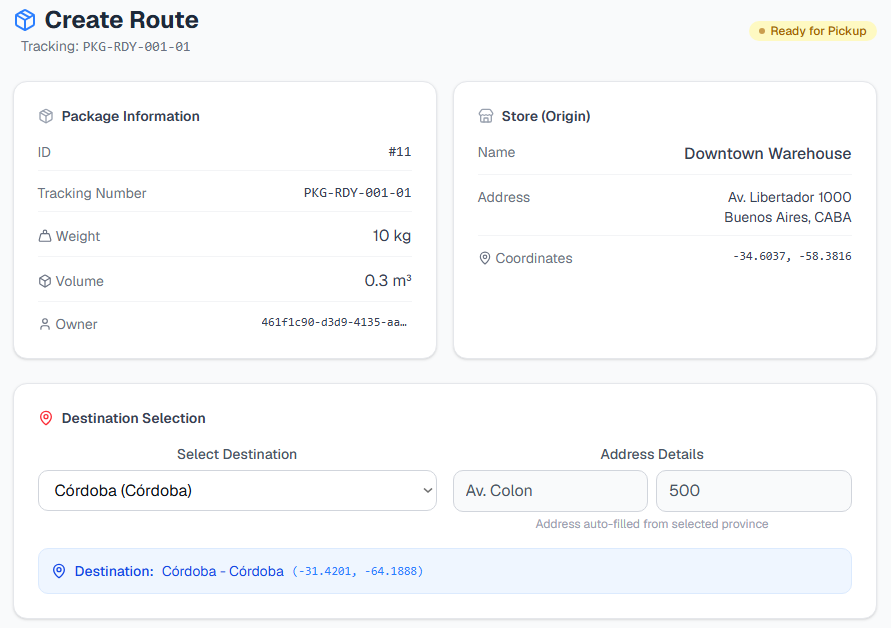
Package details with destination selector |
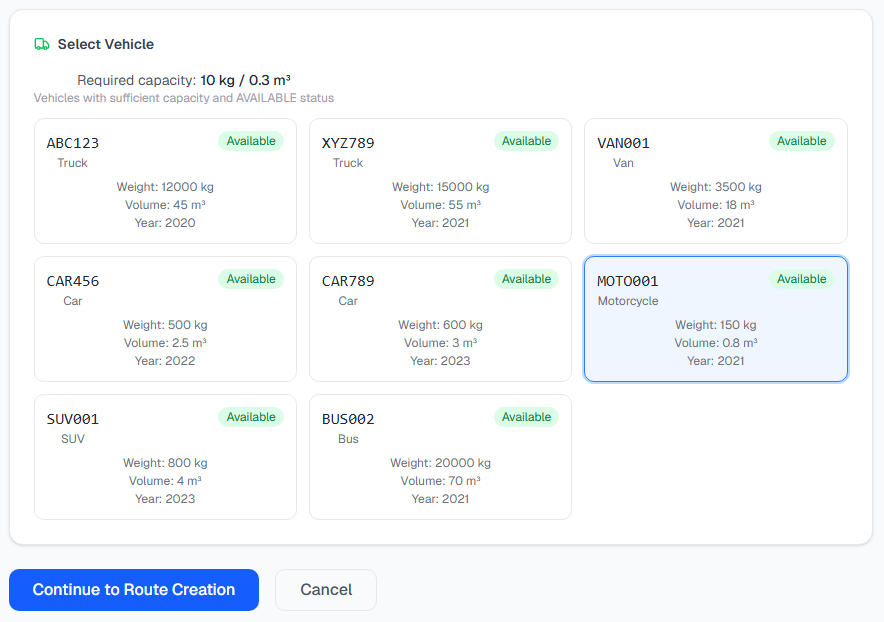
Available vehicles filtered by capacity |
| graph services | DER |
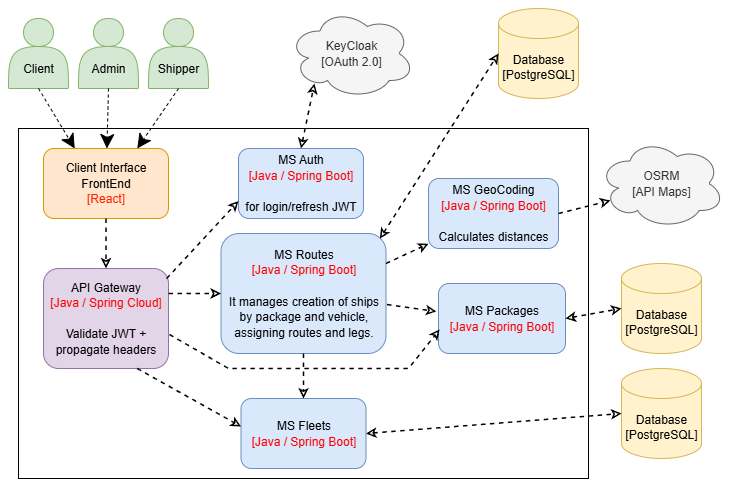
graph services with Draw.io |
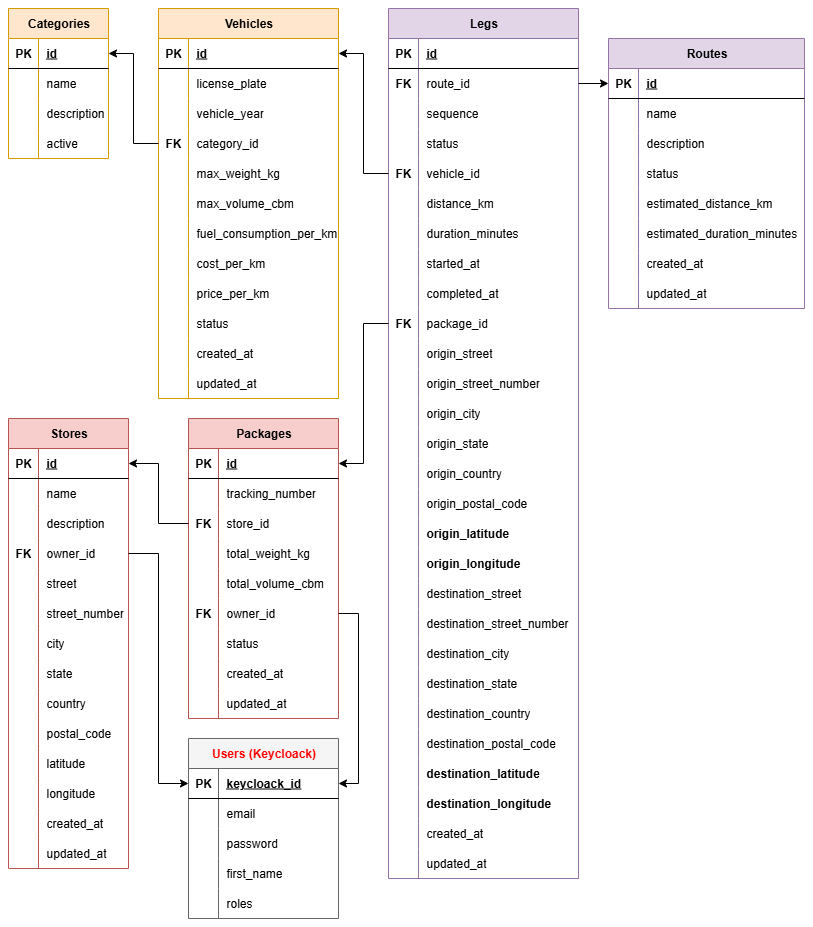
DER with Draw.io |
- Single Gateway entry point: only the Gateway is exposed to the host. All microservices and databases live on an internal Docker network. This reduces the attack surface and centralizes cross-cutting concerns (auth, logging, rate limiting).
- Database per service: each microservice owns its PostgreSQL database. No shared schema, no cross-service joins. Communication is via HTTP only.
- Managed Identity Provider (Auth0): instead of self-hosting Keycloak, the project uses Auth0 to avoid the operational overhead of running and patching an IdP.
- Orchestration in ms-routes: the Routes Service acts as the orchestrator for shipment creation, coordinating validation with Packages and Fleets before persisting.
-
Nginx as reverse proxy: serves the compiled SPA and proxies
/apitraffic to the Gateway, keeping the browser on a single origin (no CORS issues).
Future work: rate limiting, observability, and CI/CD are on the roadmap and will be added as the project evolves.
Service responsibilities
The system follows a modern architecture composed of multiple independent microservices, each responsible for a specific domain:
Single entry point for all frontend applications or external clients. Responsible for routing and communication to each microservice, as well as validating JWT tokens issued by Auth0 and propagating user context.
Centralizes user management and authentication. Integrates with Auth0 (OAuth2/OpenID Connect) for JWT token issuance and refresh, and role/permission management.
Manages the vehicle catalog. Handles CRUD operations for vehicles and their categories, including capacities (maximum weight and volume), operational costs, and availability status.
Manages the package lifecycle from creation (with weight, volume, and origin) to final status (CREATED, PROCESSING, READY_FOR_PICKUP, IN_TRANSIT, DELIVERED, etc.). Each package is associated with a source store.
Orchestrates the shipment creation process. Coordinates package and vehicle validation with other microservices, calculates distances and times through the Geocoding MS, and atomically persists routes and their legs. Each package in a shipment becomes a leg of the route.
Client application developed with React that consumes the Gateway API. Provides a user interface for managing packages, vehicles, routes, and shipment tracking. Communicates exclusively with the API Gateway, which acts as an intermediary with the rest of the microservices.
Microservice dedicated exclusively to route and distance calculation based on geographic coordinates (latitude/longitude). Consumes the OpenRouteService (ORS) API, a routing service that requires an API key for usage. Supports distance and estimated time calculation to optimize system costs and logistics. Implements a batch endpoint to process multiple locations in a single call.




