

A terminal-native HTTP client — like Postman, but in your terminal.


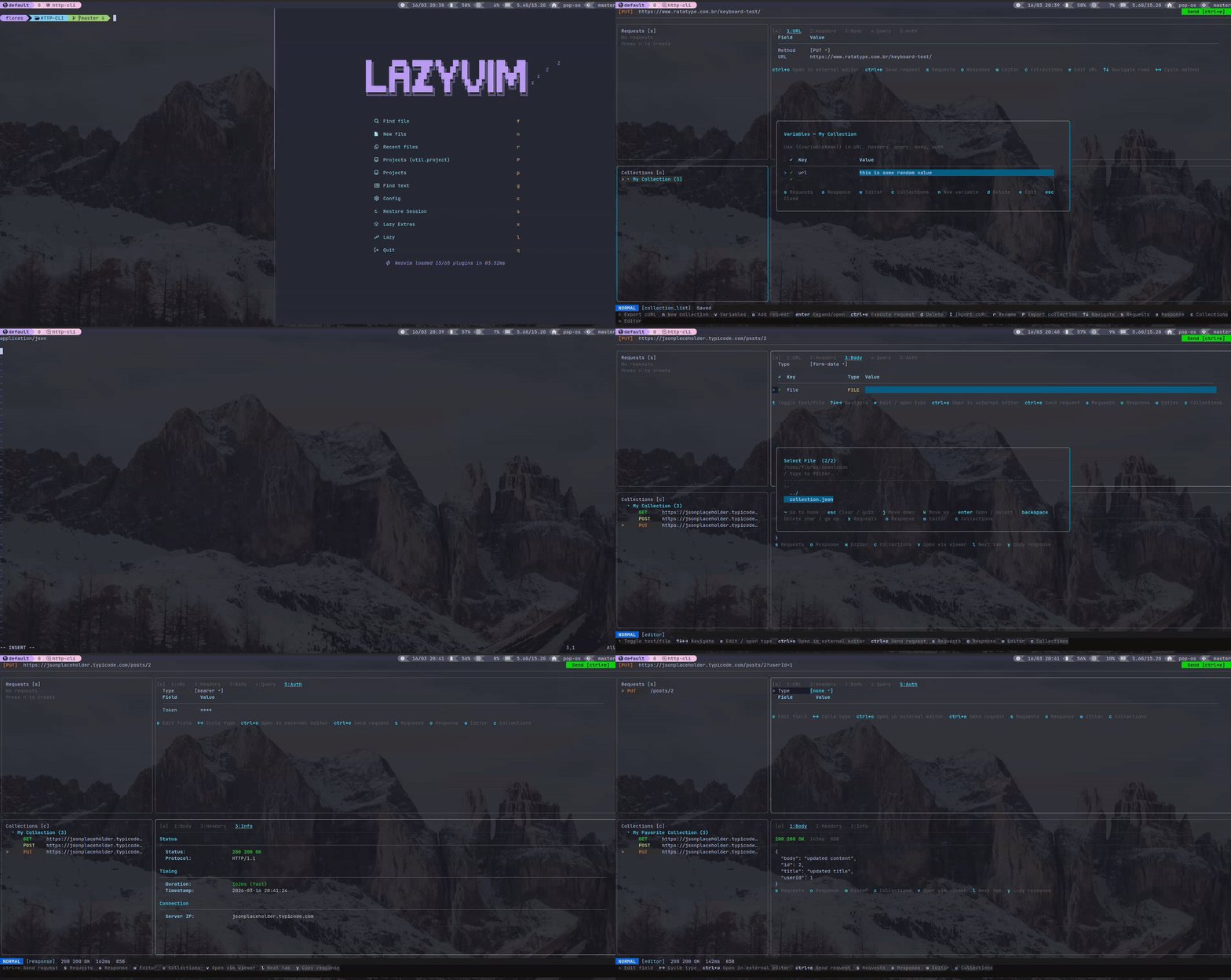
http-cli is a fully interactive TUI HTTP testing tool built in Go. Create, organize, and execute HTTP requests without leaving the terminal. Vim-style navigation, fully config-driven keybindings and colors, persistent storage, and contextual hints make it a complete replacement for GUI HTTP clients in keyboard-driven workflows.
- Three-panel layout — requests list, request editor, response viewer
- Five-tab request editor — URL, Headers, Body, Query, Auth
- All HTTP methods — GET, POST, PUT, DELETE, PATCH, HEAD, OPTIONS
- Body types — JSON, raw, form-data, multipart, URL-encoded
- File upload support — toggle any form-data field between text and file mode
- Auth — Bearer token, Basic auth, API Key
- Vim-style navigation —
j/k/g/G/ctrl+d/ctrl+uthroughout every panel - Import requests from cURL — supports cookies, multiline, all common flags
- Export request as cURL — copy the current request as a ready-to-run curl command
- Import Postman collections — load a Postman v2.1 JSON export
- Export Postman collections — save all requests as a Postman-compatible file
- Open response in external editor — view the response body in your configured editor
- Open any cell in external editor — edit large values (headers, body) outside the TUI
- Persistent storage — requests saved automatically in SQLite
- All keybindings come from
configs/config.json— no hardcoded keys in source - All colors come from
configs/config.json— fully themeable - Contextual hints bar — footer shows only the shortcuts relevant to the active panel
Go to the Releases page and download the binary for your platform, or use the commands below.
Linux (amd64):
curl -L https://github.com/GabrielAlmeidaFlores/HTTP-CLI/releases/latest/download/http-cli_linux_amd64 \
  -o http-cli
chmod +x http-cli
sudo mv http-cli /usr/local/bin/http-cli
Linux (arm64):
curl -L https://github.com/GabrielAlmeidaFlores/HTTP-CLI/releases/latest/download/http-cli_linux_arm64 \
  -o http-cli
chmod +x http-cli
sudo mv http-cli /usr/local/bin/http-cli
macOS Apple Silicon (arm64):
curl -L https://github.com/GabrielAlmeidaFlores/HTTP-CLI/releases/latest/download/http-cli_darwin_arm64 \
  -o http-cli
chmod +x http-cli
xattr -d com.apple.quarantine http-cli 2>/dev/null || true
sudo mv http-cli /usr/local/bin/http-cli
macOS Intel (amd64):
curl -L https://github.com/GabrielAlmeidaFlores/HTTP-CLI/releases/latest/download/http-cli_darwin_amd64 \
  -o http-cli
chmod +x http-cli
xattr -d com.apple.quarantine http-cli 2>/dev/null || true
sudo mv http-cli /usr/local/bin/http-cli
Windows (amd64):
Invoke-WebRequest -Uri https://github.com/GabrielAlmeidaFlores/HTTP-CLI/releases/latest/download/http-cli_windows_amd64.exe `
  -OutFile http-cli.exe
After installation, run from anywhere:
http-cliRequires Go 1.21+.
git clone https://github.com/GabrielAlmeidaFlores/HTTP-CLI.git
cd HTTP-CLI
go build -o http-cli ./cmd/http-cli
./http-cli
Or run without building:
go run ./cmd/http-cliRe-run the same install command for your platform — it overwrites the existing binary.
Linux (amd64):
curl -L https://github.com/GabrielAlmeidaFlores/HTTP-CLI/releases/latest/download/http-cli_linux_amd64 \
  -o http-cli && chmod +x http-cli && sudo mv http-cli /usr/local/bin/http-cli
Linux (arm64):
curl -L https://github.com/GabrielAlmeidaFlores/HTTP-CLI/releases/latest/download/http-cli_linux_arm64 \
  -o http-cli && chmod +x http-cli && sudo mv http-cli /usr/local/bin/http-cli
macOS Apple Silicon (arm64):
curl -L https://github.com/GabrielAlmeidaFlores/HTTP-CLI/releases/latest/download/http-cli_darwin_arm64 \
  -o http-cli && chmod +x http-cli && sudo mv http-cli /usr/local/bin/http-cli
macOS Intel (amd64):
curl -L https://github.com/GabrielAlmeidaFlores/HTTP-CLI/releases/latest/download/http-cli_darwin_amd64 \
  -o http-cli && chmod +x http-cli && sudo mv http-cli /usr/local/bin/http-cli
Windows (amd64):
Invoke-WebRequest -Uri https://github.com/GabrielAlmeidaFlores/HTTP-CLI/releases/latest/download/http-cli_windows_amd64.exe `
-OutFile http-cli.execd HTTP-CLI
git pull
go build -o http-cli ./cmd/http-cli
sudo mv http-cli /usr/local/bin/http-cliRun ./http-cli to open the TUI. No arguments required.
| Key | Action |
|---|---|
Tab |
Focus next panel |
Shift+Tab |
Focus previous panel |
q / ctrl+c |
Quit |
| Key | Action |
|---|---|
j / ↓ |
Move down (loads request in editor) |
k / ↑ |
Move up (loads request in editor) |
Enter |
Open request and focus editor |
ctrl+e |
Execute selected request |
n |
New request |
r |
Rename request |
y |
Duplicate request |
d |
Delete request |
/ |
Search / filter requests |
I |
Import from cURL |
E |
Export current request as cURL |
P |
Import a Postman collection |
X |
Export all requests as Postman collection |
The editor has five tabs: URL, Headers, Body, Query, Auth. Navigate with arrow keys.
| Key | Action |
|---|---|
↑ / ↓ |
Move between rows |
← / → |
Move between columns (or cycle method/type values) |
e / Enter |
Edit selected cell |
ctrl+o |
Open selected cell in external editor |
Space |
Toggle row enabled / disabled |
d |
Delete current row |
t |
Toggle text / FILE mode (form-data only) |
1 – 5 |
Switch tabs (URL / Headers / Body / Query / Auth) |
] / [ |
Next / previous tab |
ctrl+e |
Execute request |
ctrl+s |
Save request |
Tab |
Focus next panel |
Shift+Tab |
Focus previous panel |
Opens when you press e on a text cell. Full text editing with clipboard paste support.
| Key | Action |
|---|---|
Enter |
Save and close |
ctrl+d |
Save without closing |
ctrl+j |
Insert newline |
ctrl+o |
Open in external editor |
ctrl+shift+v |
Paste from clipboard |
Esc |
Cancel |
Three tabs: Body, Headers, Info.
| Key | Action |
|---|---|
j / ↓ |
Scroll down |
k / ↑ |
Scroll up |
g |
Jump to top |
G |
Jump to bottom |
ctrl+d |
Half page down |
ctrl+u |
Half page up |
l |
Next tab |
h |
Previous tab |
1 |
Body tab |
2 |
Headers tab |
3 |
Info tab |
y |
Copy response body to clipboard |
v |
Open response body in external editor |
Tab |
Focus next panel |
Shift+Tab |
Focus previous panel |
The Info tab shows timing with fast/moderate/slow label, server IP, protocol, content type, response size, and timestamp.
Press I in the Requests panel. Paste any curl command, including multi-line commands with \ continuation. Supported flags: -X, -H, -d, --data-raw, --data-binary, -b/--cookie, -u, -A/--user-agent, -L, and more.
Example:
curl -X POST https://api.example.com/login \
  -H "Content-Type: application/json" \
-d '{"username":"admin","password":"secret"}'Press E in the Requests panel to see the current request as a curl command. Press y to copy it to the clipboard.
- Import (
P) — provide a path to a Postman v2.1 JSON export file. All requests are added to your collection. - Export (
X) — provide a filename. All requests are written as a Postman-compatible JSON file you can import into Postman or share.
The external editor is used in two places:
- Cell edit — press
ctrl+oinside the cell edit modal to open the cell value in your editor - Response body — press
vin the response panel to open the full response body in your editor
The editor is configured in configs/config.json:
"external_editor": "vi"Set it to any editor command: "nano", "nvim", "code --wait", "$EDITOR", etc. The content is written to a temporary file which is deleted after the editor closes.
Everything is in configs/config.json. There are no hardcoded keys or colors in the source code.
Find the action in the relevant panel section and change "keys":
"request_list": {
  "new_request": {
    "keys": ["a"],
    "description": "New request",
    "category": "Requests",
    "visible": true
  }
}
Multiple keys are supported: "keys": ["n", "ctrl+n"]
Set "visible": false to hide a shortcut from the hints bar without disabling it.
All colors are under "ui" → "theme". Values are hex colors:
"theme": {
  "primary": "#00d7ff",
  "success": "#00d700",
  "error": "#d70000",
  "method_get": "#00d700",
  "method_post": "#d7d700",
  "method_delete": "#d70000"
}
See configs/config.json for the full list of theme fields and all available panels and actions.
http-cli/
├── cmd/http-cli/         Entry point
├── configs/config.json   All keybindings, colors, layout settings
└── internal/
    ├── config/           Config loading and types
    ├── models/           Request, Response, Collection types
    ├── storage/          SQLite persistence
    ├── transport/        HTTP client and cURL parser
    ├── parser/           Postman collection parser
    ├── exporter/         cURL and Postman exporters
    └── ui/               TUI — panels, editor, response, modals
MIT