A centralized, high-performance platform for students and teachers to manage and share study materials efficiently with advanced Google Drive integration and separate admin panel architecture.
🔗 Live Website: StudyStack
🔗 Source Code: GitHub Repository
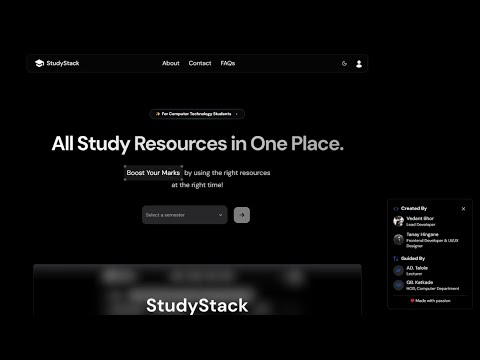
Click the image above to watch the video demo.
StudyStack is a comprehensive educational content management platform designed for colleges and educational institutions where:
- Students can browse, search, and download study materials with lightning-fast performance
- Teachers can upload and manage study materials directly through Google Drive integration
- Admins have dedicated dashboard with full control over content, users, and system analytics
Built with modern architecture principles, it provides a scalable, secure, and highly performant solution for academic content sharing.
✅ Role-based Access Control (RBAC) with dedicated dashboards for Students, Teachers, and Admins
✅ Direct Google Drive Integration for unlimited storage and seamless file management
✅ Separated Admin Panel for enhanced security and specialized administration
✅ Advanced Search & Filtering powered by Algolia for instant content discovery
✅ Real-time Analytics with PostHog integration for usage insights
✅ Modern Authentication with NextAuth.js and JWT token management
✅ Responsive Design with shadcn/ui and Tailwind CSS for optimal user experience
✅ Email Notifications via Resend for important updates
✅ Quiz Management System with Google Forms integration
✅ YouTube Video Integration for multimedia learning resources
This project implements enterprise-grade optimizations for maximum performance:
-
Server-Side Pagination with Hybrid Rendering: Initial page loads server-rendered for instant display, subsequent pages fetched client-side with TanStack Query for smooth UX
-
Advanced Caching Strategy: Multi-layered caching with client-side staleTime optimization and dedicated cache collection for frequently accessed data
-
Direct-to-Drive Resumable Uploads: Serverless file uploads directly from client to Google Drive, eliminating proxy bottlenecks and size limitations
-
Intelligent Database Indexing: Optimized Appwrite collections with strategic indexing on frequently queried fields (title, abbreviation, semester, etc.)
-
Hybrid Token Management: Dual-layer Google Drive authentication with proactive cron job renewal and fallback server-side logic ensuring 99.9% uptime
-
Scalable Admin Architecture: Separated admin panel with optimized queries that handle massive datasets by fetching statistics separately from paginated content
-
Smart Search Implementation: Algolia-powered search with real-time synchronization across Notes, YouTube videos, Quizzes, and Subjects
- ⚡ Next.js 15 (App Router, React Server Components)
- 🎨 Tailwind CSS with shadcn/ui components
- 🚀 React 19 with modern hooks and suspense
- 📱 Responsive Design with HeroUI and Aceternity UI
- ✨ Animations with Framer Motion and Magic UI
- 🗄️ Appwrite (Database, Authentication, Storage, Cloud Functions)
- ☁️ Vercel (Hosting, Serverless Functions, Edge Runtime)
- 🔍 Google Drive API (Primary file storage and management)
- 🏗️ Zustand (Global state management)
- 🔄 TanStack Query (React Query) (Server state, caching, mutations)
- 📊 TanStack Table (Advanced data tables with sorting/filtering)
- 🔍 Algolia (Search engine with real-time indexing)
- 🔐 NextAuth.js (Authentication provider)
- 🎫 JWT (Token-based authentication)
- 🔄 Custom session management with automatic token renewal
- 📧 Resend (Contact email service)
- 📊 PostHog (Analytics and user behavior tracking)
- 🚨 Sentry (Error monitoring and performance tracking)
- 📋 Google Forms (Quiz and form integration)
- 📦 TurboRepo (Monorepo management)
- 🐳 Docker (Containerization for consistent environments)
- 🔧 TypeScript (Type safety and developer experience)
- 📝 React Hook Form with Zod (Form handling and validation)
- 🎨 Figma (Design system and prototyping)
- 📮 Postman (API testing and documentation)
The platform uses Appwrite with the following optimized collections:
- Users: User profiles with role-based permissions and session management
- Notes: Study materials with metadata, file references, and search indexing
- Subjects: Subject catalog with hierarchical organization
- Youtube: Video resources with embedding and metadata
- Quiz: Assessment system with Google Forms integration
- Cache: Performance optimization with uploader statistics and frequently accessed data
- DriveAPIAccessToken: Google Drive authentication with automatic renewal
- Session: Custom session management for enhanced security
All collections feature strategic indexing on frequently queried fields for optimal performance.
Create a .env.local file with the following variables:
PROJECT_ID=your_appwrite_project_id
API_KEY=your_appwrite_api_key
DATABASE_ID=your_database_id
USER_COLLECTION_ID=your_users_collection
NOTE_COLLECTION_ID=your_notes_collection
SUBJECT_COLLECTION_ID=your_subjects_collection
YOUTUBE_COLLECTION_ID=your_youtube_collection
LOGIN_COLLECTION_ID=your_login_collection
FORM_COLLECTION_ID=your_forms_collection
CACHE_COLLECTION_ID=your_cache_collection
UPLOADERS_CACHE_DOCUMENT_ID=your_cache_doc_idGOOGLE_REFRESH_TOKEN_COLLECTION_ID=your_refresh_token_collection
GOOGLE_DRIVE_TOKEN_DOC_ID=your_token_document_id
GOOGLE_CLIENT_SECRET=your_google_client_secret
GOOGLE_CLIENT_ID=your_google_client_id
GOOGLE_REFRESH_TOKEN=your_google_refresh_tokenNEXT_PUBLIC_ALGOLIA_APP_ID=your_algolia_app_id
ALGOLIA_ADMIN_KEY=your_algolia_admin_key
NEXT_PUBLIC_ALGOLIA_SEARCH_KEY=your_algolia_search_key
NEXT_PUBLIC_ALGOLIA_INDEX_NAME=your_algolia_indexNEXTAUTH_URL=your_app_url
NEXTAUTH_SECRET=your_nextauth_secretNEXT_PUBLIC_POSTHOG_KEY=your_posthog_key
NEXT_PUBLIC_POSTHOG_HOST=your_posthog_host
RESEND_API_KEY=your_resend_api_key
REVALIDATION_TOKEN=your_revalidation_tokenNEXT_PUBLIC_ENDPOINT=https://cloud.appwrite.io/v1
NEXT_PUBLIC_BASE_URL=your_deployed_app_url- Node.js 18+
- npm or yarn
- Appwrite account and project
- Google Cloud Console project with Drive API enabled
- Algolia account for search functionality
1️⃣ Clone the Repository
git clone https://github.com/Arsenic-01/studystack.git
cd studystack
2️⃣ Install Dependencies
npm install3️⃣ Environment Setup
- Copy
.env.exampleto.env.local - Fill in all required environment variables
- Configure Google Drive API credentials
- Set up Appwrite collections and database
4️⃣ Database Setup
- Create Appwrite collections matching the schema
- Set up proper indexing for performance
- Configure collection permissions for different user roles
5️⃣ External Service Configuration
- Configure Algolia search indexes
- Set up PostHog analytics
- Configure Resend email templates
- Set up Sentry error monitoring
6️⃣ Run Development Server
npm run devVisit http://localhost:3000 to view the application locally.
StudyStack follows a modern, scalable architecture:
- App Router: Next.js 15 with server-side rendering and client-side hydration
- Component System: Reusable UI components with shadcn/ui and custom components
- State Management: Zustand for global state, TanStack Query for server state
- Performance: Optimized with React Server Components and strategic caching
- Serverless Functions: Vercel edge functions for API routes
- Database: Appwrite with optimized collections and indexing
- File Storage: Google Drive API with direct uploads and token management
- Search: Algolia with real-time synchronization
- Authentication: NextAuth.js with multiple providers
- Authorization: Role-based access control with session validation
- Data Protection: Encrypted tokens and secure API endpoints
- Browse and search study materials
- Download notes and resources
- Access YouTube video content
- Take quizzes and assessments
- View personal dashboard
- Upload and manage study materials
- Organize content by subjects and semesters
- Share YouTube video resources
- Create and manage quizzes
- View upload statistics
- Full system administration access
- User management and role assignment
- Content moderation and approval
- System analytics and reporting
- Database management tools
We welcome contributions from the community! Here's how to get started:
- Fork the repository
- Create a feature branch:
git checkout -b feature/amazing-feature - Make your changes and ensure they follow the coding standards
- Test thoroughly with the existing test suite
- Commit your changes:
git commit -m "Add amazing feature" - Push to your branch:
git push origin feature/amazing-feature - Submit a pull request with a detailed description
- Follow TypeScript best practices
- Write meaningful commit messages
- Update documentation for new features
- Ensure responsive design compatibility
- Test across different user roles
StudyStack is optimized for enterprise-scale performance:
- Page Load Time: < 2 seconds for initial load
- Search Response: < 100ms with Algolia
- File Upload: Direct to Google Drive (no size limits)
- Database Queries: Optimized with strategic indexing
- Caching: Multi-layer caching for instant navigation
- Connect your GitHub repository to Vercel
- Configure environment variables in Vercel dashboard
- Deploy with automatic CI/CD pipeline
npm run build
npm startdocker build -t studystack .
docker run -p 3000:3000 studystackCopyright (c) 2024-present, Vedant Bhor.
This project is licensed under the MIT License. See the LICENSE.md file for details.
Having trouble with StudyStack? We're here to help!
📧 Email: vedbhor25@gmail.com
🐦 Twitter: @arsenic_dev
💼 LinkedIn: Vedant Bhor
🐛 Issues: GitHub Issues
Special thanks to:
- Appwrite team for the excellent BaaS platform
- Vercel for hosting and deployment infrastructure
- All contributors and beta testers
- Educational institutions using StudyStack
Built with ❤️ for the education community