




MacBenchForge is a lightning-fast, C++ powered local benchmarking suite designed exclusively for Apple Silicon (M-Series) Macs. It provides a stunning, glassmorphism-styled web interface to download, run, and analyze the performance of Large Language Models (LLMs) locally using maximum Metal GPU acceleration.
- Key Features
- Under the Hood
- Prerequisites
- Installation & Build
- Usage & Dashboard
- Configuration (config.toml)
- Distribution (.dmg)
- Contributing
- License & Attribution
- Apple Silicon Native: Built from the ground up to aggressively leverage Apple's Metal Performance Shaders via
llama.cpp, pushing your Unified Memory and GPU cores to their absolute limit. - HuggingFace Hub Integration: Browse, search, and download
.ggufmodels straight from the HuggingFace Hub inside the app. - Native macOS File Picker & Discovery: Securely load local models right from Finder into the dashboard, or scan common macOS directories (
~/Downloads,~/.lmstudio, etc.) for instant discovery. - Intelligent File Filtering: Automatically ignores non-generative multi-modal projector weights (
mmproj-) and sub-100MB vocabulary files to ensure benchmark stability. - Smart Data Persistence: SQLite background engine uses
UPSERTlogic to seamlessly track, clean up, and reactivate dormant local models. - Zero-Bloat Architecture: The frontend is 100% Vanilla HTML, CSS, and JS. No React, no Node.js, no
npm install. Just blazing fast execution. - Advanced Benchmarking:
- Test Time To First Token (TTFT) and Tokens per Second (t/s).
- Simulate real-world loads with customizable Prompt Types (Short QA, Long Code Generation, etc.) and Presets (Quick vs. Thorough).
- Hardware Telemetry: Automatically detects your specific M-series chip, CPU/GPU core counts, system RAM, and dynamic VRAM Metal wiring limits (via
iogpu.wired_limit_mb) in real-time. - Beautiful Visualizations: A sleek, dark-themed glassmorphic UI featuring live progress bars, toast notifications, and
Chart.jsgraphs with inline tokens-per-second data labels. - Data Portability: Export your benchmark run history seamlessly to JSON or CSV.
MacBenchForge bridges the gap between low-level hardware performance and modern web design:
- The Backend (C++17): Uses
cpp-httplibfor an ultra-lightweight REST API,SQLiteCppfor persistent history tracking, and nativeosascriptbindings for macOS integration. - The Inference Engine: Orchestrates the heavily-optimized
llama-benchtool to isolate LLM throughput away from interface overhead. - The Frontend (Vanilla JS): A highly responsive Single Page Application (SPA) served entirely from memory by the C++ backend.
Before you begin, ensure your Mac meets the following requirements:
- macOS Ventura (13.0) or newer.
- An Apple Silicon Mac (M1, M2, M3, M4, or M5 series).
- Homebrew installed (
/opt/homebrew).
-
Clone the Repository
git clone --recursive https://github.com/AdityaGuhaa/MacBenchForge.git cd MacBenchForge -
Install Dependencies MacBenchForge relies on standard C++ build tools and
llama.cppfor its underlying engine.brew install curl openssl cmake llama.cpp
-
Build the Application
mkdir build && cd build
cmake ..
cmake --build . -j
-
Launch
./bin/MacBenchForge
The backend will start and your default web browser will automatically open to
http://localhost:7860.
When you launch MacBenchForge, the First-Run Wizard will analyze your hardware and tailor the environment to your system.
- Dashboard: High-level overview of your fastest runs, recent activity, and total models.
- Models: View locally scanned models or use the "Pick from Finder" button to instantly add
.gguffiles from anywhere on your Mac. - HuggingFace: Search the global AI community for new models or grab one of our Curated Apple-Silicon recommendations.
- Benchmark: Select a model, choose your workload (e.g. Medium Reasoning), and hit Start. Watch the live hardware telemetry as it runs.
- History & Export: Graph your historical data, compare models side-by-side on radar charts, and export results for external analysis.
All core behavior is driven by config.toml, generated next to your executable.
Key tunable parameters include:
benchmark.threads: The number of CPU threads used during processing (Default: 8).benchmark.gpu_layers: Layers offloaded to the GPU (Default: 99 for full Metal acceleration).general.port: Change the UI port if7860is in use.huggingface.api_token: Add your HF token to access gated/private models.
Want to share your compiled build with others? MacBenchForge includes a packaging script to generate a beautiful, self-contained macOS Disk Image (.dmg).
Note: You must build the project first (see above).
./packaging/create_dmg.shThis drops a deployable .dmg in your root folder. (Keep in mind: end-users will still need to run brew install llama.cpp to execute the benchmarks).
Because macOS applies a quarantine flag to downloaded .dmg files from unidentified developers, you may encounter an error stating the app is "damaged and can't be opened" when first trying to run it.
To bypass this error, simply Right-Click (or Control-Click) the MacBenchForge.app inside your Applications folder and select Open.
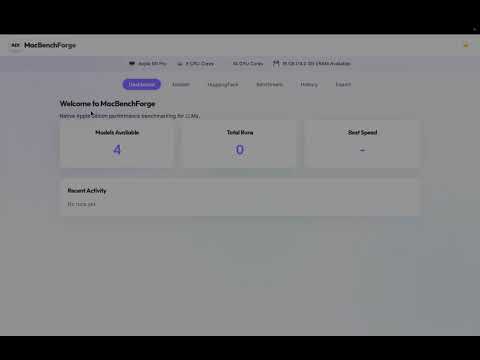
Check out this quick video tutorial on how to resolve the issue:
If you discover a security vulnerability in MacBenchForge, please see our Security Policy for instructions on how to securely report it. We take security seriously and appreciate your help in keeping the app safe.
We welcome pull requests! Whether it's adding new prompt types, expanding the hardware telemetry, or optimizing the C++ routes.
- Fork the Project.
- Create your Feature Branch (
git checkout -b feature/AmazingFeature). - Commit your Changes (
git commit -m 'Add some AmazingFeature'). - Push to the Branch (
git push origin feature/AmazingFeature). - Open a Pull Request.
Please ensure your code follows the existing style guidelines (C++17 standards, #pragma once headers, and encapsulated namespaces).
This project is licensed under the Apache License 2.0. See the LICENSE file for the full legal text.
Attribution Request
MacBenchForge is a labor of love. If you use this tool, modify it for your own purposes, or build a commercial/open-source product on top of it, please provide credit to Aditya Guha.
A simple inclusion of "Powered by MacBenchForge by Aditya Guha" or a link back to this GitHub repository in your project's README.md or application "About" page is highly appreciated!