
Turn TypeScript into interactive diagrams. Define interfaces, type aliases, classes, enums, and function signatures to see their relationships.
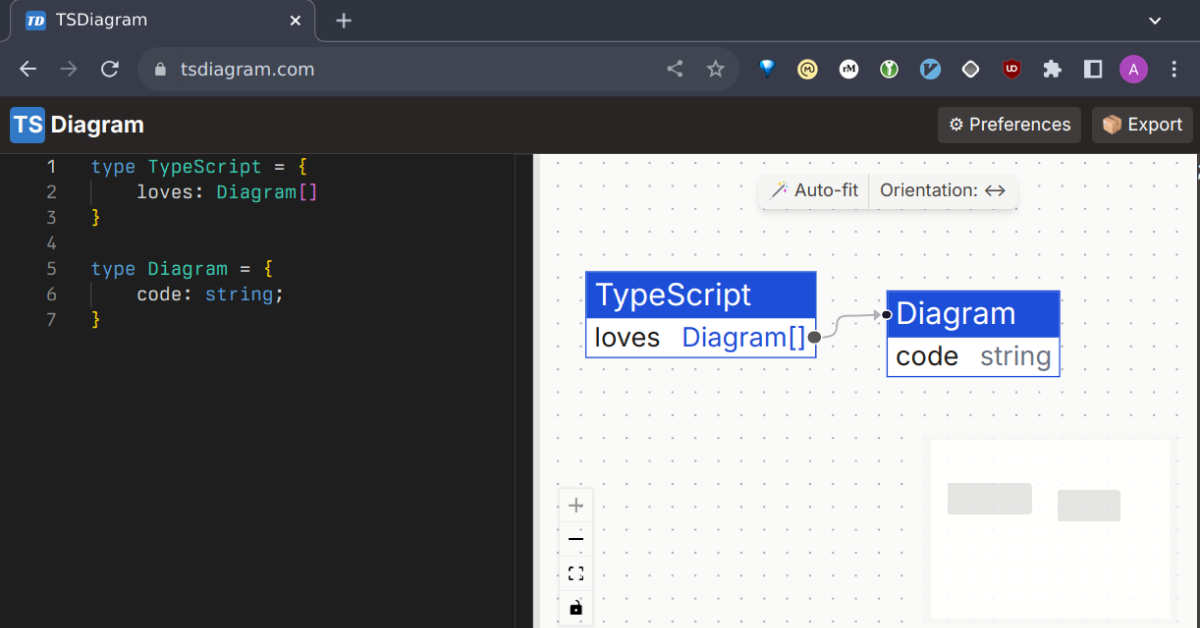
- Automatic layout that preserves manually positioned nodes.
- Documents saved in your browser and shareable by URL.
- SVG export from the web app.
- SVG and PNG export from the command line.
The tsdiagram CLI reads TypeScript from files, stdin, or inline code. It renders SVG and PNG with Takumi, sharing the web app's card presentation, fonts, themes, layout, and edge routing.
It requires Node.js 22.12 or later. Rendering runs locally without a browser or web server. CLI SVG text is stored as vector outlines; the web app's SVG export retains selectable text.
tsdiagram render domain.ts -o diagram.svg --png
cat domain.ts | tsdiagram render
tsdiagram render --code 'interface User { id: string }' -o user.svg
The first command writes diagram.svg and diagram.png. Piped stdin and inline code default to diagram.svg in the current directory. Use -o or --output to choose another path for any input mode. Positional output paths remain supported, but cannot be combined with -o/--output.
See the CLI guide for installation and options, or run tsdiagram render --help. To run it from this checkout, use the build commands below.
Use Node.js 22.12 or later and pnpm 10.14.0. From the repository root, install dependencies and start the web app:
pnpm install
pnpm dev
Other commands, run from the repository root:
pnpm test:runruns tests once;pnpm testruns them in watch mode.pnpm typecheckchecks TypeScript across the workspace.pnpm buildchecks types and builds all packages. The web build is written topackages/web/dist/.pnpm previewpreviews the production web build.
After installing dependencies, build and run the CLI from its package directory:
cd packages/cli
pnpm build
node dist/cli.js --help
This also builds and bundles the renderer.
core: TypeScript analysis and diagram models.renderer: shared diagram presentation, browser rendering, and browser-free Takumi export.web: editor, documents, preferences, and sharing.cli: Gunsmith commands, render-process lifecycle, and file export.
Tests live beside the code they cover. Shared browser build configuration lives in build/browser-config.ts. The CLI is packaged for npm as tsdiagram; core and renderer are internal packages.
- Function call visualization.
- Configurable TypeScript context, including libraries.
- Support for other document storage providers.
- Move to Tree-sitter to support broader code and data-flow visualization.